pag. 23
ST2 User’s Manual
TV Mode
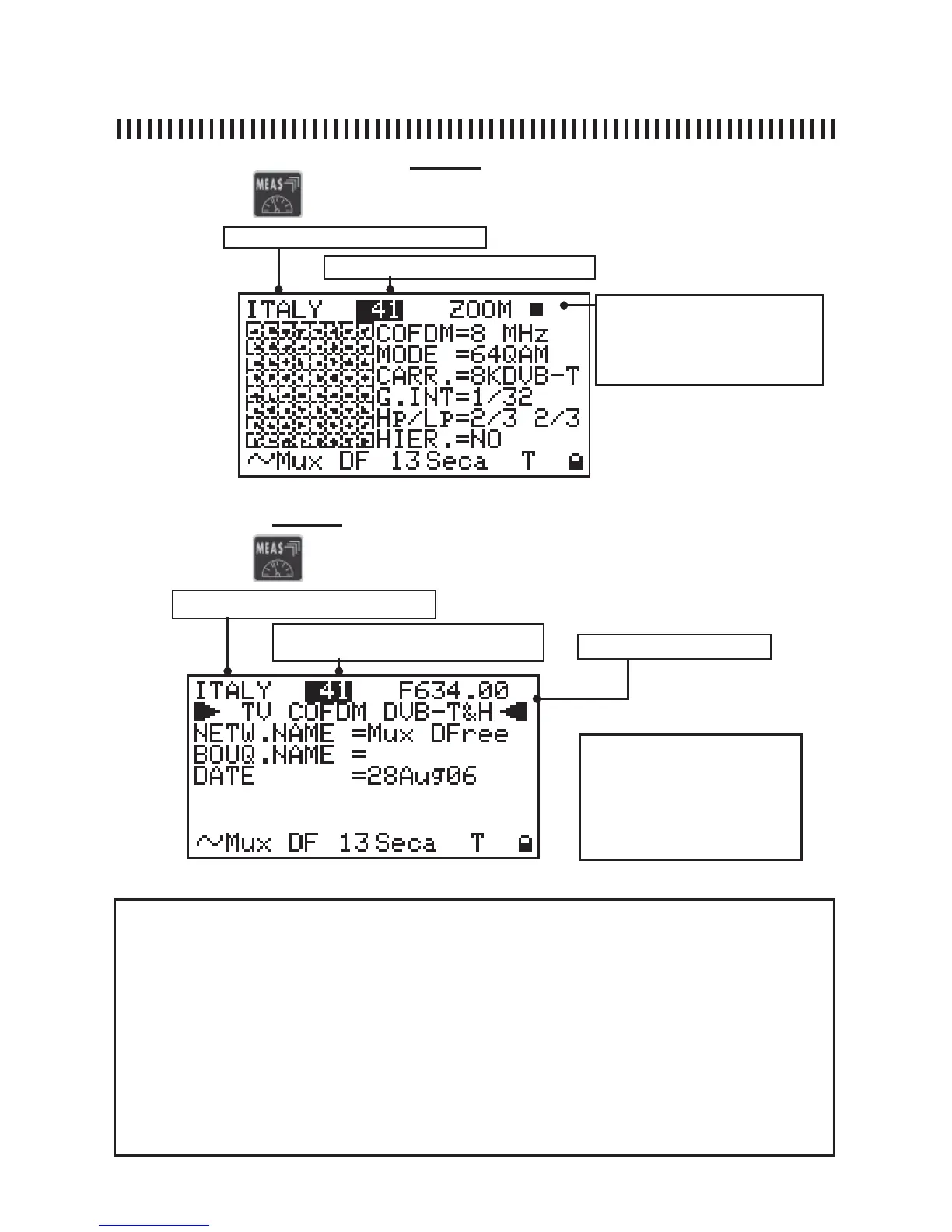
Fig. 4.5 This display shows the Network name, the bouquet and date.
4.4 Eye constellation display (Level 4)
Memory plan (See section 1.0)
Channel frequency
Channel (See section 1.0)
NOTE
There are three variable fi elds
in this measurement level:
the Memory Plan, the channel
number and frequency. Only
on the user genereated plans.
NOTE
• When there is no signal, or when the power measurement is below the meter’s measurement dynamic range,
or when the digital signal is not locked, three horizontal lines are shown instead of the measurement values (See
Fig. from 4.2 to 4.5), (in Fig. 4.1 in the PWR measurement fi eld the word “PWR Too Low is displayed),
• Only the memory plan, the channel number and signal frequency can be changed for all measurement levels
from 2 to 5 this, only on the user generated palns otherwise only the channel. may be changed .
• When the frequency value is modifi ed three horizontal lines are displayed instead of the channel or programme
number. This is because the correspondence between the frequency value and the associated channel number
or name is lost,
• If you press the “POWER ON” key [14] the meter automatically returns to the fi rst measurement level shown in
Fig. 4.1, regardless of the previous measurement level.
• On the display’s base line, starting from the second Measurement Level (see fi g. 4.2), the NIT values are
shown: network name, encryption system, and the letter “D” to highlight that the signal under test is DIGITAL.
Finally a lock icon is shown to indicate if the digital multiplex is locked.
continuation: DIGITAL TV SIGNAL MEASUREMENTS: MEAS
Memory plan (See section 1.0)
Channel (See section 1.0)
4.5 Net-ID data (Level 4)
The ZOOM allows constellation
enlargement in order to view
one quadrant at a time
Press again the
key again to start the third level measurement:
Press again the
key again to start the fourth level measurement:
Fig. 4.4 the 4th level provides the constellation display.



 To Next Page