Section 1: System Description
25238801 1-9
EMI FILTER
The ElectroMagnetic Interface (EMI) filter removes undesirable electrical noise from the incoming power line. The
power transformer supplies 36 VAC and 22 VAC from which the rest of the system voltages are derived.
POWER SUPPLY
The ON/OFF switch controls power to the machine.
A 7-amp circuit breaker is in the power line to the bill changer. The power transformer is protected by a 2-amp circuit
breaker in the primary winding. A 7-amp and a 5-amp circuit breaker protect the secondary windings.
The power supply circuit board rectifies and filters the 36 VAC and 22 VAC to provide 40 VDC, 30 VDC (current
limited), 12 VDC, 8 VDC, and 5 VDC to the rest of the system. It contains indicator LED’s for the 40 VDC, 30
VDC, 12 VDC, and 5 VDC supplies. Note that the 12 VDC actually runs at about 14.6 V – this is normal.
TEST SWITCHES
The three TEST switches are used to manually initiate a change dispense cycle for each of the machine’s escrow
buckets. The computer will not recognize a TEST switch closure if the machine is in the process of validating a bill,
dispensing change, or in SHUTDOWN. Pushing a TEST switch will also cause the stacker to cycle.
POWER CONTROL RELAY
The power control relay switches the 40 VDC, 30 VDC, and 120 VAC supplies to the machine and 5 VDC to the
OUT OF SERVICE lamp. This relay is controlled by the CCC and is energized under normal operating conditions.
Under OUT OF SERVICE conditions, the CCC de-energizes the relay to disconnect the previously mentioned
voltages from the rest of the system and shut down the machine. In this condition, the +40 VDC LED on the power
supply board will be OFF, while the other three remain ON.
Computer Control Center
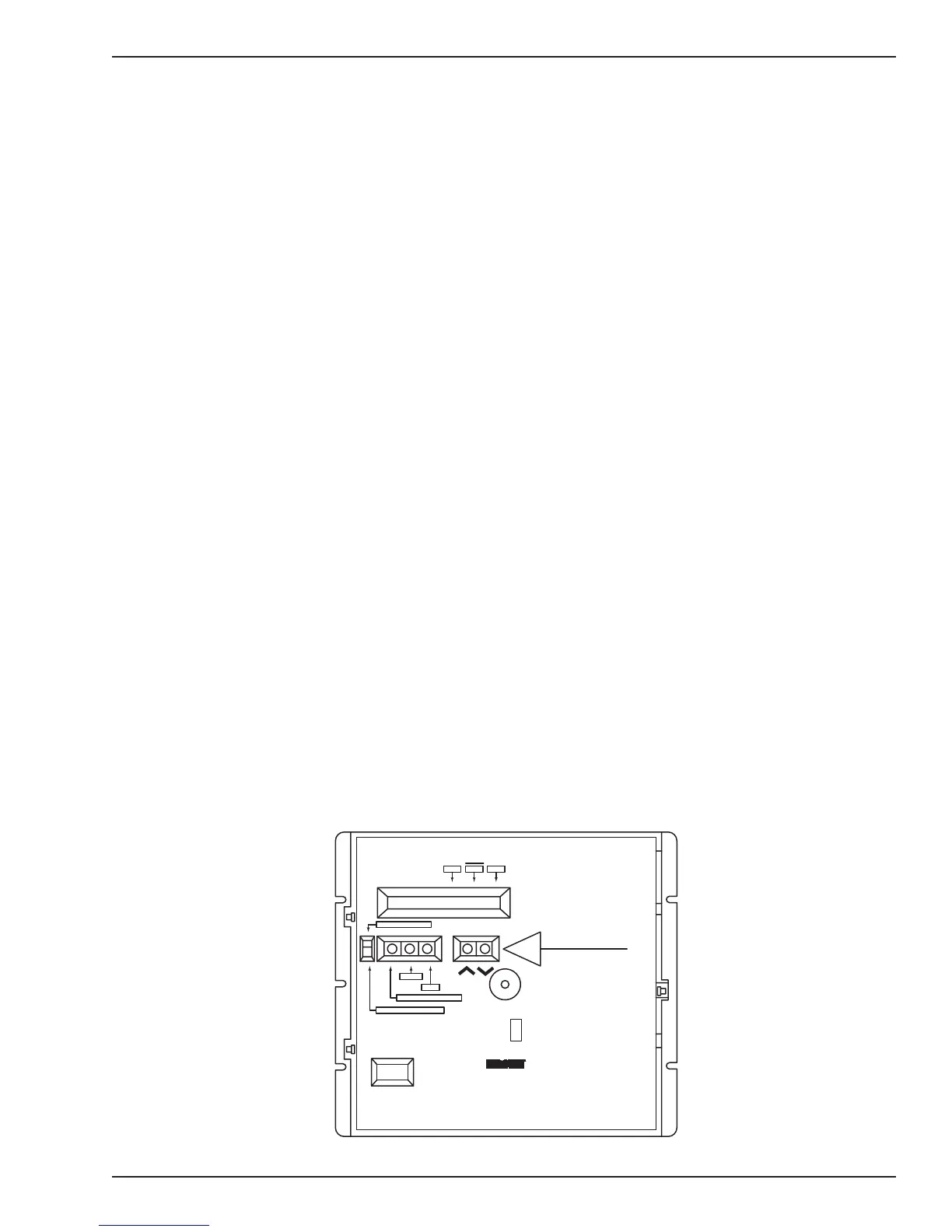
The computer control center (referred to as the “CCC” and shown in Figure 1-9) directs all of the operations of
the bill changer including both validation and change dispensing functions. It contains a microcomputer which controls
all of the major functions of the bill changer. It also contains the following controls and displays:
Figure 1-9. Computer Control Center
HOPPER
CNTRLEFT RIGHT
PROGRAMMING MODE
NORMAL OPERATING MODE
FUNCTION - ERROR RESET
HOPPER
VALUE
NOTE:
PRESS FUNCTION - ERROR RESET
BUTTON TO CLEAR DISPLAYED ERROR
COUNT
SWITCHES
EITHER BUTTON ACTS AS YES/NO,
ON/OFF, ALT/SEP, OR UPPER/LOWER
PRESS BOTH BUTTONS TO CLEAR
DISPLAYED TEMPORARY COUNTER
1
4
BILL CHANGER
CONTROL COMPUTER
65069059
P6
P1
P2
P3
P4
P5
12
14
1
15
1
8
1
1
91


 To Next Page