Chapter 8: Running Reports
88 Alpha 600/601 User’s Guide
Note
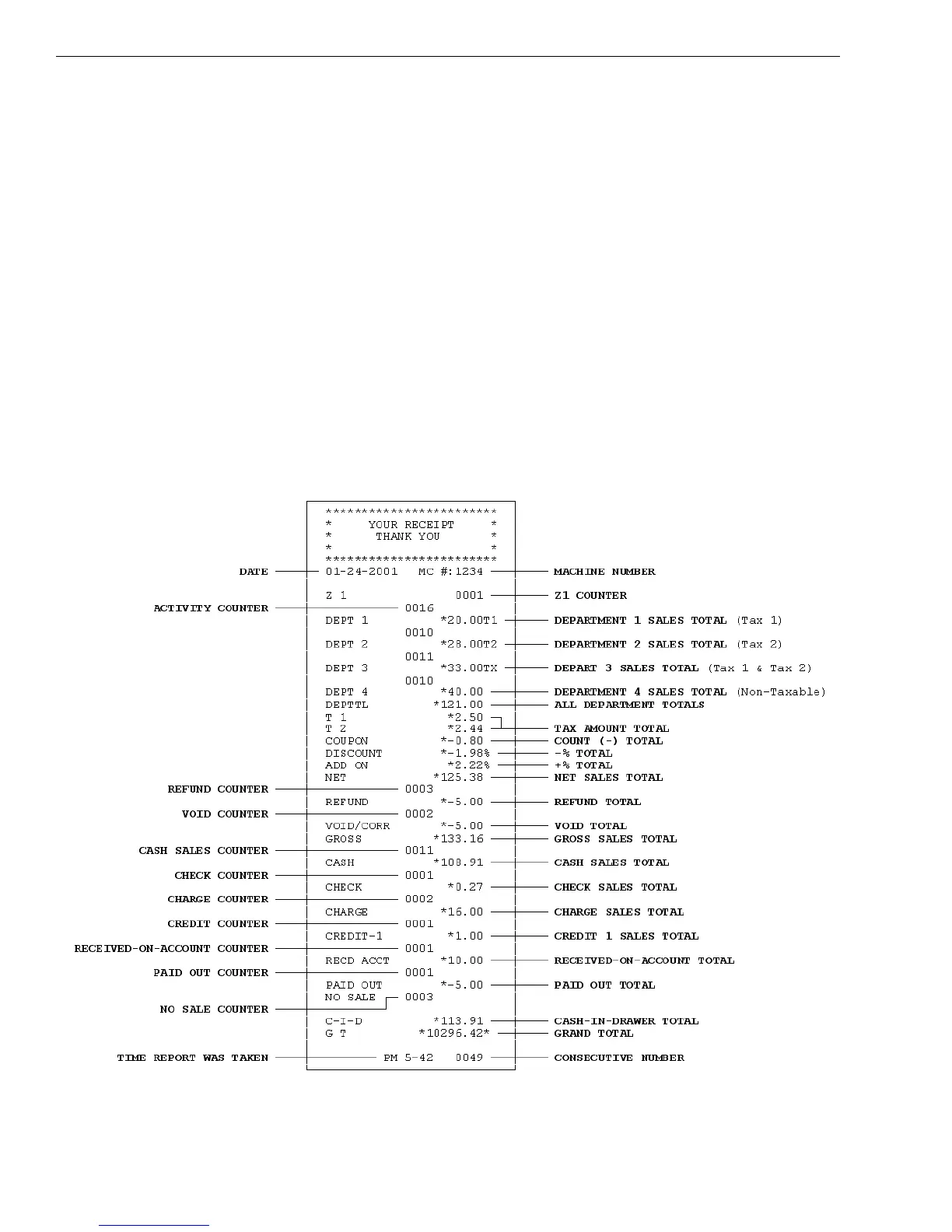
Minus percentage discount (DISCOUNT), voids (VOID/CORR) and
returns/refunds (REFUND) are all deducted from the department totals and
the plus percentage (ADD ON) is added to the department totals. If you do
not want the percentage discount and plus percentage reflected in the
department totals, see Flag 23 on page 68.
• GROSS SALES TOTAL (GROSS) - Shows the total of all sales
registered. The Gross Sales Total includes net sales total (NET), coupon
discount (COUPON), minus percentage discount (DISCOUNT),
return/refund (REFUND), and void (VOID/CORR).
Note
The Percentage Discount [-%] must be done after each item, not on the
subtotal amount, for the formula given above to balance as shown.
The Financial report looks like the following. Your specific report looks
different, because of your unique cash register activity.



 To Next Page