Chapter 11: Examples
108 Alpha 600/601 User’s Guide
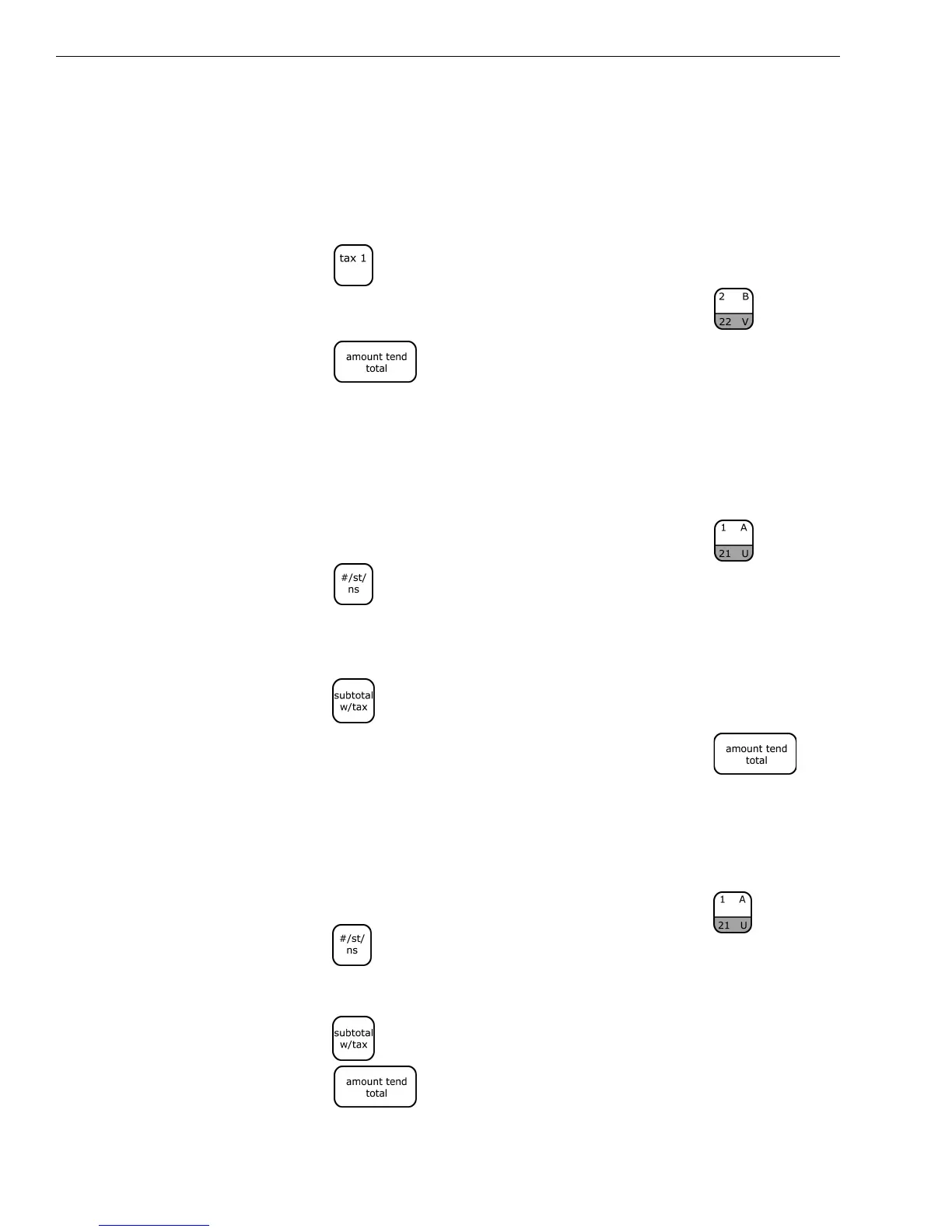
Adding Tax to a Non-Taxable Department
Example 26: Assume the Department 2 key is programmed for no tax and the
TAX 1 rate is programmed for 6%. Ring up a $1.00 item in Department 2,
charging the 6% tax rate.
To add tax to a non-taxable department
1 Press the key.
2 In the Number keys area, press 100, and then press the key.
3 Press the key.
Cash Sale With Tendering Change
Example 27: Ring up a $1.00 item in Department 1 and compute change from
$5.00 cash tendered.
To ring up a sale with tendering change
1 In the Number keys area, press 100, and then press the key.
2 Press the key.
You do not need to press the Subtotal key if you do not want the
subtotal of a sale to print.
3 Press the key
4 In the Number keys area, press 500, and then press the key.
Cash Sale Without Tendering Change
Example 28: Ring up a $1.00 item in Department 1.
To ring up a sale without tendering change
1 In the Number keys area, press 100, and then press the key.
2 Press the key.
You do not need to press the Subtotal key if you do not want the subtotal
of a sale to print.
3 Press the key.
4 Press the key.



 To Next Page