6 Operation of con::cube
The con::cube is equipped with the operating software moni::tool and uses multi touch technology and a Web-Browser as
gracaluserinterface.Thismeansthatmoni::toolcanbeoperatedviaWeb-Browsereitherdirectlyonthetouchscreenofthe
con::cubewithyourngersand/oratouchpen(seesection6.1)orviaremoteconnectionusingaPC,notebook,tablett,etc.
(see section 6.2). Please note that only one user can operate the con::cube directly (i.e. can be logged on).
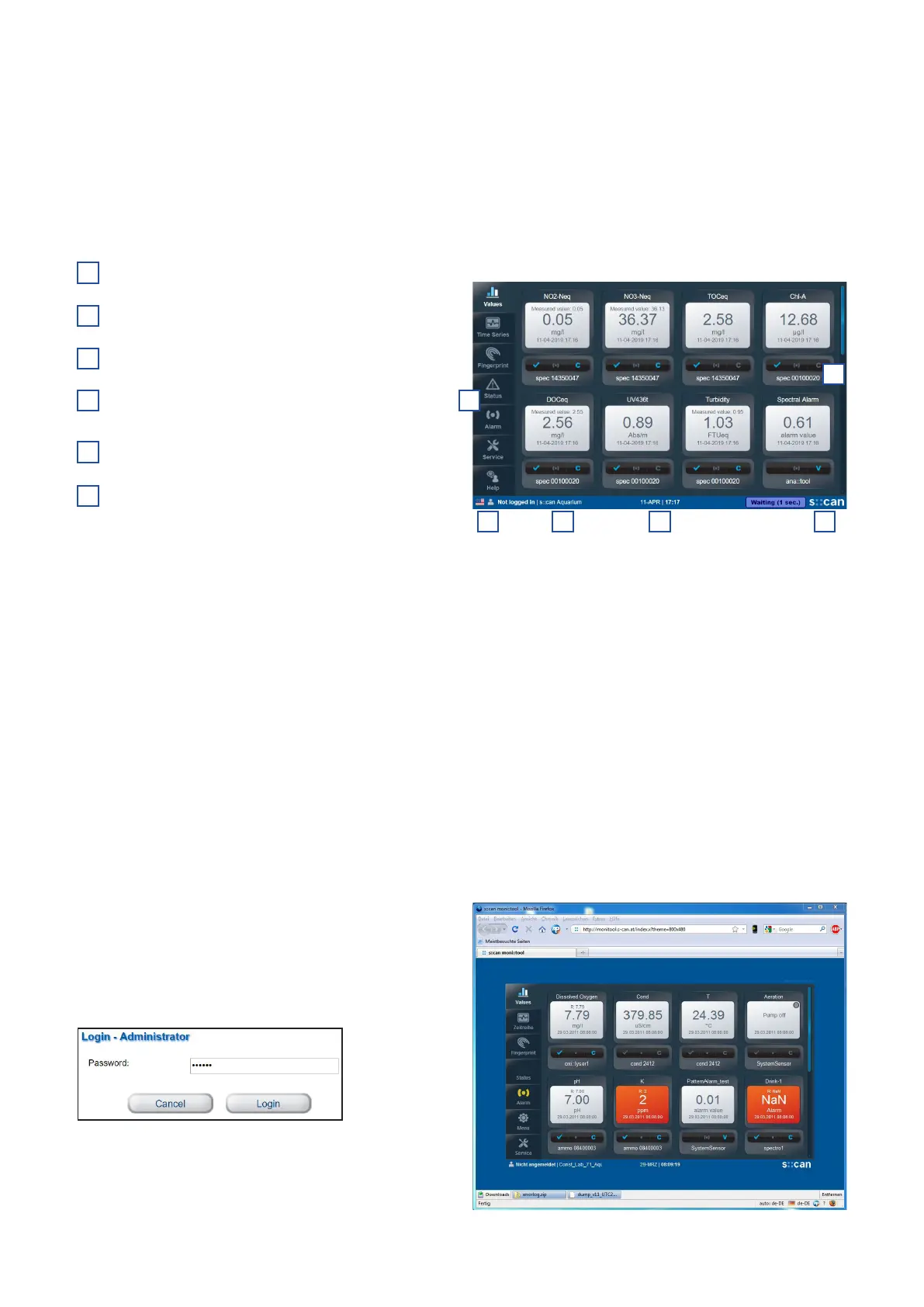
The main frame of the moni::tool display contains the following items that are visible at all times.
Tabs for navigating between the main views
Clicking on this item will open the login window or
logout window
Name of the monitoring station
Current system date and time (clicking on this icon
will display date / time of the last measurement)
Clicking on the s::can logo will callup information on
the installed software version and the controller
Scrollbar to scroll the display up and down
6.1 Direct Operation of con::cube
Normally this direct operation is performed by a person standing in front of the con::cube and using the touch screen.
Alternatively moni::tool can also be operated with a USB mouse and / or a USB keyboard. These devices can be connected to
theUSB-socket(markedwithno.7inthegureofsection3.3)ofthecon::cube.AUSB-hubcanbeusedtooperatekeyboard
and mouse simultaniously.
Please keep in mind that a few service actions (e.g. touch calibration) can be used in direct operation only (see manual
moni::tool).
6.2 Remote Operation of con::cube
For any kind of remote operation the con::cube needs to be connected to the internet, a VPN network, a local network or
directly to a PC (see section 6.5).
6.2.1 Remote Operation of con::cube via Web-Browser
The moni::tool software can be operated from any computer
that has access to the con::cube. Simply enter the IP address
of the con::cube into the address bar of your Web-Browser.
Several users can view moni::tool simultaniously but only one
user can be logged in.
User = Administrator
Password = admin1
1
2
4
5
6
3
con::cube D-330, 01-2020 Release
www.s-can.at
Copyright © s::can Messtechnik GmbH
17 / 42
1
2 3 4 5
6


 To Next Page