9 Maintenance
9.1 Cleaning
The device housing is made of aluminium alloy. Only use a wet cloth tissue and drinking water and / or mild detergents (e.g.
dish washing soap) for cleaning.
9.2 Desiccant Package
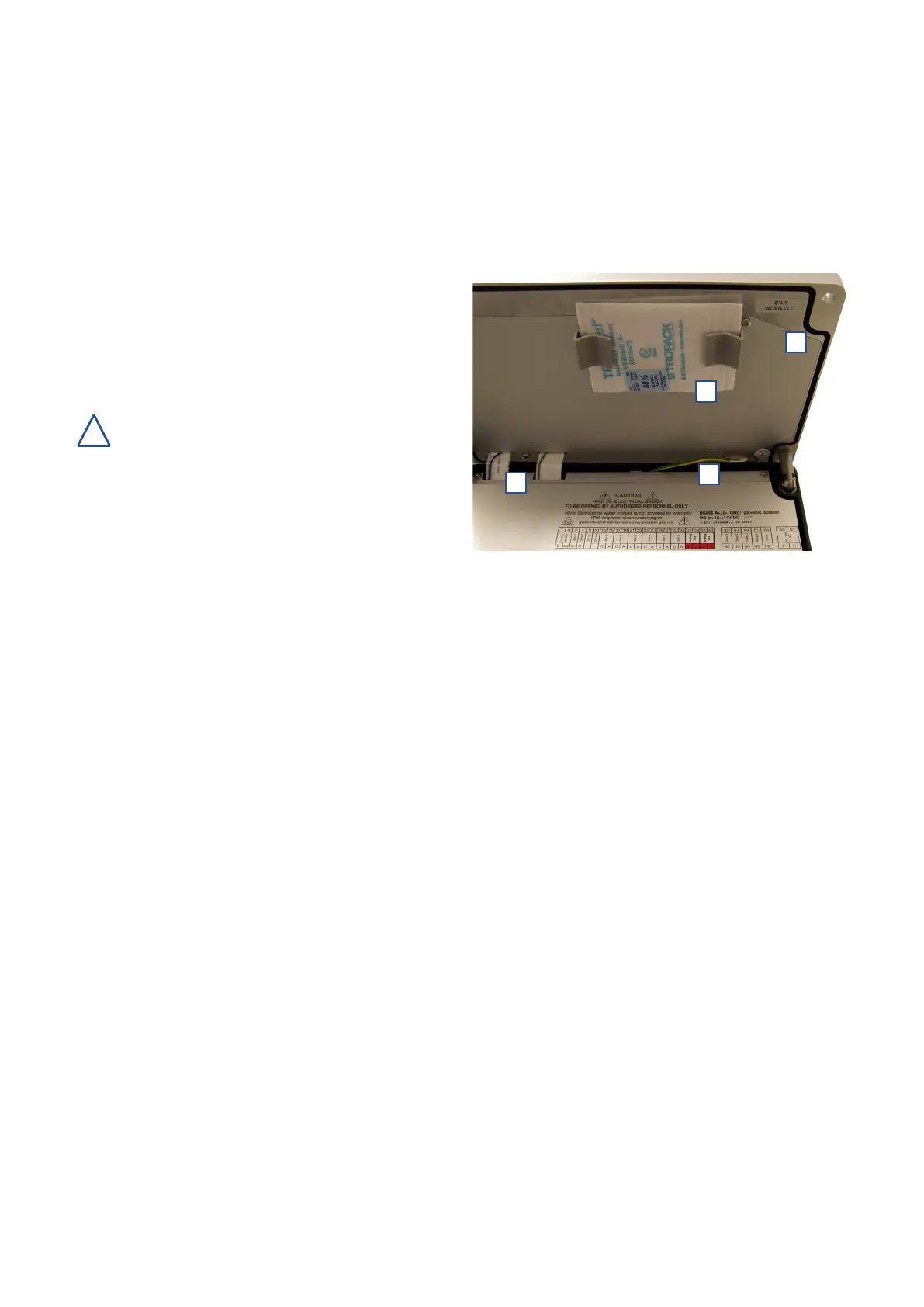
To avoid malfunctions due to condensing humidity, one
desiccantpackage[1]isxedonthecoverofthecon::cube
(see picture on the right hand side). When the package has
reached the maximum humidity absorption capacity (the
blue-coloured label will turn pink in that case), it has to be
exchanged. Before closing the con::cube, every time check
the desiccant package.
The desiccant package is not intended for the
continuous absorption of humidity but only for
the reduction of humidity below the dew point in a
completely closed case. For this reason, properly closed
housing cover and tightly screwed cable bushings are a
prerequisite for correct functioning. In case of damage to the
cord gasket in the housing cover it has to be repaired.
Used desiccant packages can be regenerated using normal
drying processes (e.g. drying chamber at max 60°C or
nitrogen). In this context, care must be taken that the cartridges cool down and are stored in an absolutely dry environment
after the drying process.
Desiccant Packages are also available as spare parts (see section 11.3.1)
9.3 Housing
To ensure IP 65 grade protection, gaskets and case edges have to be checked for cleanliness, possible damage and dirt or
foreign bodies before closing the housing cover every time. In case of damage to the cord gasket [2] in the housing cover it
has to be repaired! Please ensure that the wires for the display [3] and the earth grounding [4] are positioned correctly (see
picture above).
Thecovermustbetightlyscrewed(tighteningtorque2.5Nm)andthecableglandslledwithcableorttingplugs,mustalso
be tight (tightening torque 2.5 Nm for 16 mm and 5 Nm for 20 mm). All sockets not in use (USB, MIL, etc.) must be covered
with corresponding caps. Damage caused by intrusion of water will not be covered by the warranty.
9.4 Calibration Touch Screen
Every touch screen requires calibration so that each point on the touch surface is assigned to the corresponding spot on the
display as accurately as possible.
Calibration has to be repeated if necessary because the touch screen properties may change due to environmental impacts,
inparticularrepeatedtemperatureuctuationsandageing.
The touch screen calibration programme can be started up directly in moni::tool. For a description of the functionality, please
refer to the manual moni::tool.
In case the con::cube can no longer be operated via its touch screen, the calibration procedure can be started via web browser,
via VNC-Viewer or via mouse / keyboard connected to USB and the calibration can be carried out on the touch screen of the
con::cube.
3
!
con::cube D-330, 01-2020 Release
www.s-can.at
Copyright © s::can Messtechnik GmbH
31 / 42
1
2
3
4


 To Next Page