6.2.2 Remote Operation of con::cube via Terminal Program (VNC-Viewer)
The terminal program VNC-Viewer can be used for direct operation of
the con::cube via remote connection. In this case keyboard, mouse and
monitor of the computer running the VNC-Viewer can be used to operate
the con::cube.
When using the VNC-Viewer a login window will pop up once the remote
connection was successful. The password to be entered is „scan“ (case-
sensitive).
If you operate the con::cube via VNC-Viewer, all actions can be seen on the
touch screen of the con::cube also.
For operation of VNC-Viewer with Linux (moni::tool Version V3) the port 5900 has to be unlocked in the con::cube
rewall.
6.3 con::cube Interfaces
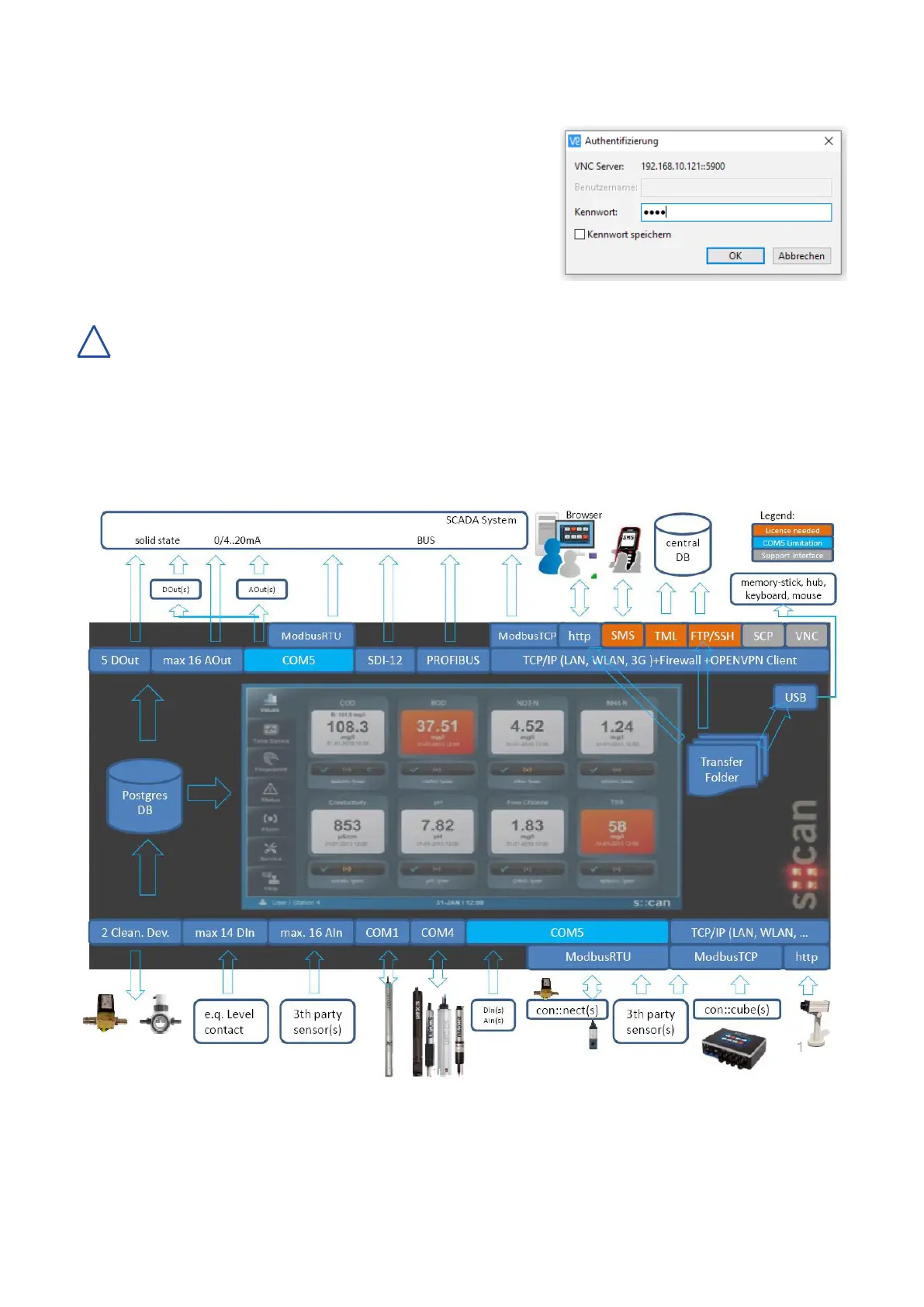
Thegurebelowoersanoverviewofallavailableinterfaces,thatcanbeusedforoperationofthecon::cube.
!
con::cube D-330, 01-2020 Release Copyright © s::can Messtechnik GmbH
www.s-can.at18 / 42


 To Next Page