6
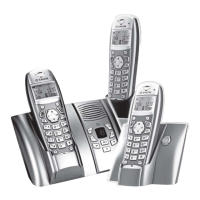
YOUR TELEPHONE
Model with answering machine (D30V):
1. Increase the volume on the base loudspeaker
2. Mains light
Fixed light
- green: On - Answering machine off.
- red: On - Answering machine activated, no message.
Flashing light
- slow red: Messages read.
- quick red: Flashes at a rate corresponding to the number of unread messages.
3. Display
Answering machine off: nothing is displayed
Simple answering machine: "oo" displayed
Answering machine recorder:
- No new messages: the message read counter is displayed
- New messages present: the unread message counter flashes
4. Paging / Pairing button:
Press and hold: Pair handsets
Short press: find handsets (Paging)
5. ON Simple recorder
OFF: press and hold
OFF
ON Recorder: short press
ON Recorder ON Simple: short press
ON Simple
ON Recorder: short press
6. Next message
7. Play messages / Pause during playback
8. Erase a message
Erase a message: Press and hold in playback mode
Erase all messages: Press and hold outside playback mode
9. Last message
10. Reduce the base loudspeaker volume
1
3
2
5
4
8
7
6
10
9
Votre téléphone.fm Page 6 Lundi, 25. juin 2007 9:36 09


 To Next Page