Modules & Options
Port Replicator 7 - 13
7
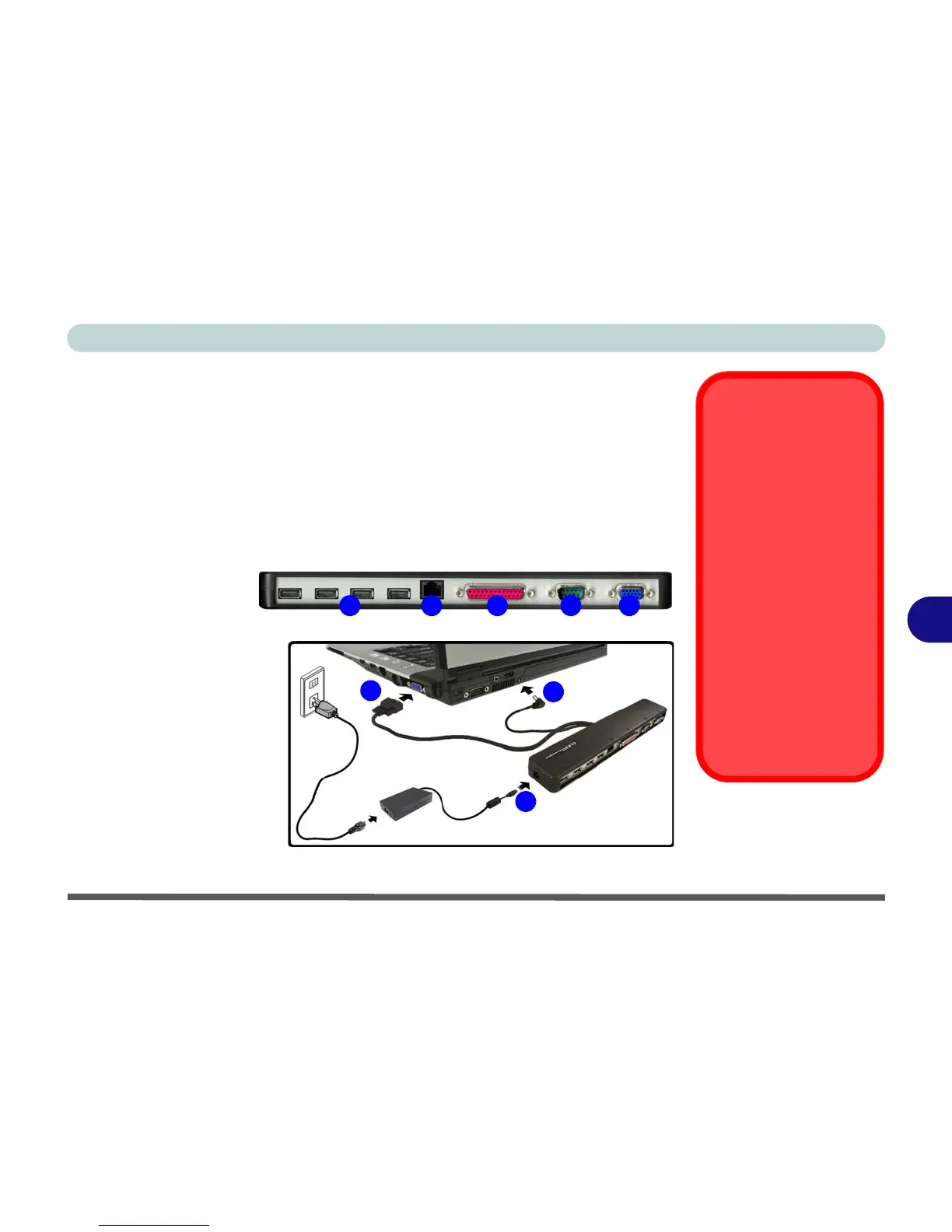
Port Replicator
If you have included the Port Replicator in your purchase option, the device will al-
low you to easily attach the notebook to standard, non-portable devices e.g. a printer
or monitor. Note the sidebar warning on the power supply.
You will be provided with a CD including drivers for the serial (COM) port, and for
the network (LAN) jack. See “Port Replicator Setup Instructions:” on page 7 - 14
for configuration information.
Port Replicator
AC/DC Adapter
You will be provided
with a 90W AC/DC
adapter if you purchase
the port replicator op-
tion.
If you are using the com-
puter with the Port Rep-
licator, then you must
use the 90W AC/DC
adapter to power the
port replicator and com-
puter (DO NOT USE the
computer’s AC/DC
adapter to power the
Port Replicator).
Figure 7 - 6
Port Replicator
1. 4 * USB Ports
2. RJ-45 LAN Jack
3. Parallel (printer)
Port
4. Serial Port
5. External Monitor Port
6. Port Replicator DC-In
7. Port Replicator Power
Cable
(to computer’s DC-In)
8. External Monitor Cable
(to computer’s External
Monitor Port)
21 53 4
6
7
8



 To Next Page