1 - 6 System Map: Top View with LCD Panel Open
Quick Start Guide
1
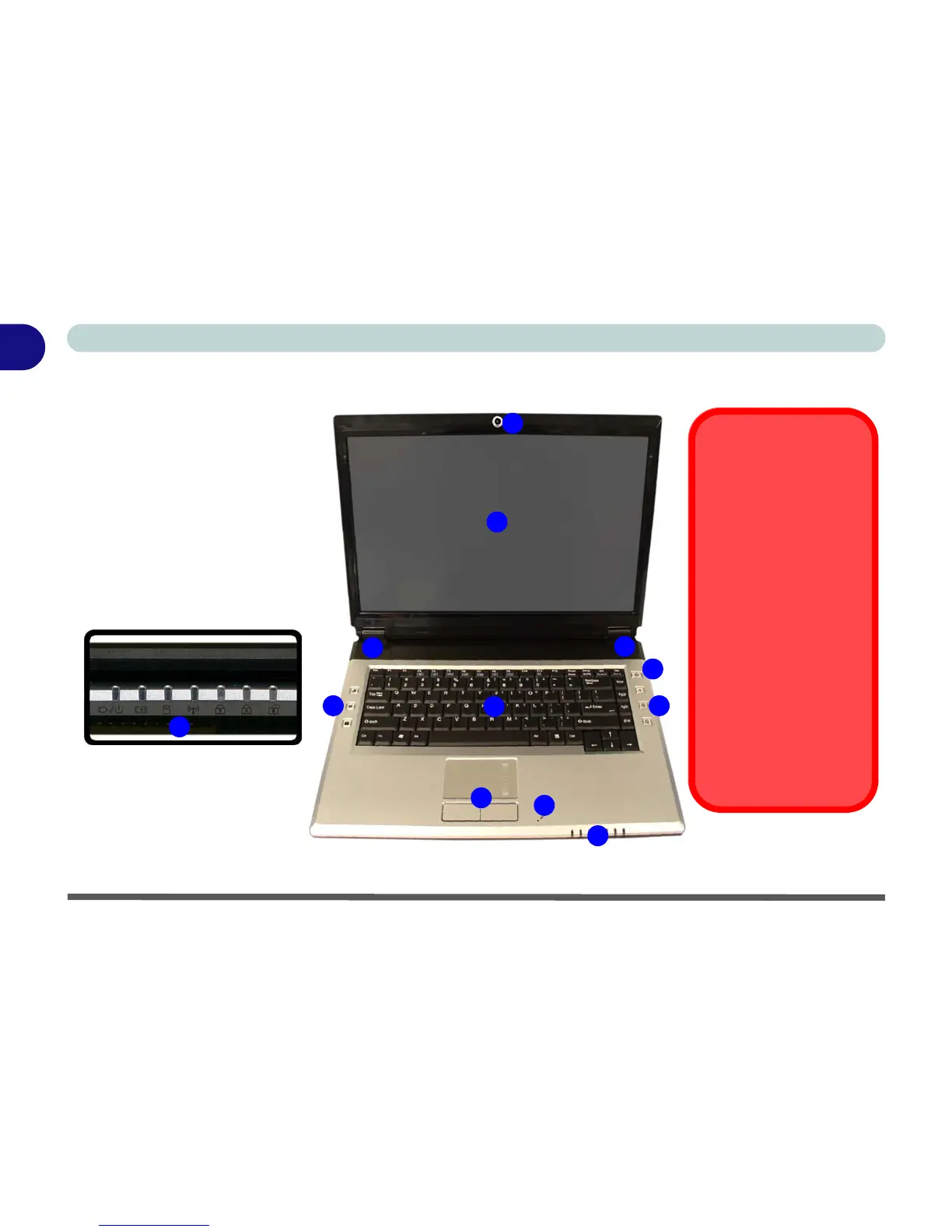
System Map: Top View with LCD Panel Open
Figure 1 - 2 - Top View with LCD Panel Open
2
5
1
7
8
4
1. Optional Built-In PC Camera
2. LCD
3. Speakers
4. Power Button
5. Hot Key Buttons
6. Keyboard
7. TouchPad and Buttons
8. Built-In Microphone
9. LED Indicators
6
9
3
3
Wireless Device
Operation Aboard
Aircraft
The use of any portable
electronic transmission de-
vices aboard aircraft is usu-
ally prohibited. Make sure
the module(s) are OFF if
you are using the computer
aboard aircraft.
Use the key combinations to
toggle power to the WLAN/
Bluetooth modules, and
check the LED indicator
icon to see if the modules
are powered on or not (see
Table 1 - 2, on page 1 - 7/
Table 1 - 4, on page 1 - 9).
5
9



 To Next Page