4.AlignmentandTroubleshooting
4.1.7.2.Updatethermwarebyusingthenetwork
Upgradingpreparations
•WiredorWirelessNetworkconnectionisestablished.
•Firmwareletoupdate
UpgradeProcedure
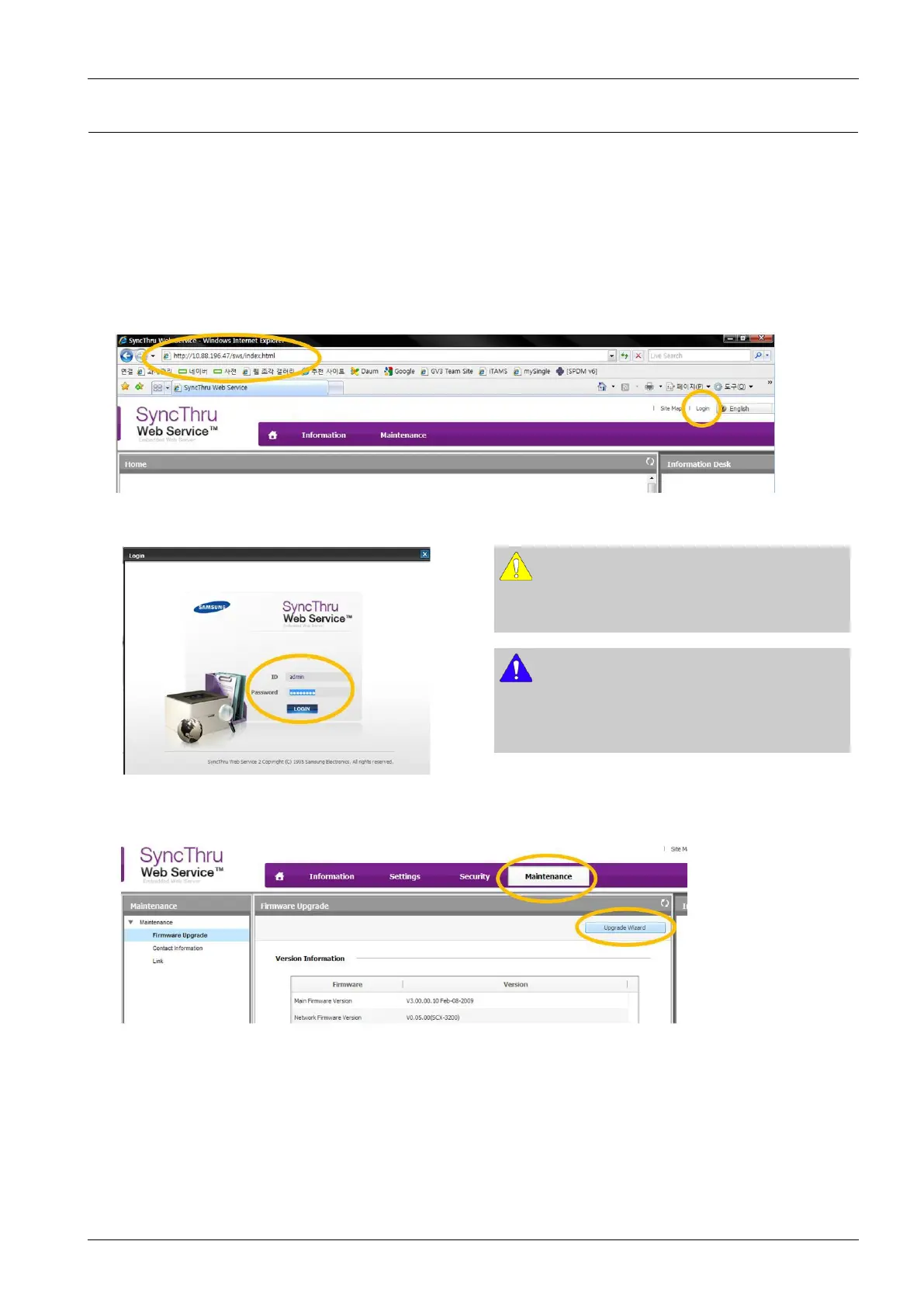
1)OpentheWeb-browserandinputIPaddressofmachine.Click“Login”.
2)Log-inAdminMode.(ID:admin,PW:sec00000)
CAUTION
Please,changeSWSDefaultIDandPasswordfor
systemsecurityincaseofyourrstconnection
NOTE
Ifthemachinesupports‘DirectPrint’,youcanenablethis
functionusingtheSWSmenu.Thedefaultconguration
is‘Disabled’foryoursecurity
3)SelectMaintenancemenuandclick“upgradewizard”
Copyright©1995-2016SAMSUNG.Allrightsreserved.4-24



 To Next Page
 Loading...




