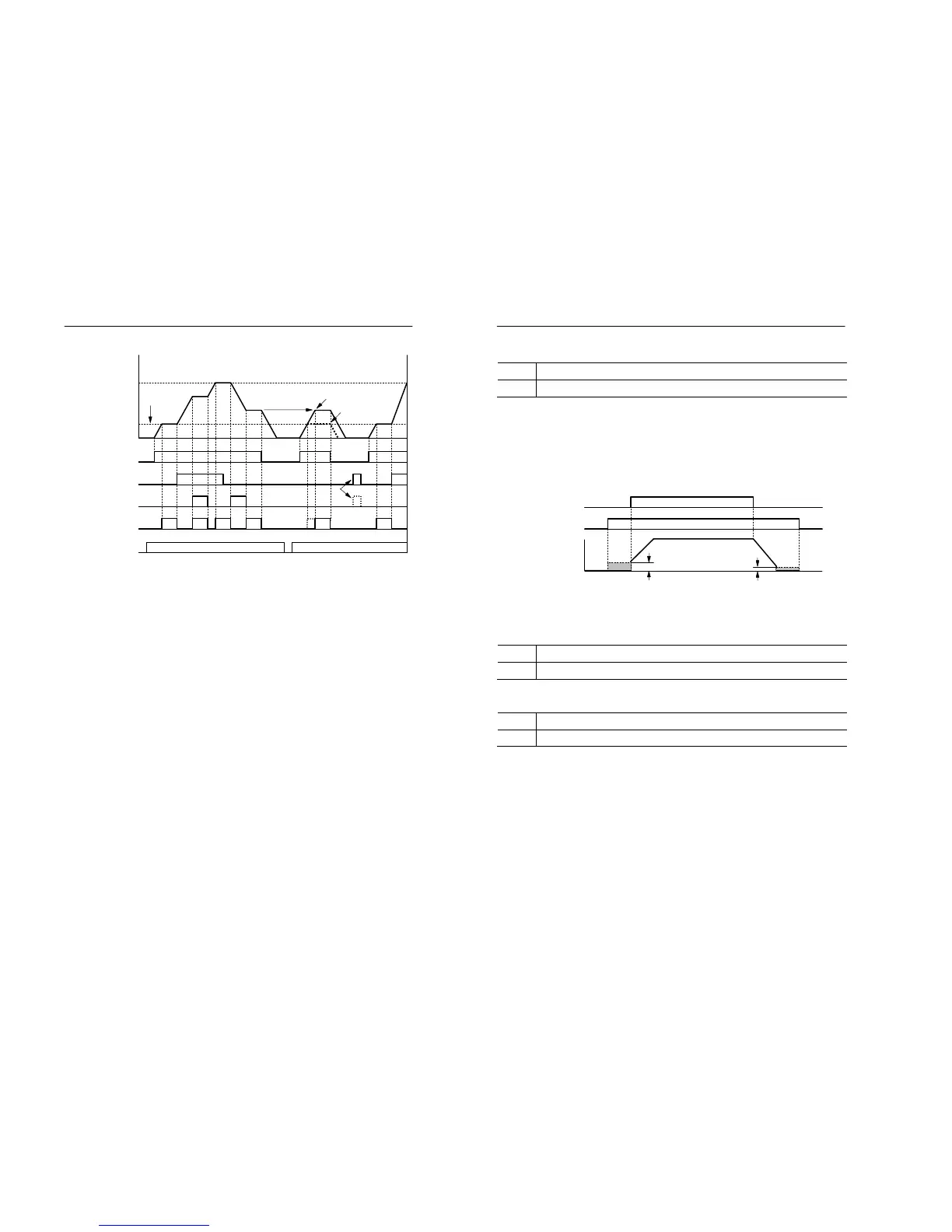
F1.07=1
F1.07=0
ON
Reference frequency reset
ON
ON
ON
ON
The speed Agree signal remains ON while the run command is ON and the motor is not
accelerating or decelerating
5-48 MOSCON-E7 User’s Manual
DC braking (Setting : 15)
OFF Normal operation
ON Applies DC injection braking if the inverter is stopped.
• This function is used to prevent the motor from rotating due to inertia
or external forces at stop.
• Inputting a run command or jog command (jog, clockwise jog, or
counterclockwise jog) clears the DC injection braking causing the
motor to start.
Figure 5.20 Timing chart for DC injection braking command
Speed search command 1 (Setting :16)
OFF Normal operation.
ON Starts a speed search from the output frequency command.
Speed search command 2 (Setting :17)
OFF Normal operation.
ON Starts a speed search from the pre-defined frequency.
• Only one of the search functions can be selected.
• When switching the operation from a commercial power supply and the
inverter or starting a coasting motor, this function can be used to run the
motor without tripping.
OFF
S0.01 Zero speed level
DC
brakin


 To Next Page