5. Parameters 5-41
5.7 H-parameter : I/O Control functions
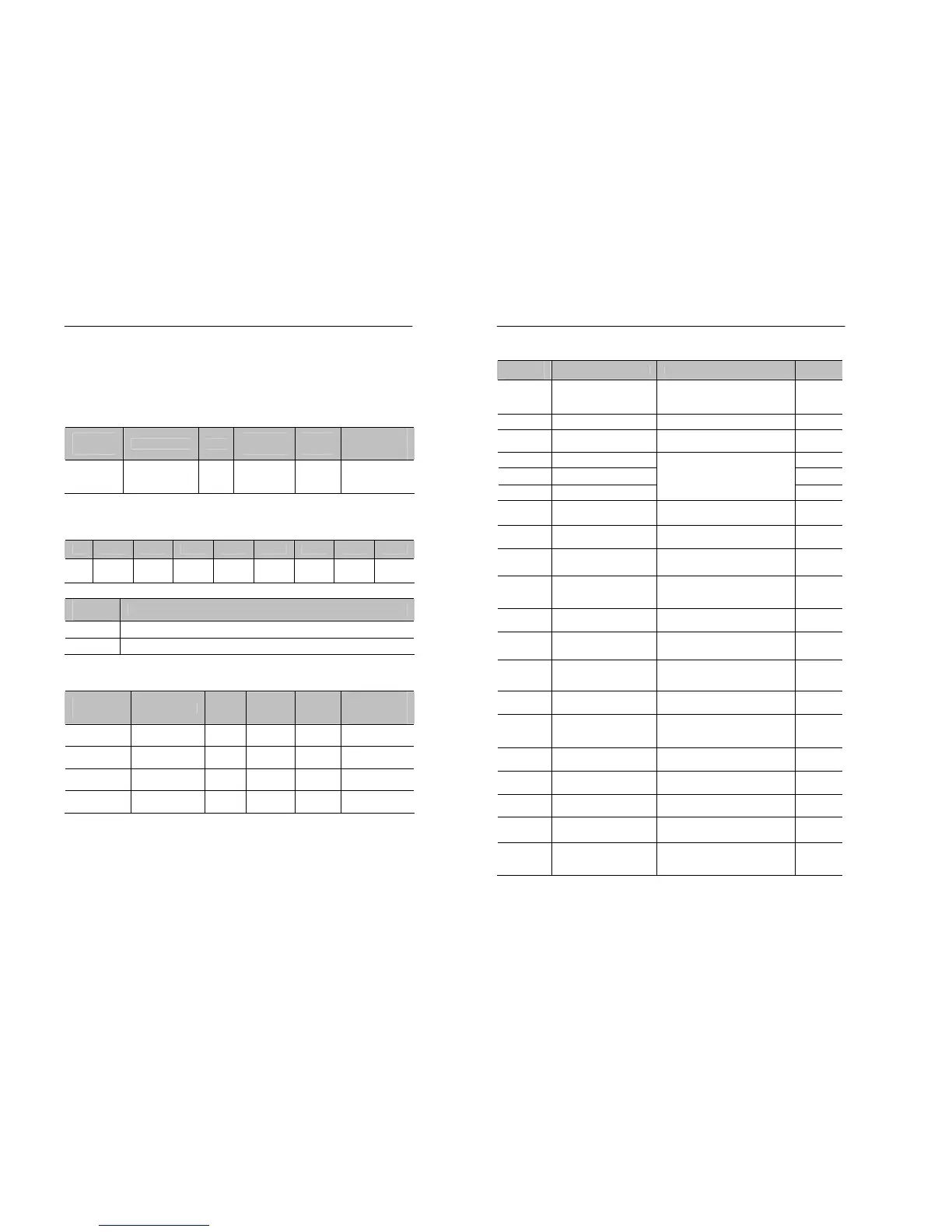
5.7.1 Multi-function contact input
5.7.1.1 Set input type of multi-function contact input: H0.01
Parameter
No.
Name Unit
Setting
range
Factory
Setting
Changeable
during
operation
H0.01
Select Terminal
Input Type
-
00~3F
(Hexa-
decimal)
00 X
• H0.01 is used to set the input type of each terminal.
•The definition of each bit in H0.01
bit7 bit6 bit5 bit4 bit3 bit2 bit1 bit0
H0.01 0 0
Terminal
no. 6
Terminal
no. 5
Terminal
no. 4
Terminal
no. 3
Terminal
no. 2
Terminal
no. 1
•Setting
Setting
constant
Function
0 Each bit is set as ‘a’ contact (NO)
1 Each bit is set as ‘b’ contact (NC)
5.7.1.2 Setting the function of contact input : H0.02~H0.05
Parameter
No.
Name Unit
Setting
range
Factory
Setting
Changeable
during
operation
H0.02
Function of
Terminal3
- 0~19 1 X
H0.03
Function of
Terminal4
- 0~19 2 X
H0.04
Function of
Terminal5
- 0~19 3 X
H0.05
Function of
Terminal6
- 0~19 6 X
• Refer to the table on the next page for the function settings of the
multi-function input terminal.
• Note that H0.02~H0.05 should be different from each other.
5-42 MOSCON-E7 User’s Manual
•Setting
Setting
constant
Function Description Reference
0 3-Wire Sequence
Uses 3-wire operation when
operating with the external
terminal
5-43
1 External Fault External fault signal input. -
2 Fault Reset
Resets the fault when turned
on
5-43
3 Multi-step Speed 1 5-44
4 Multi-step Speed 2 5-44
5 Multi-step Speed 3
Runs in selecting the set
speed(Using the binary code)
5-44
6
Jog Frequency
Command Selection
Higher priority than multi-
step speed commands
5-44
7 Reverse Jogging
ON: Clockwise run at jog
frequency F0.09.
5-44
8 Forward Jogging
OFF: Counterclockwise run
at jog frequency F0.09.
5-44
9
Accel/Decel Time
Switching Command
Change the accel/decel rate
from F2.01/F2.02 to
F2.03/F2.04
5-45
10 Holding Accel/Decel
ON: accel/decel stopped,
frequency on hold
5-45
11
External Base block
Command
Blocks the output voltage of
the inverter(Frequency on
hold)
-
12
Frequency Up
Command
Always set with the
frequency down command.
5-46
13
Frequency Down
Command
Always set with the
frequency up command.
5-46
14
Current Analog
Command Selection
Uses the external current
analog command to the
command frequency
5-46
15 DC Braking
Valid in stopping only :
outputs DC current
5-48
16
Speed Search
Command 1
Searches the speed to the
output frequency
5-48
17
Speed Search
Command 2
Searches the speed to the
input frequency
5-48
18
Energy-Saving
Operation
ON: energy-saving control
set for S3.01, S3.02
-
19
Remote → Local
Selection
Switches to the set
speed/Run command in
local mode
5-49


 To Next Page