5. Parameters 5-49
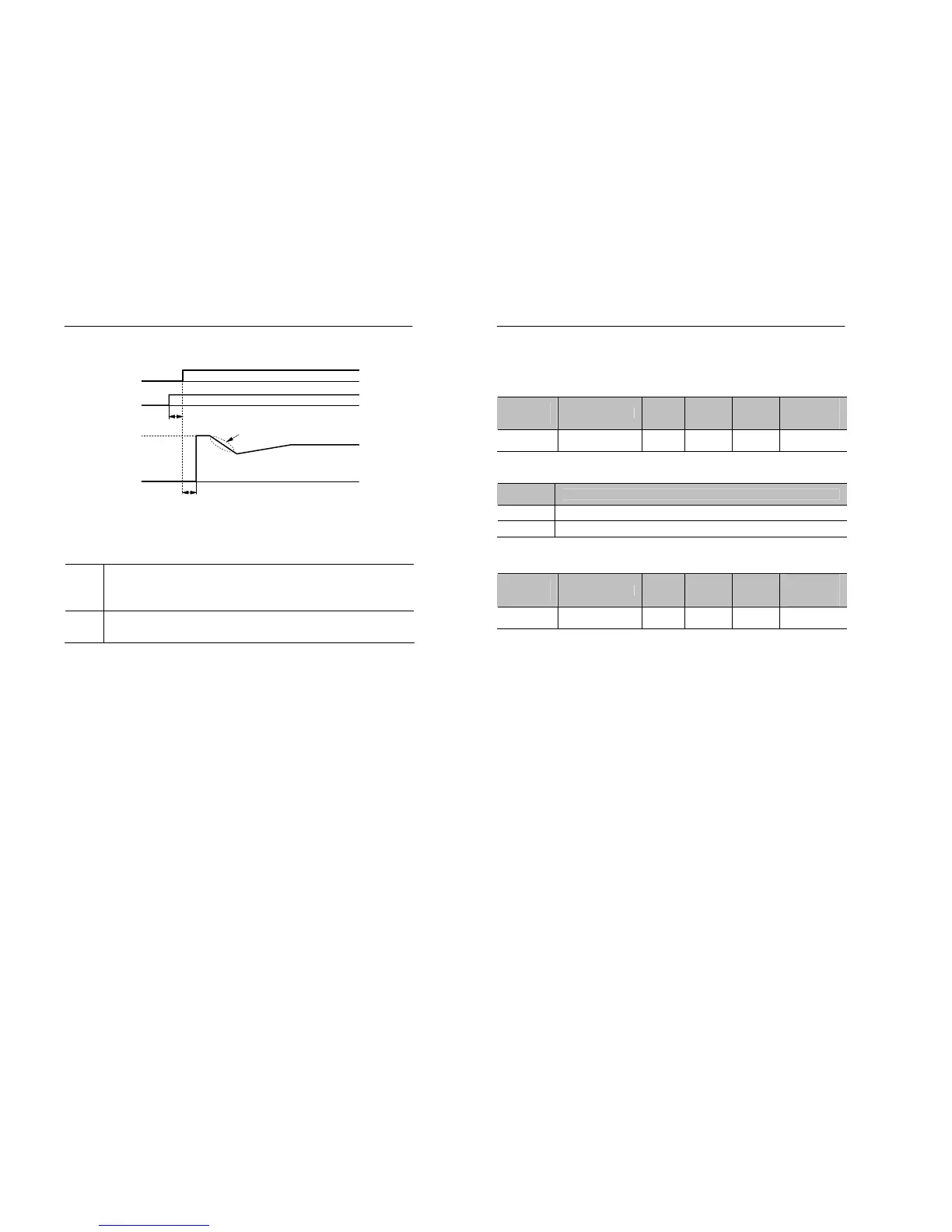
Figure 5.21 Timing chart for the external speed search command
Remote → local selection (Setting : 19)
OFF
Operates with the frequency command and run command
specified in remote mode. For more detail, see B0.01
(reference source) and B0.02 (operation mode).
ON
Operates with the frequency command and run command
specified in local mode.
• With this setting, the multi-function input selects the input method for
the frequency command and run command.
OFF
Run comman
command
Minimum baseblock time
Deceleration time set in S1.04
5 ms min
5-50 MOSCON-E7 User’s Manual
5.7.2 Multi-function contact output
5.7.2.1 Set output type of multi-function output: H1.01
Parameter
No.
Name Unit
Setting
range
Factory
Setting
Changeable
during
operation
H1.01
Select Terminal
Output Type
- 0~ 1 0 X
• H1.01 is used to set the output type of each terminal.
• Setting
Setting
constant
Function
0 Contact output is set as ‘a’ contact (NO)
1 Contact output is set as ‘b’ contact (NC)
5.7.2.2 Setting the function of multi-function output: H1.02
Parameter
No.
Name Unit
Setting
range
Factory
Setting
Changeable
during
operation
H1.02
Function of
Output Terminal
- 0~11 0 X
• Refer to the table below for the setting of the multi-function input
terminal.


 To Next Page