OfficeServ 7400 INSTALLATION
TECHNICAL MANUAL PART 7 MAY 2010
7.28
o Server IP Address: (OfficeServ IP address from MMC 830)
o (use navigation key to move to the following fields)
o Server ID: (ITP ID from MMC 840)
o Server Password: (ITP password from MMC 840)
o Server Port: 6000 (press * key twice to switch input mode
to numeric mode)
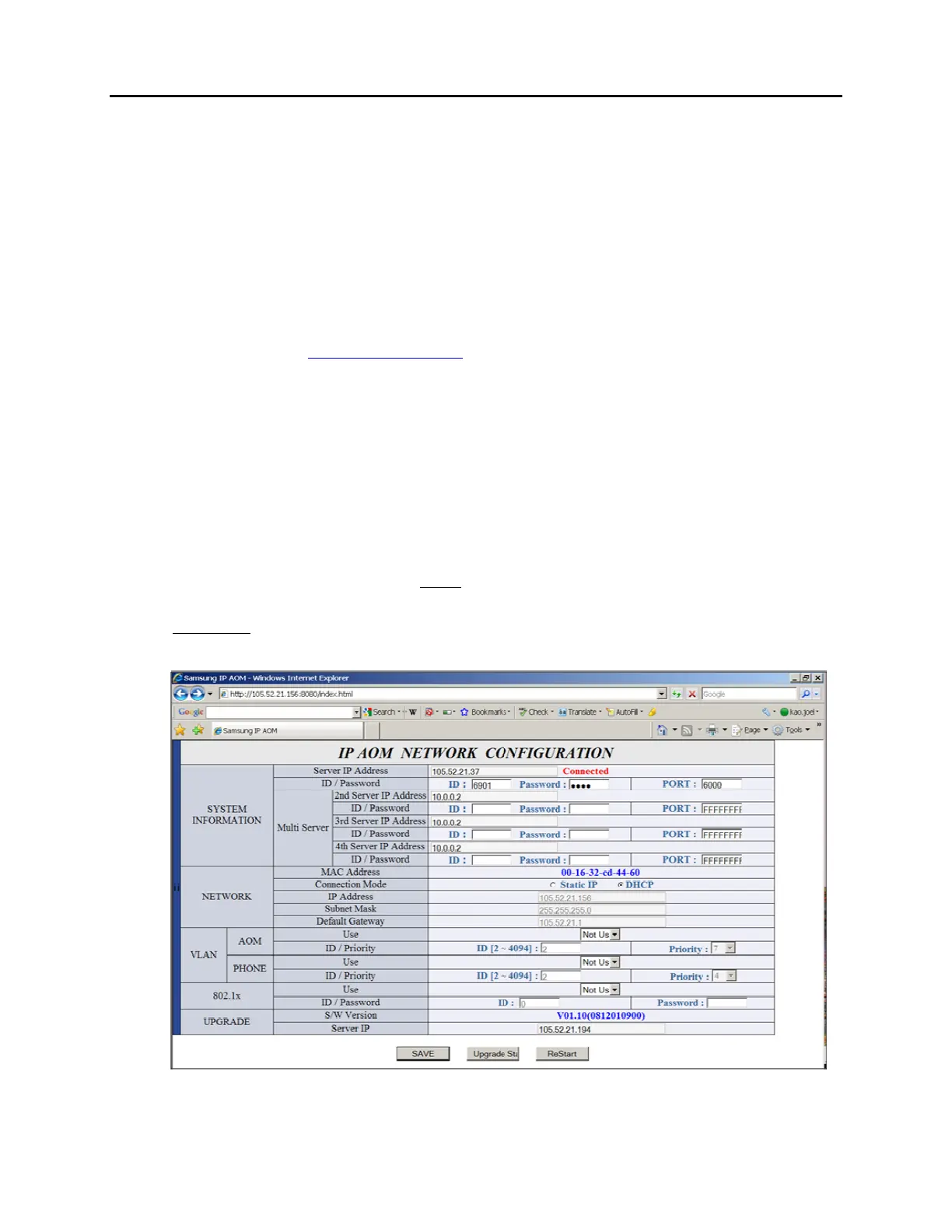
o Use Web UI
Type IP address with port 8080 in the address bar of IE browser. Default
AOM IP address is 10.0.0.3.
Ex.
http://10.0.0.3:8080
ID: admin
Password: samsung
Fill in the required data. Must enter the following information.
Server IP address is the OfficeServ MP IP address
o Ex. 192.168.1.10
Enter an ITP ID and password
Ex:
o id: 3210
o pw: 1234
default port is 6000
Press [Save] then [ReStart]
Use MMC 209 to pair AOM to any IP/TDM phone.
Use MMC 722 to assign buttons.
Figure 7.30 IP AOM Network Configuration















 To Next Page