SATEL Installation and Programming Manual 23
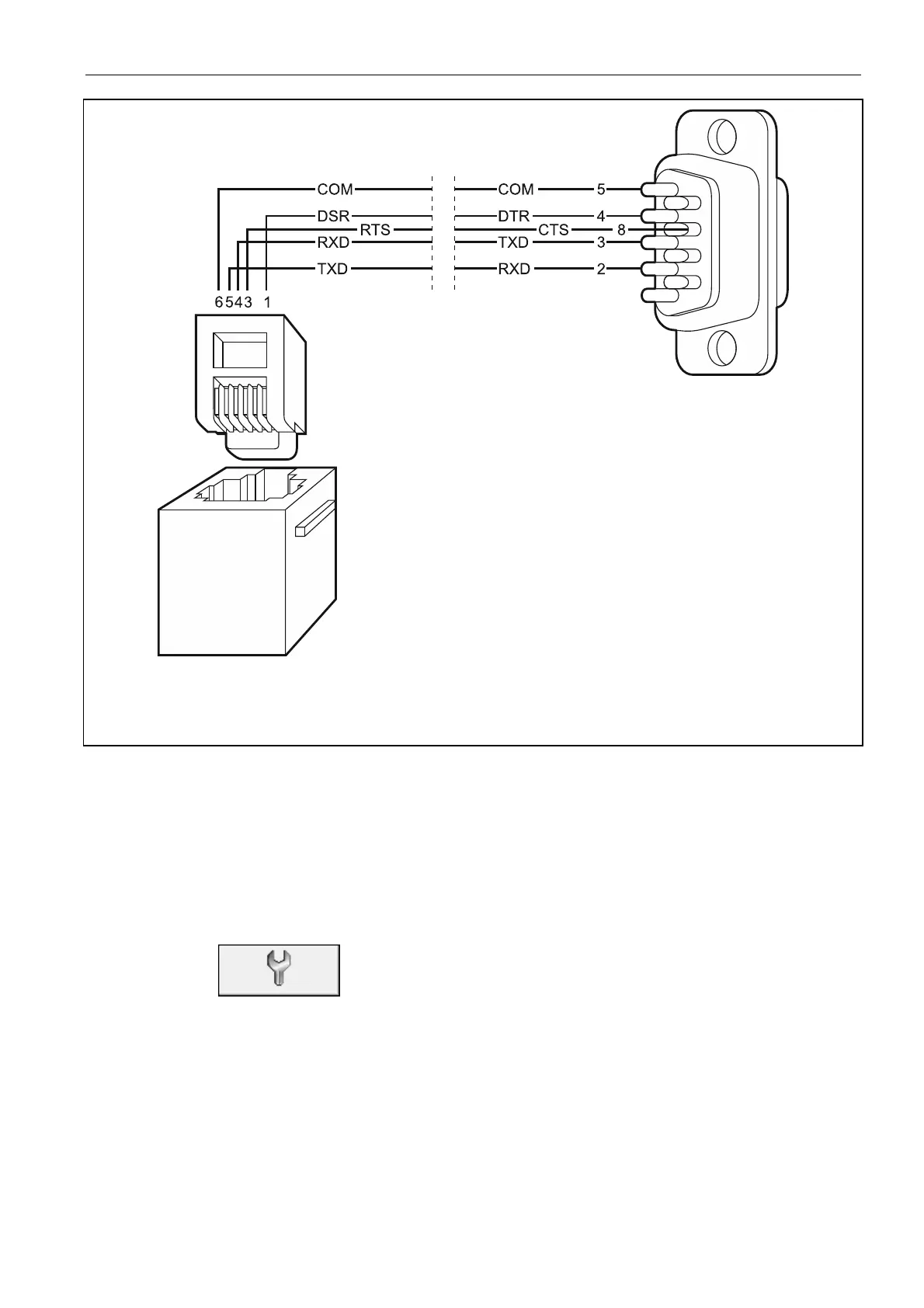
Fig. 13. Computer connection to control panel serial port. Shown on the left side is the RJ
connector on control panel mainboard. Shown on the right side is the DB-9 female connector
from the solder side.
Note: It is recommended that the cable be connected first to the control panel, and then to
the computer.
7.2.2 Starting the programming
1. Get level 3 access in the control panel (see: A
CCESS LEVELS
,
p. 18). In the case of level 1
and level 2 access, the program only allows to read and view the alarm log and event log
(additionally, level 2 makes it possible to program the control panel clock).
2. Run the DCSP program on the computer.
3. Click on the
button.
4. When a selection window opens, select the COM port through which communication with
the control panel is to take place.
5. Click on the button "OK". The port selection window will close.
6. A pop-up window will open asking you whether the data from control panel are to be read.
After the control panel data have been read, you can begin programming.



 To Next Page