SATEL Installation and Programming Manual 39
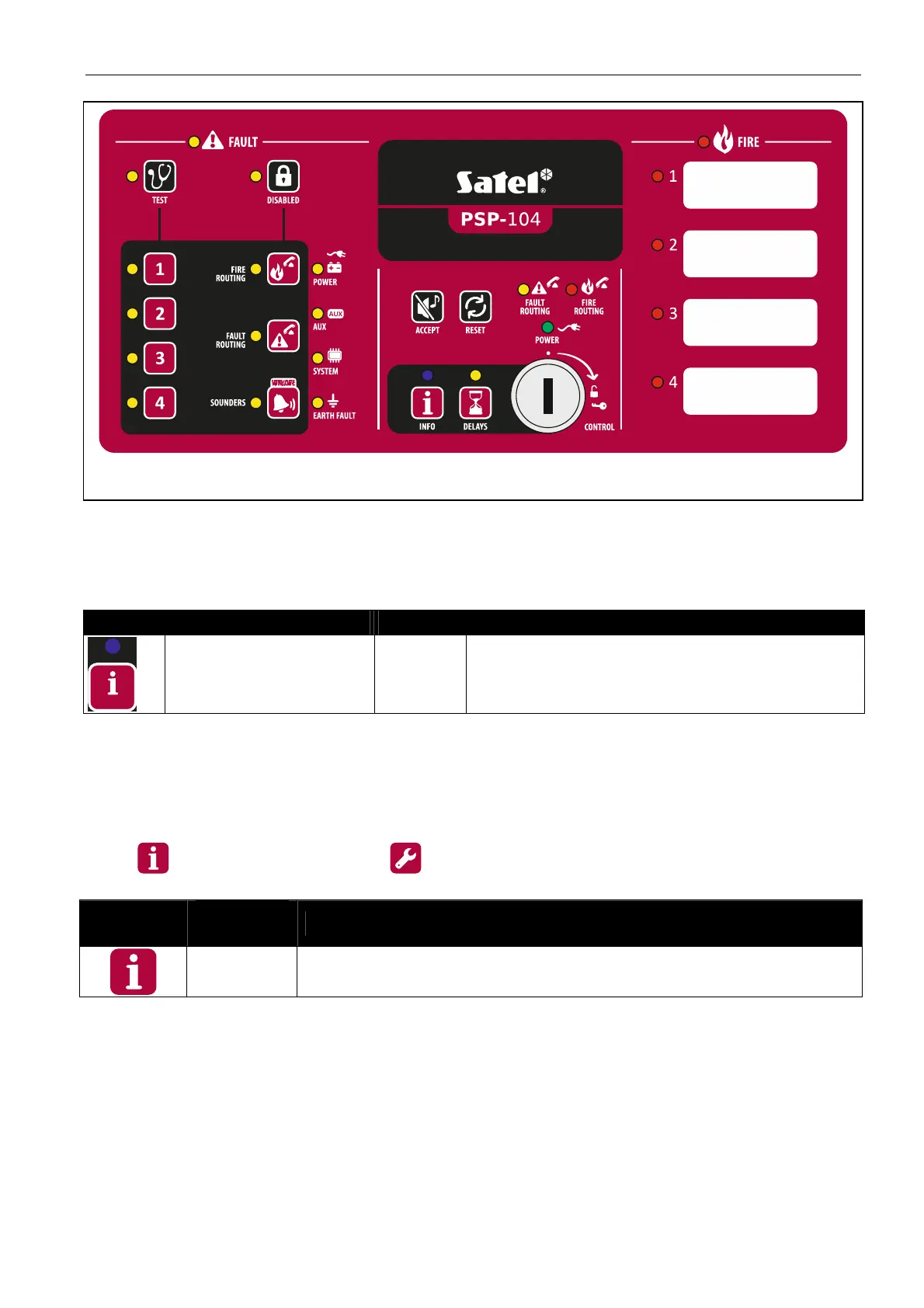
Fig. 20. Front panel of the PSP-104 repeater panel.
LED indicators
Most of the indicators function in the same way as their counterparts on the control panel's
front panel (see: p. 8), the only difference being the blue LED described in the table below.
LED Description Color Indications
info blue
slow blinking – access level 2
ON – repeater panel cannot be operated
Buttons
The buttons execute the same functions as the corresponding buttons on the control panel's
front panel, when operating the control panel at level 1 and 2 (see: p. 10). The only difference
is the
button which replaces the button and is described in the table below.
Button
Access
level
Function
1
- checks whether operation at level 2 is available on the control
panel's front panel
Key switch
The key switch allows to gain access at level 2 (see: A
CCESS LEVELS
, p. 18).
Display
The display is installed in CSP-204 and CSP-208 repeater panels. It allows to view the alarm
and event logs and to better identify the current faults and program the control panel clock.



 To Next Page