10 P
rogramming
10.1 General description
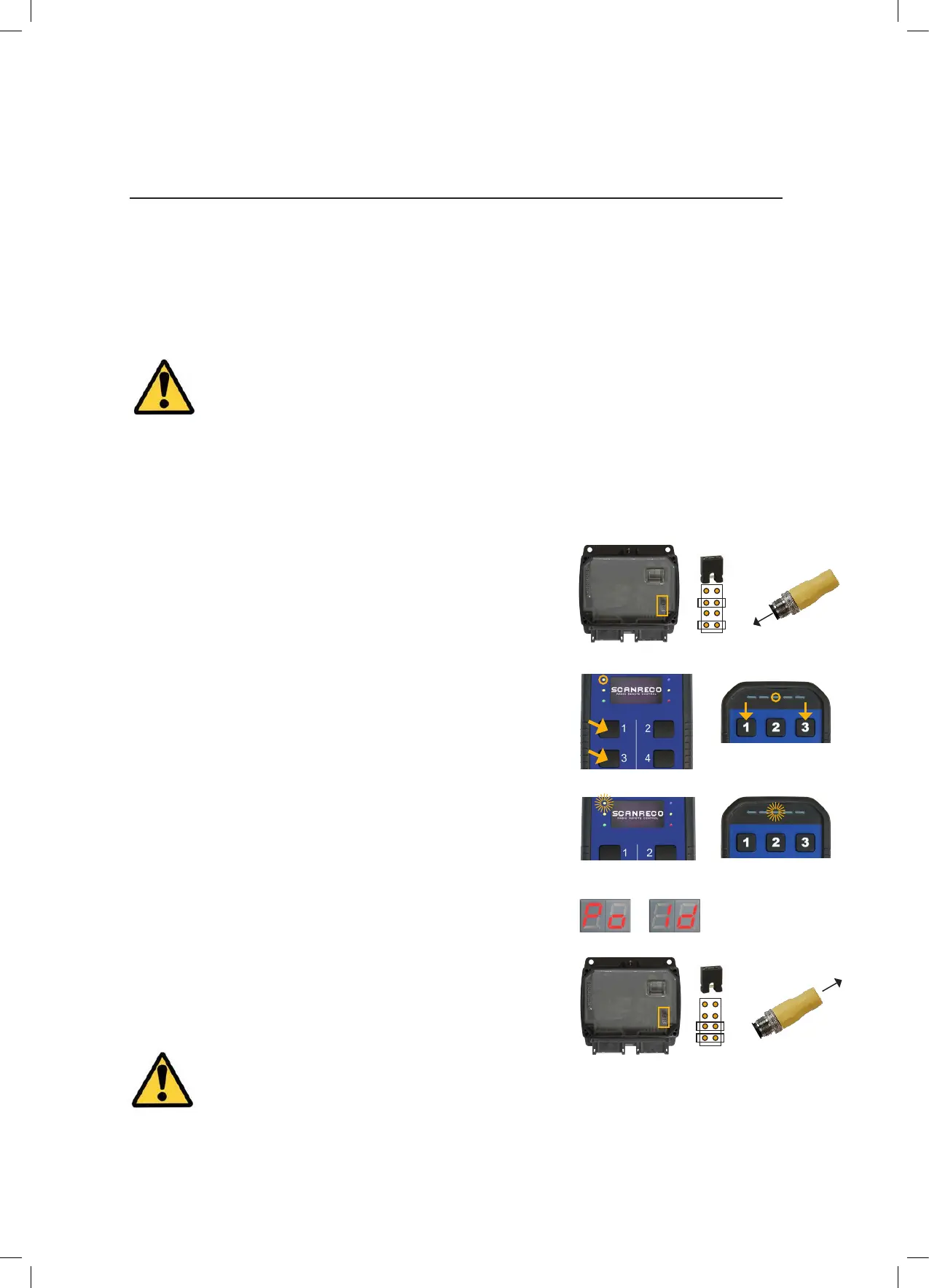
10.2 Safe paring of Transmitter to Receiver
A G5 system is normally delivered with default settings, it is therefore required to congure
the system prior to operation. There are two ways to do this; connecting the system to a
computer using RS232 communication and WinSCI software or On-Site programming which
is a simple method with less options. Please contact Scanreco and ask for G5 On-Site or
WinSCI software conguration instructions.
Safe pairing is used to get a unique assignment between a single Transmitter and a single
G5 Receiver. To exchange the Transmitter and Receivers ID’s when replacing either the
Receiver or Transmitter in a system follow the Safe Paring procedure below:
IMPORTANT!
Changes and modications not expressly approved by the responsible system installer
will void the warranty and Scanreco will no longer take any responsibility for the system.
IMPORTANT!
If pairing is performed during low battery on the Transmitter it may look like the paring works but it
does not. This is related to a safety precaution. Replace battery and repeat the paring procedure.
A. Remove power from Receiver (unplug the Grey
connector for G5 24) and remove the cover
E. The Transmitter will conrm the download
is complete by ashing LED#3 eight times
E.
G.
Turn off the power to the Receiver. Restore the
jumper to “Jumper Rest” position (for G5 CAN remove
the paring plug), re-install the cover and power up the
Receiver again.
(Step D must be done within 10 seconds of C)
D. Re-apply power to the Receiver
F. The Receiver LED Display will ash Po-Id
F.
C. Simultaneously press button #1 and button
#3. LED#3 will light indicating the Transmitter is
ready for Safe Pairing
C.
B. Install the “Paring” jumper into the
positon indicated (for G5 CAN, assemble the paring
plug in the B connector)
B.
10.3 Set to factory defaults
If for any reason it is needed to reset all settings to factory defaults this is possible by setting
the jumpers on “Pairing” and “Conguration” mode. Do this without power supply connected
and restart unit.
G.
G5 CAN
G5 CAN
27/33



 To Next Page