11
Operation
CPC III Manual
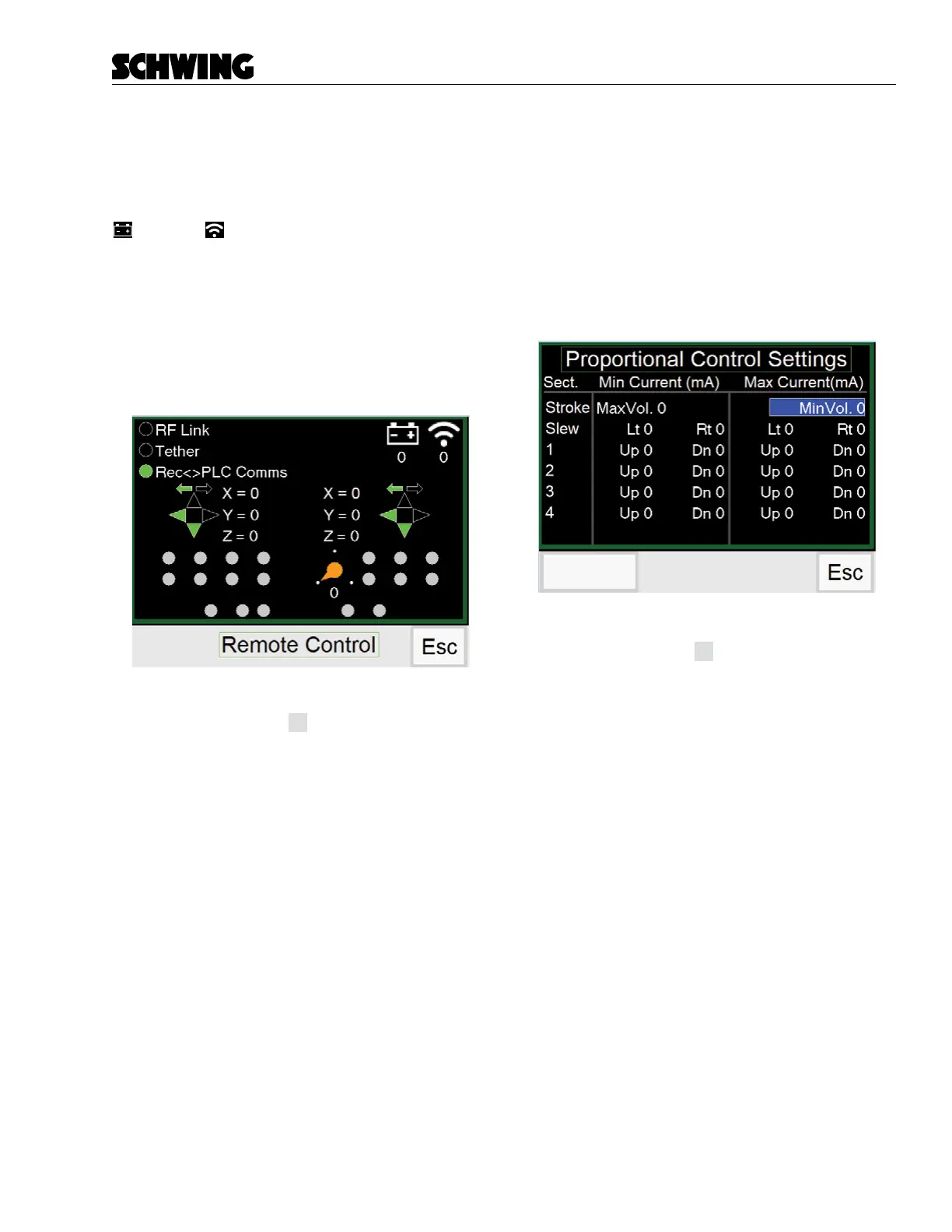
Radio Screen
Displays active functions and status of the Radio/Cable
remote.
When the Radio/Cable remote is activated, the Battery
and Link symbols will display current values. If
using the Radio remote, the “RF Link” will show a green
dot. When using the Cable remote, “Tether” will display
the green dot.
With Radio/Cable remote connected, activated joystick
functions or switches will be highlighted in green. The
stroke limiter is represented by the orange dot with ar-
row.
Functions:
- Press (F4) button
Esc
to return to Menu Screen.
Proportional Settings Screen (Display)
If you access the Proportional Settings screen without
entering a password, the current placing boom and
stroke limiter settings will be displayed, but they can-
not be changed. If you want to change the parameters,
press the Esc (F4) button to return to the Menu Screen
and enter the password.
To change settings see “Teach Mode Operation” on
page 22.
Login for
Teach Mode
Functions:
- Press (F4) button
Esc
to return to Menu Screen.



 To Next Page