17
Operation
CPC III Manual
1
4
2
5
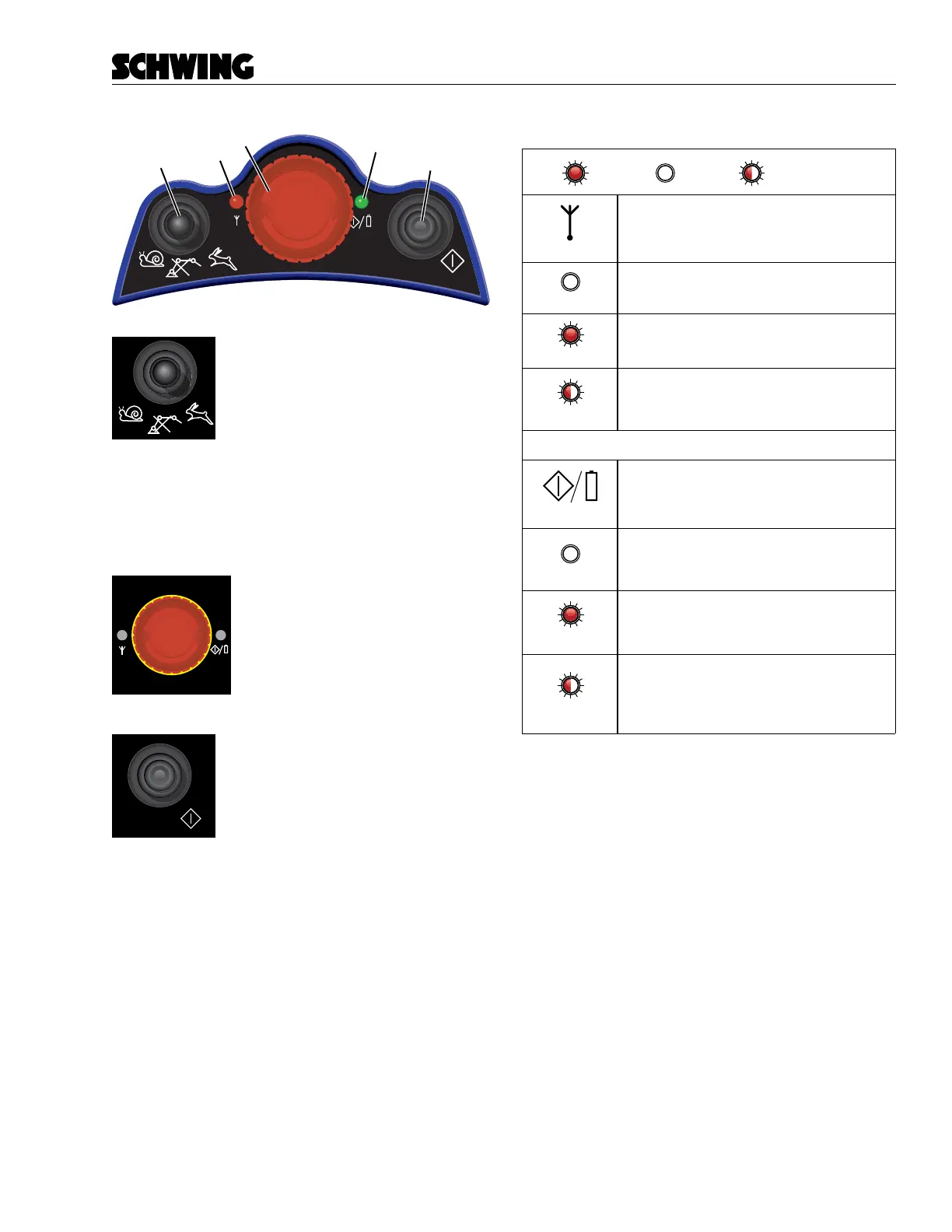
Boom Speed Selector Switch
The boom Speed Selector switch will
raise or lower the speed of each boom
section. Use the fast speed (rabbit)
when folding and unfolding or when
fast boom movements are appropriate
for the job conditions. Use the slow speed (turtle) when
job conditions require precise boom movements. Posi-
tioning the switch in the center disables the joysticks.
Use this feature when you momentarily put the remote
control box down.
E-Stop Button
When pressed, the E-stop button
disables the hydraulic circuit and
turns o the Radio/Cable Remote.
Press the Power On button and re-
lease the E-stop button to use the
Radio/Cable Remote.
Power On Button
The Power On button is used to acti-
vate the Radio/Cable remote control.
Push the E-Stop button to switch the
remote o.
Status Lights
=ON
=OFF
=FLASHING
"Antenna"(1)
"Voltage"(2)
DESCRIPTION
DESCRIPTION
OFF
Low signal strength
Radio link with a strong signal
Unit is deactivated
Transmitting data
Transmitting data
Low Battery!
(buzzer will emit an alarm
for the first three sequences when low
battery level is detected)
No link
red, on
red, flashing
OFF
red, on
red, flashing



 To Next Page