22
Operation
CPC III Manual
Teach Mode Operation
Teach mode calibrates the joysticks of the Radio Re-
mote. When the joystick is barely moved the boom
should start to slowly move. When the joystick is maxed
out the hand lever should be brought to the point where
the hand lever is just barely maxed out and still wiggles.
This will give the joysticks the most accurate and con-
sistent range of motion.
To enter teach mode:
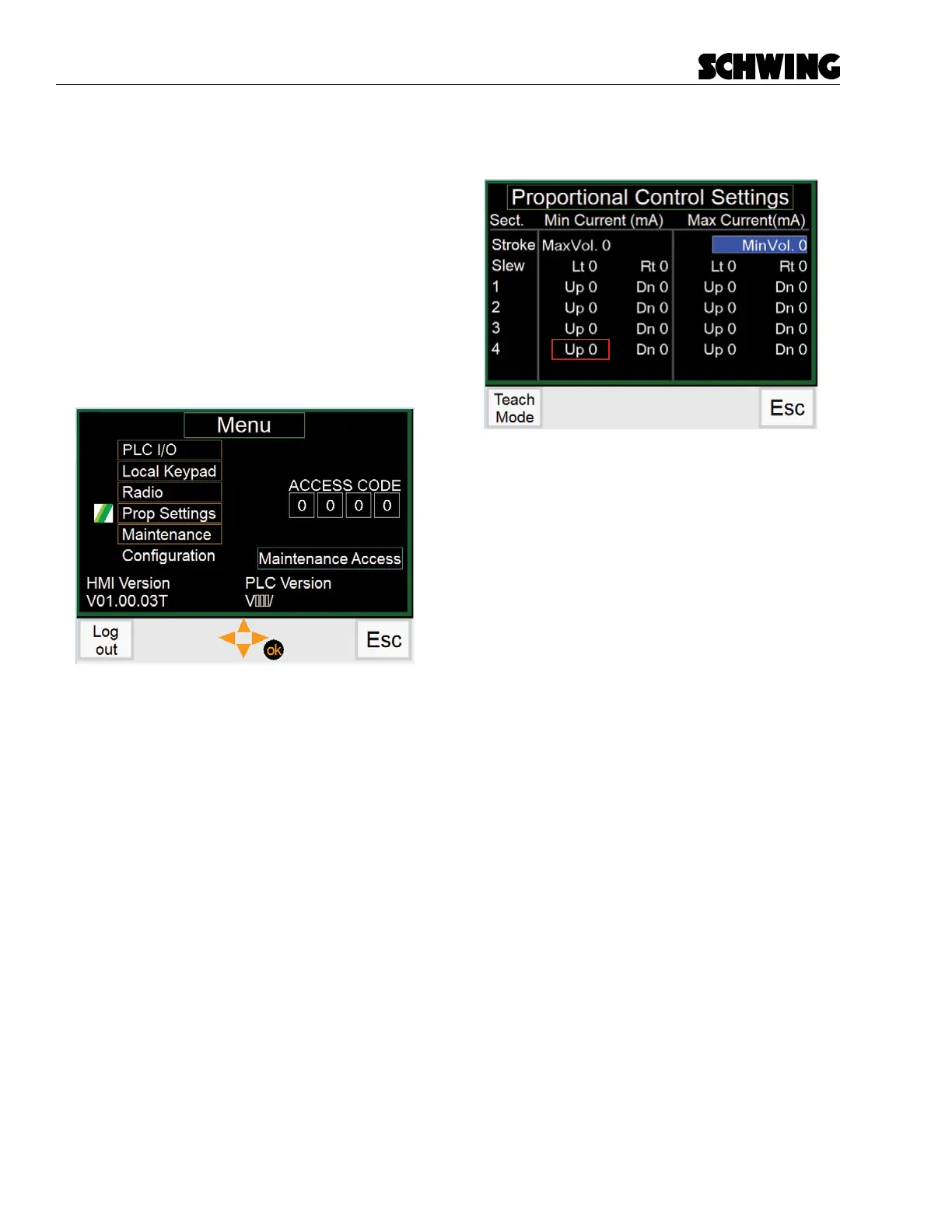
1. On the display, go to the menu screen and go
down to “Proportional Settings”. A password eld
will show up to the right.
- If you do not enter a password, you can still
enter the screen, but you will not be able to
change any values.
- Entering the customer password (Default
“1234”) allows you to change the values or
restore to Schwing Factory Settings.
- Entering the Factory password allows you
to revert to either the factory settings or the
default settings. Making any changes while
under the Factory password adjusts the Fac-
tory parameters. This should only be used at
Schwing.
2. With a password entered, go into the Proportional
screen.
Figure 3
The blue box indicates the eld that is being adjusted.
The red box indicates the eld has been adjusted and
saved.
3. All operations should be done at Max RPM.
Raise the vehicles RPM to max.
4. Click the “Teach Mode” button (F1) at the bottom.
5. At this time, you can adjust any function you need
using the radio remote.



 To Next Page