19
Operation
CPC III Manual
Operator Panel Keypad
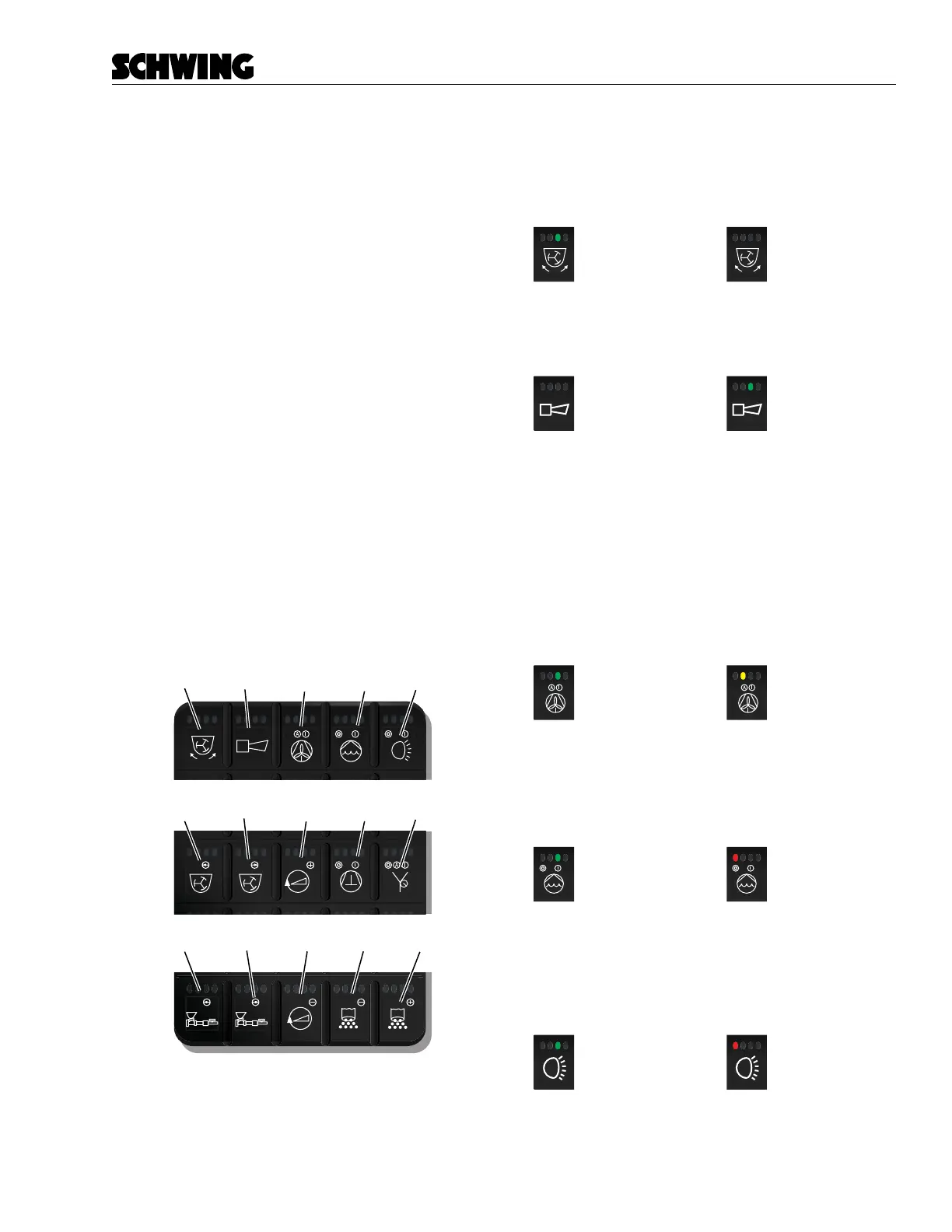
The Operator Panel Keypad contains 15 buttons used
to control various functions of the concrete pump. Each
button contains four indicator lights. These lights are
used to provide feedback on currently active functions.
Not every indicator light is used. Reference each button
for functionality. Buttons are as follows:
A. Agitator - Change Direction
B. Horn / Reset
C. Oil Cooler Auto / Manual On
D. Water Pump On/O
E. Work Light - On/O
F. Agitator Forward
G. Agitator Reverse
H. Throttle (+)
I. Compressor On/O
J. Vibrator Auto/Manual - On/O
K. Concrete Pump Forward
L. Concrete Pump - Reverse
M. Throttle (-)
N. Stroke Limiter (-)
O. Stroke Limiter (+)
E
D
C
B
A
J
I
H
G
F
MN O
L
K
Keypad Buttons
Agitator Reverse
Press and hold to change agitator direction.
= Enabled
= Disabled
Horn / Reset Button
Press once or press and hold to sound the horn.
= Horn / Off
= Horn / On
(Push/Hold)
Oil Cooler On/Auto
Press once to manually turn the oil cooler On. Green
light will illuminate. Press again to place into automat-
ic mode - yellow light. In automatic mode the oil cool-
er will turn on when the set maximum oil temperature
is reached. Oil cooler defaults to Auto On mode upon
startup. Pressing the button once will turn on the cooler
continuously.
= On
= Auto
Water Pump On/O
Pressing once will turn the water pump On - green light.
Pressing again will turn the water pump o - red light.
= On
= Off
Work Lights
Press to turn on the lights - green light. Press again to
shut the lights o - red light.
= Lights / On
= Lights / Off



 To Next Page