13
Operation
CPC III Manual
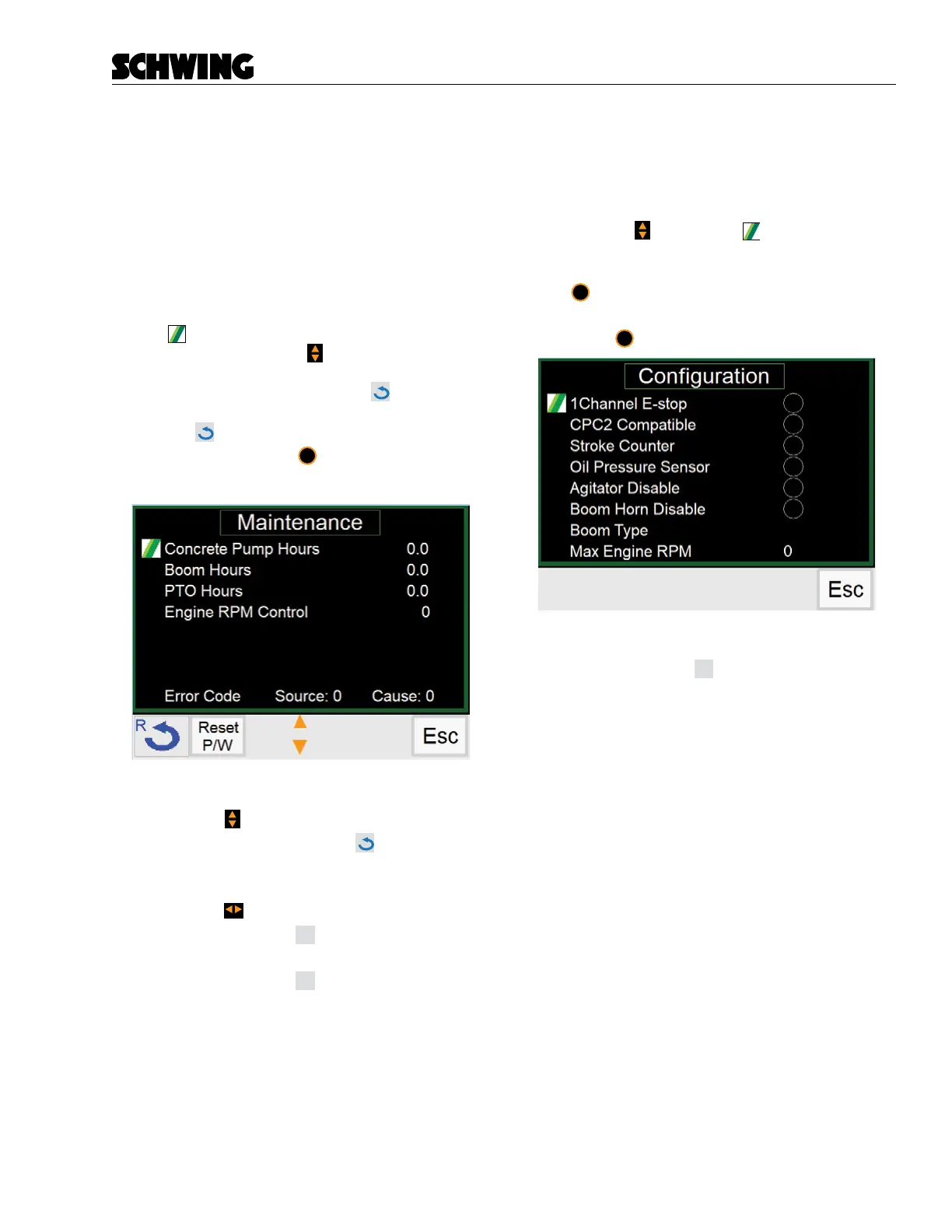
Maintenance Screen
The Maintenance Screen displays the following param-
eters:
• Concrete Pump Hours
• Boom Hours
• PTO Hours
• Engine RPM Control
• Error Codes
A small
Schwing logo indicates which menu item is
currently selected. Use the to change which menu
item is selected. If “Concrete Pump Hours” is selected,
press and hold the Reset (F1) button
to change the
value back to 0. If “Error Code” is selected, press Reset
(F1) button
once to clear the code. If “Engine RPM
Control” is selected, press
ok
to increase or decrease
engine RPM.
Functions:
- Use the to select menu items.
- Press and hold (F1) button
to reset “Con-
crete Pump, Boom and PTO hours” parame-
ters
- Use the to change RPM values.
- Press (F2) button
Reset
P/W
to go to the Password
reset screen
- Press (F4) button
Esc
to exit Maintenance
menu screen.
Conguration Screen
Used to enable functionality of any installed options. As
options are added, you must select the added option
from the menu in order to enable them.
- Use the
to move the between the
option settings. When the icon appears next
to the setting you would like to add, press the
ok
to turn the setting on or o. A green dot will
indicate which options are activated.
- Press
esc
to return to the Menu Screen
Functions:
- Press (F4) button
Esc
to return to Menu Screen.



 To Next Page