7
Operation
CPC III Manual
HMI (Human Machine Interface)
The HMI is the interface between the operator and CPC
III Controller. From the HMI, operators can view and set
machine parameters.
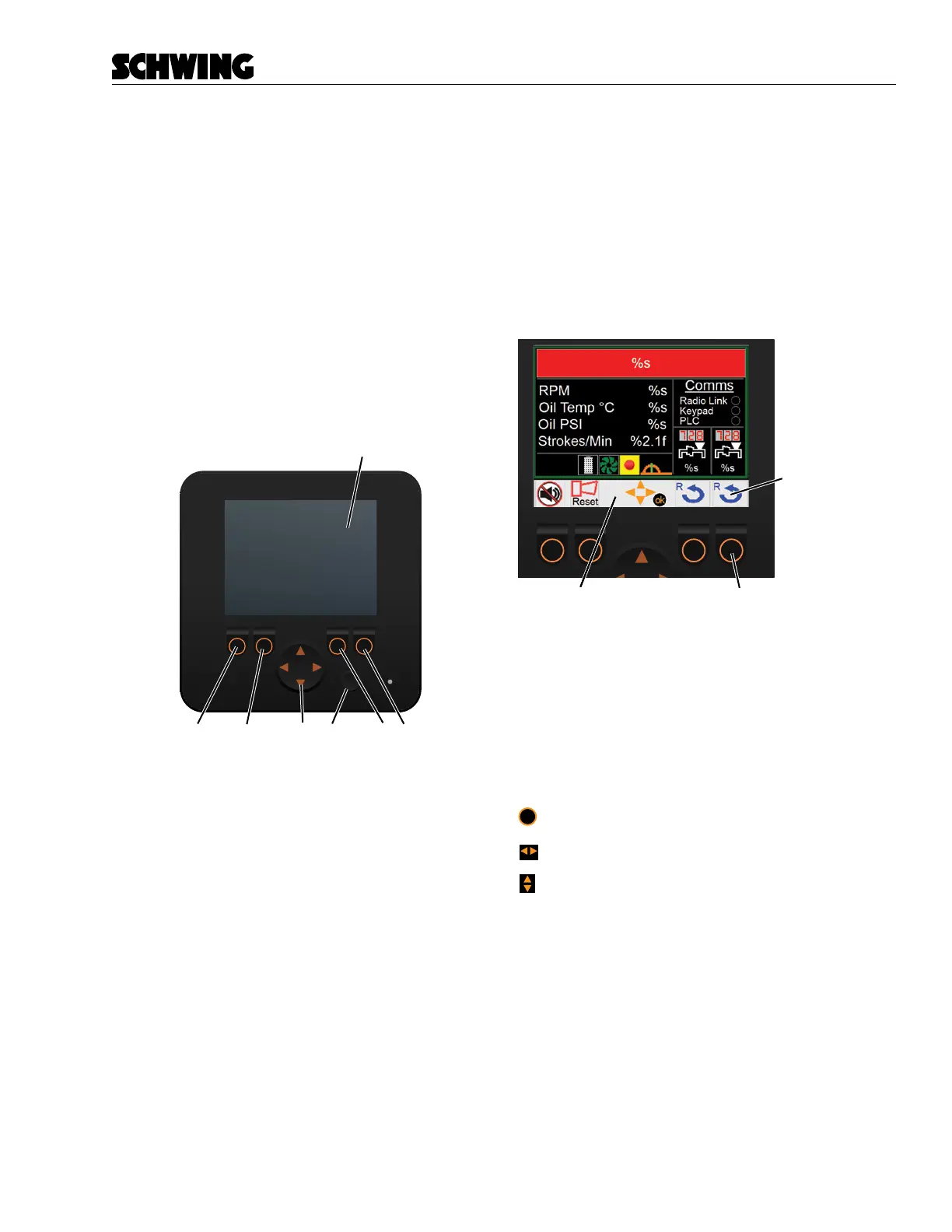
The HMI contains the following:
A. LCD Screen
B. (F1) Function Button
C. (F2) Function Button
D. (F3) Function Button
E. (F4) Function Button
F. OK Button
G. Navigation Arrows Button
E
D
B
C
F
G
Navigation Pane
The Navigation Pane displays the available functions
and menu actions for each screen. If a function symbol
appears on the Navigation Pane, the operator can push
the corresponding function button below that symbol to
execute a menu action.
Example: The stroke counter reset symbol appears
above the (F4) Function Button. Press and hold this
button for 2 seconds to reset the stroke counter.
Avaliable
Function Symbol
Arrows in the center of the Navigation Pane, repre-
sent which direction you can push the Function Arrows
button. The Function Arrows button can be pushed in
four directions. Not all directions are available on ev-
ery screen. These buttons are used to navigate to other
screens and scroll through menu items.
To assist the reader, we will represent the symbols as
follows:
ok
= OK
= Function Arrows Left/Right
= Function Arrows Up/Down



 To Next Page