12
Operation
CPC III Manual
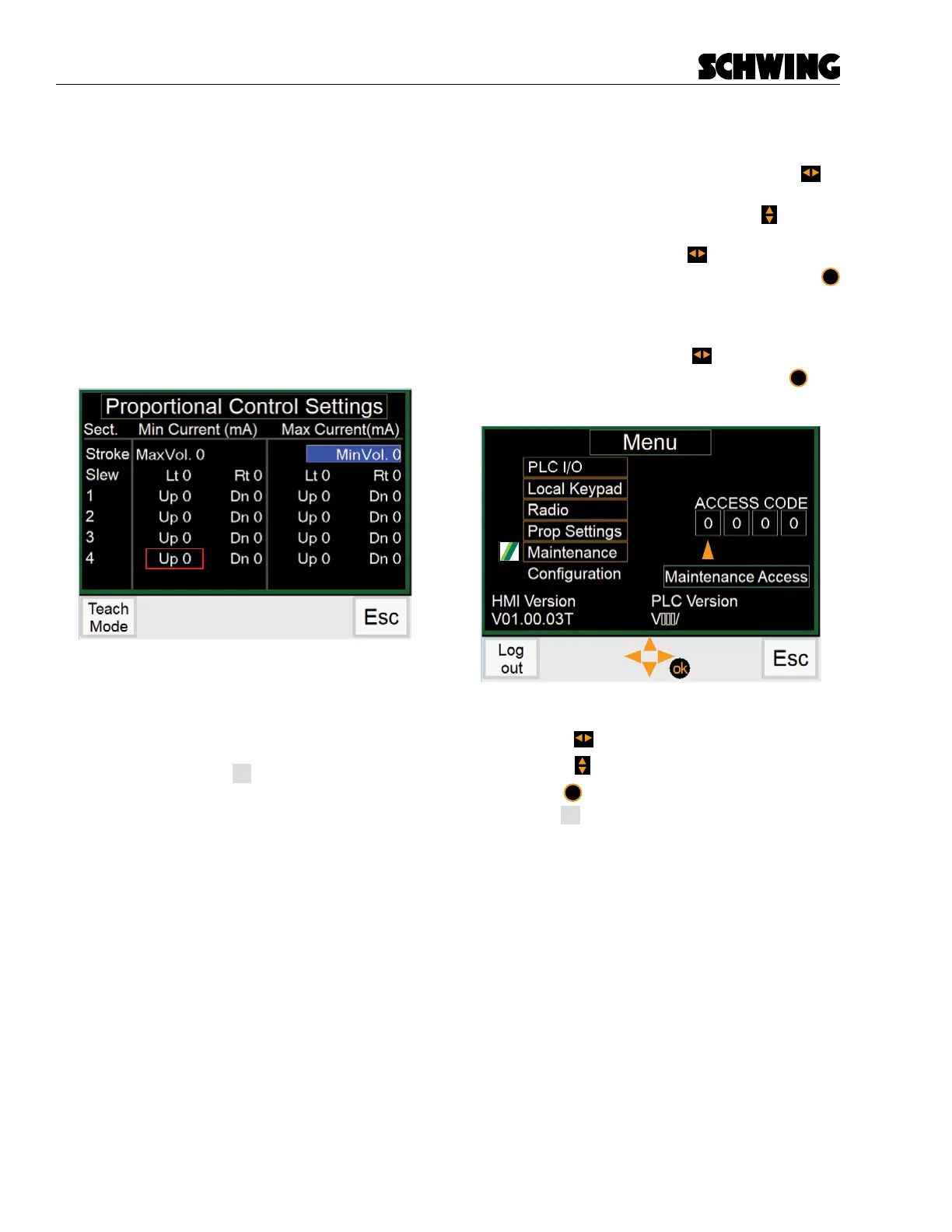
Proportional Settings Screen (Teach Mode)
If you enter a password on the Main Menu screen for
Prop Setting, you will see and be able to change the
placing boom and stroke limiter parameters on the Pro-
portional Settings Screen.
Pressing the Teach Mode button (F1) allows you to ad-
just the placing boom and stroke limiter parameters.
The function highlighted in Blue is the selected function.
To change settings see “Teach Mode Operation” on
page 22.
Functions:
- Press (F1) button to enter Teach Mode
- Press (F2) button
- Press (F3) button
- Press (F4) button
Esc
to return to Menu Screen.
Maintenance Screen - Password Prompt
When the Maintenance Screen is selected, the operator
will be prompted to supply a password. Use the
to
navigate to the password input. A orange arrow will ap-
pear under the number selected. Use the to scroll
through a list of single digit numbers. When the number
you want is displayed, use the to navigate to the
next value. When all values are lled in, press the
ok
button. If the password is correct, the Maintenance
Menu screen will be displayed. If incorrect, the orange
arrow will disappear and you will not be taken to the
Maintenance Screen. Press the to display the or-
ange arrow. Re-enter the password and press
ok
but-
ton.
Functions:
- Use the to select password digit.
- Use the to change the selected digit values
- Press
ok
to accept password.
- Press
Esc
to exit the Maintenance screen.



 To Next Page