24
Operation
CPC III Manual
Warning Messages
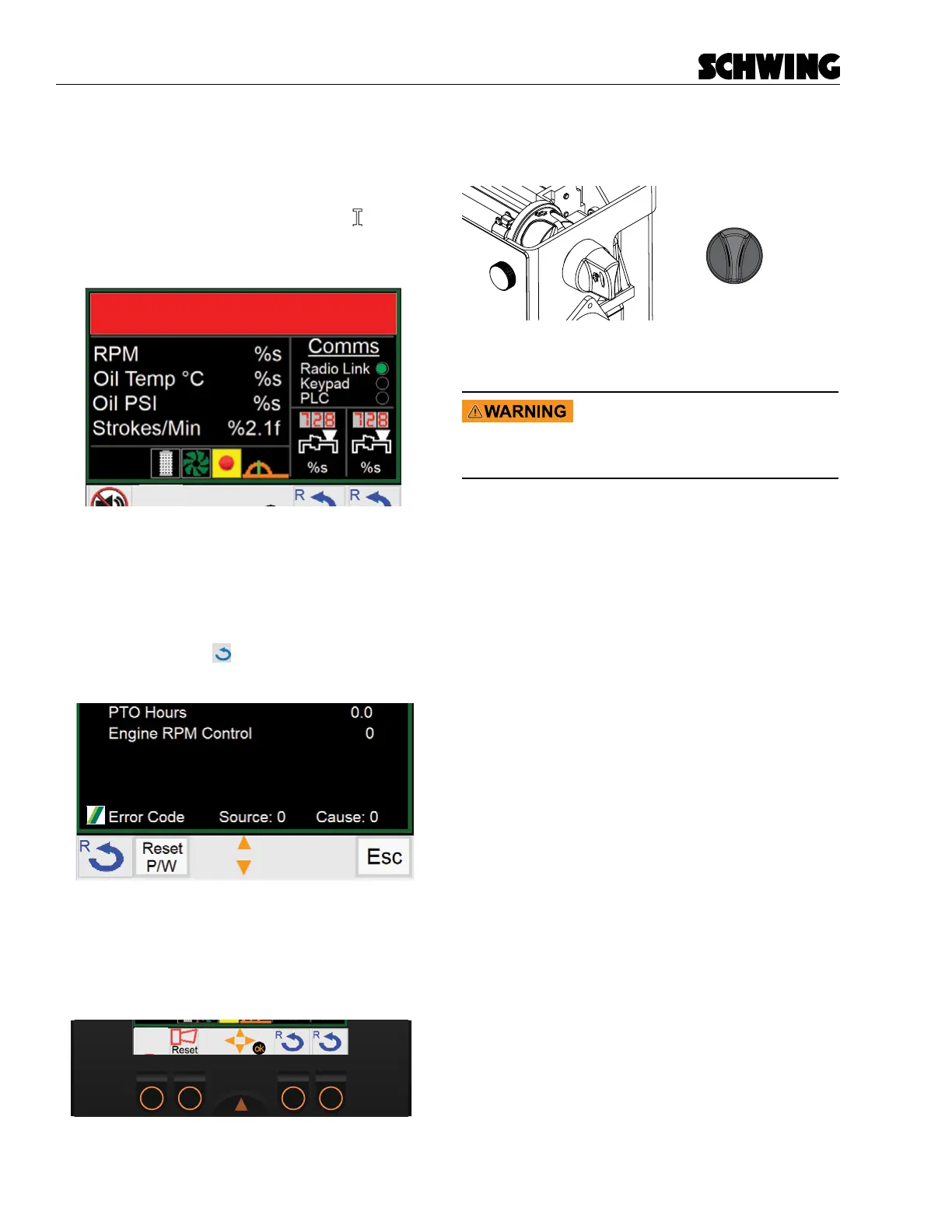
If you receive an error code, the horn will sound 5 times,
it will then remain silent for 30 seconds before sounding
again. You can silence the horn by pushing the (F1) but-
ton beneath the Silent Alarm symbol or the reset but-
ton on the remote. The warning message will still be
displayed in the Status Message Display window.
Water Tank Level Low
Pump Error Codes
To display pump codes, navigate to the Maintenance
screen and enter your password. The error code will be
displayed on the bottom of the screen. Use the Error
Code table to diagnose the problem. To clear the error
code, ensure the Schwing icon is next to “Error Code”,
press the (F1) button
once to clear the code. You
cannot clear active codes.
Loss of Rear Keypad
If the rear keypad malfunctions and you are in Local
mode, a Reset symbol will appear above the (F2) but-
ton. Pressing this button will clear the E-Stops allowing
you to continue running the machine.
Maintenance Switch:
Located on the side of the control panel.
Maintenance Switch
(PMS)
OFF
ON
This switch puts the CPC III system into bypass mode.
The keyed switch allows owner to remove this ability
Turning the Maintenance switch
ON will bypass MOST of the safety
features on CPC III. ESTOPS WILL
NOT BE OPERATIONAL.
• Turns on all Dump Valves regardless of E-Stops.
• RPM’s set to minimum values
• Oil cooler will turn on
• Horn and Lights function will still work
This switch is only intended as a backup in case a part
of the CPC III system has failed and is preventing nor-
mal operation.
The unit should be xed immediately to prevent dam-
age to equipment and/or injury tp personnel.



 To Next Page