9
Operation
CPC III Manual
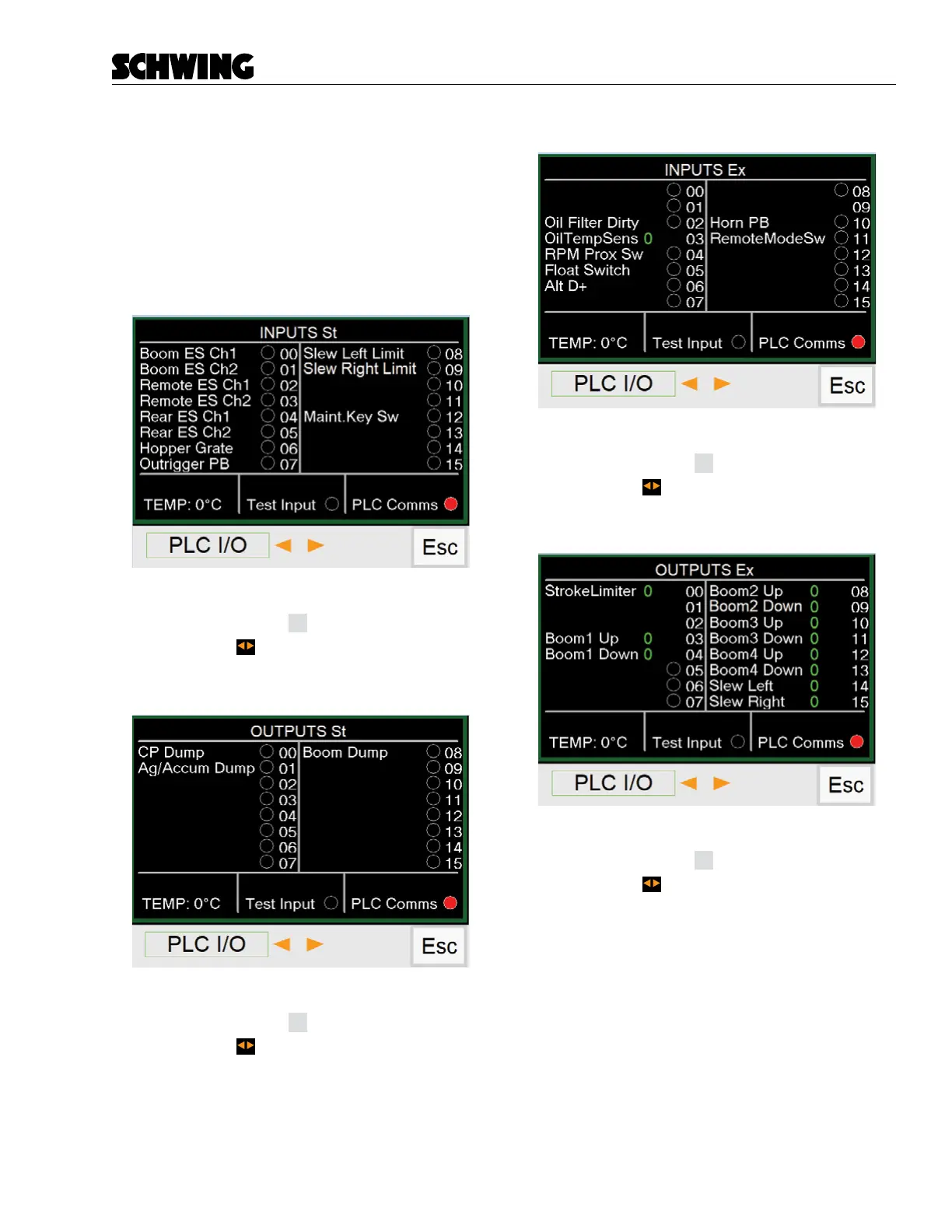
Module and PLC I/O Screens
Displays the electronic input and output signals. Active
input or output signals will be indicated with a green
circle. Supply voltage indicators and PLC temperature
are displayed below the input/outputs.
This screen can be used to assist in troubleshooting
electrical issues.
INPUTS St Screen
Functions:
- Press (F4) button
Esc
to return to Menu Screen.
- Press the to go to next or previous PLC I/O
screen
OUTPUTS St Screen
Functions:
- Press (F4) button
Esc
to return to Menu Screen.
- Press the to go to next or previous PLC I/O
screen
INPUTS Ex Screen
Functions:
- Press (F4) button
Esc
to return to Menu Screen.
- Press the
to go to next or previous PLC I/O
screen
OUTPUTS St Screen
Functions:
- Press (F4) button
Esc
to return to Menu Screen.
- Press the to go to next or previous PLC I/O
screen



 To Next Page