4
Operation
CPC III Manual
Scanreco Radio
1. The CPC III uses a Scanreco radio system similar
to current Schwing BPLs/TMPs. You can remove
all the old radio system components as none of it
will be used.
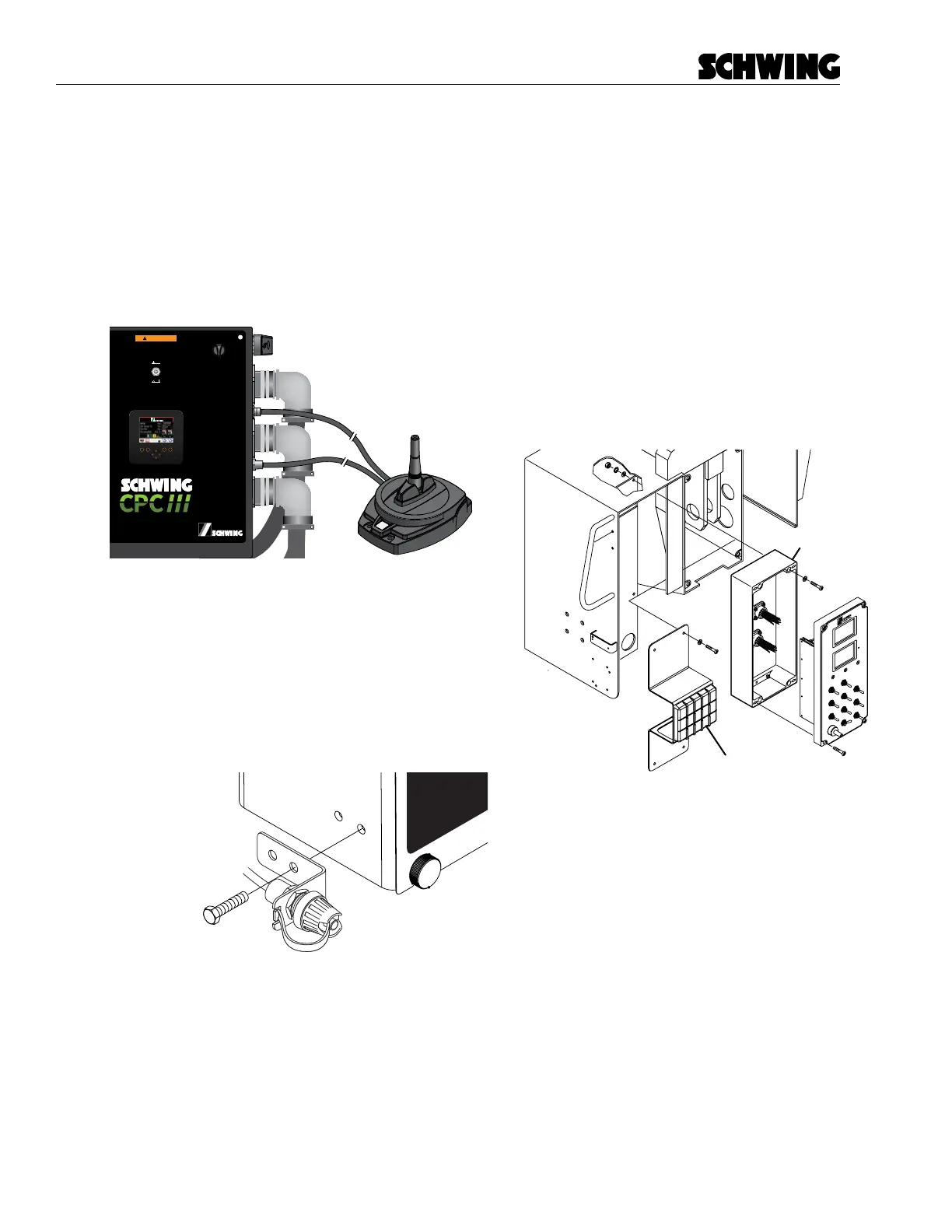
2. The Receiver and Antenna may be mounted any-
where externally on the unit. Mount the Receiv-
er/Antenna and run the three cables back to the
Control Panel. (Figure 5)
98465796-00
Panel Assembly:
Schematic:
98458772
98455320
Boom Harness
(PBC)
Radio A
(PRADA)
Front Harness
(PFC)
Rear Harness
(PRC)
Maintenance Switch
(PMS)
Radio C
(PRADC)
OFF
ON
In Maintenance mode, all CPC
safety features will be disabled
WARNING
Figure 5
Connect receiver to panel
3. Plug Cable A and Cable C into the control panel.
If you connect these backwards, it will blow a fuse
when power is applied.
4. Cable B has a mounting bracket on it. Mount the
Bracket where the pre-drilled holes are for “Pair-
ing Port” using the 2x M4x25 bolts. (Figure 6)
Pairing Port
Figure 6
Mount pairing port
5. Mount the Battery Charger in the cab.
6. Place the radio transmitter, cable and batteries
in the cab.
Oil Temperature Sensor
1. The Oil Temp Sensor that is installed on the unit
cannot be used. Locate the current Oil Temp
Sensor and replace it with the one provided.
2. Run the Oil Temp Harness from the Oil Temp
Sensor to the CPC III Control Panel and plug in
both sides. (See Item 260 on BOM 98458427)
Rear Control Panel
1. Remove the Rear Control Panel.
2. Install the new CPC III keypad onto the CPC III
mounting bracket.
3. Install the CPC III Mounting Bracket where the
old Rear Control Panel was.
Remove old panel
Install new panel
RPM
CPC 2
C
Figure 7
Remove old panel and install new keypad
4. Concrete Pressure Sensor: Find the Concrete
Pressure Sensor which is usually located near
the rear gauges and replace the sensor with the
new CPC III sensor. If your unit did not have a
Concrete Pressure Sensor then you have the op-
tion of installing it to get additional functionality.
It is not required. (Item 280 on BOM 98458427)
5. Run the I/O-E harness from the CPC III Control
Panel to the CPC III Rear Keypad.
- Plug in the I/O-E Harness to the CPC III Con-
trol Panel.



 To Next Page