OM-610-1002-1 Operator’s Manual Rev 37
PDS-2010 SECTION 6 MAINTENANCE page 45
6.4 PROCESS CONTROLLER PARAMETERS
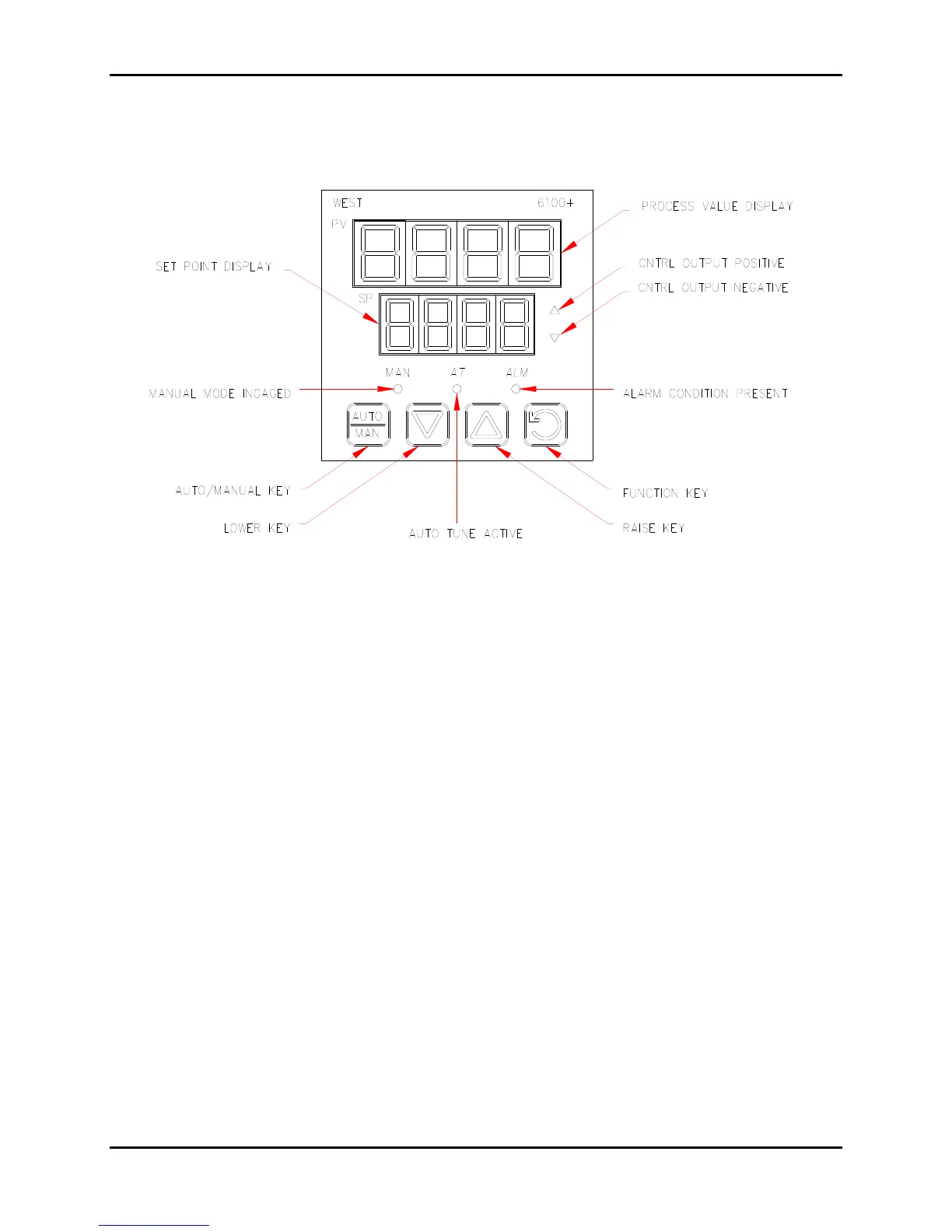
WEST MODEL 6100+ CONTROLLER
Note: New controllers must complete Configuration and Setup first.
6.4.1 To Enter the Configuration Mode:
1. Depress and hold the Function key and depress the Raise key to access Select Mode. The upper
display will read OPtr and the lower display will read SLCt.
2. Depress the Raise key once. The upper display will show Conf.
3. Depress the Function key once. The lower display will show Uloc.
4. Use the Raise key to increment the
PV value until the controller shows the proper Unlock code (the
default code is 20), and then depress the Function key. The display will show the first parameter in
the Configuration Mode and the menu will appear on the lower display.
5. Use the Function key to scroll through the menu. Use the Raise and Lower keys to scroll through
parameters.
6. Press Auto/Manual key to accept the change.
6.4.2 To Exit the Configuration Mode:
1. Depress and hold the Function key and depress the Raise key to return to Select Mode.
2. Use the lower key to select Optr and depress the Function key to return to Operator Mode.
Figure 10: Process Controller


 To Next Page