OmniHub CMP203– User Manual
Page 35 of 109
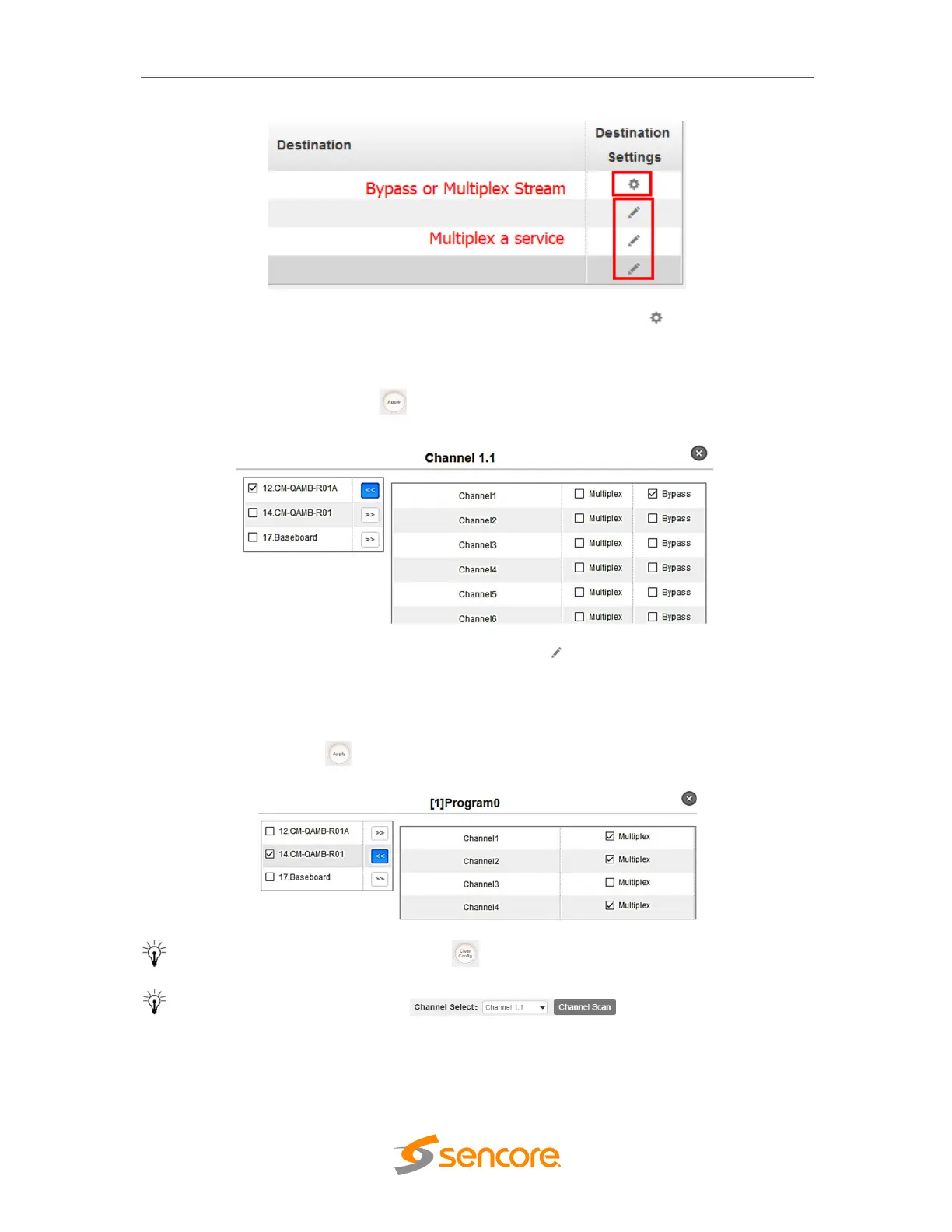
To use Bypass OR Multiplexing mode on stream level click the (cog) icon. There
will have always a BaseBoard selection for the IP output and other Output option
depending on the module inserted. Select the correct Output and Channel you want to
output the Stream. Put a tick on Multiplex or Bypass on the Channel you want to output.
Do not forget to click the Apply button on the right side to make the change takes
effect.
To use Multiplexing mode on service level click on (pencil) icon. There will have
always a BaseBoard selection for the IP output and other Output option depending on
the module inserted. Select the correct Output and Channel you want to output the
Service. Put a tick on Multiplex on the Channel you want to output, you can output
multiple service in same channel or output same service in multiple channel. Do not
forget to click the Apply button on the right side to make the change takes effect.
To clear the whole routing table click button.
There is a channel scan button on top, normally the input
service list of each channel will load itself in this page, but when you change the input
source, the list could not refresh immediately. At this time, you should refresh the changed
channels manually through the operation of selecting channel and clicking Channel Scan
button



 To Next Page