OmniHub CMP203– User Manual
Page 34 of 109
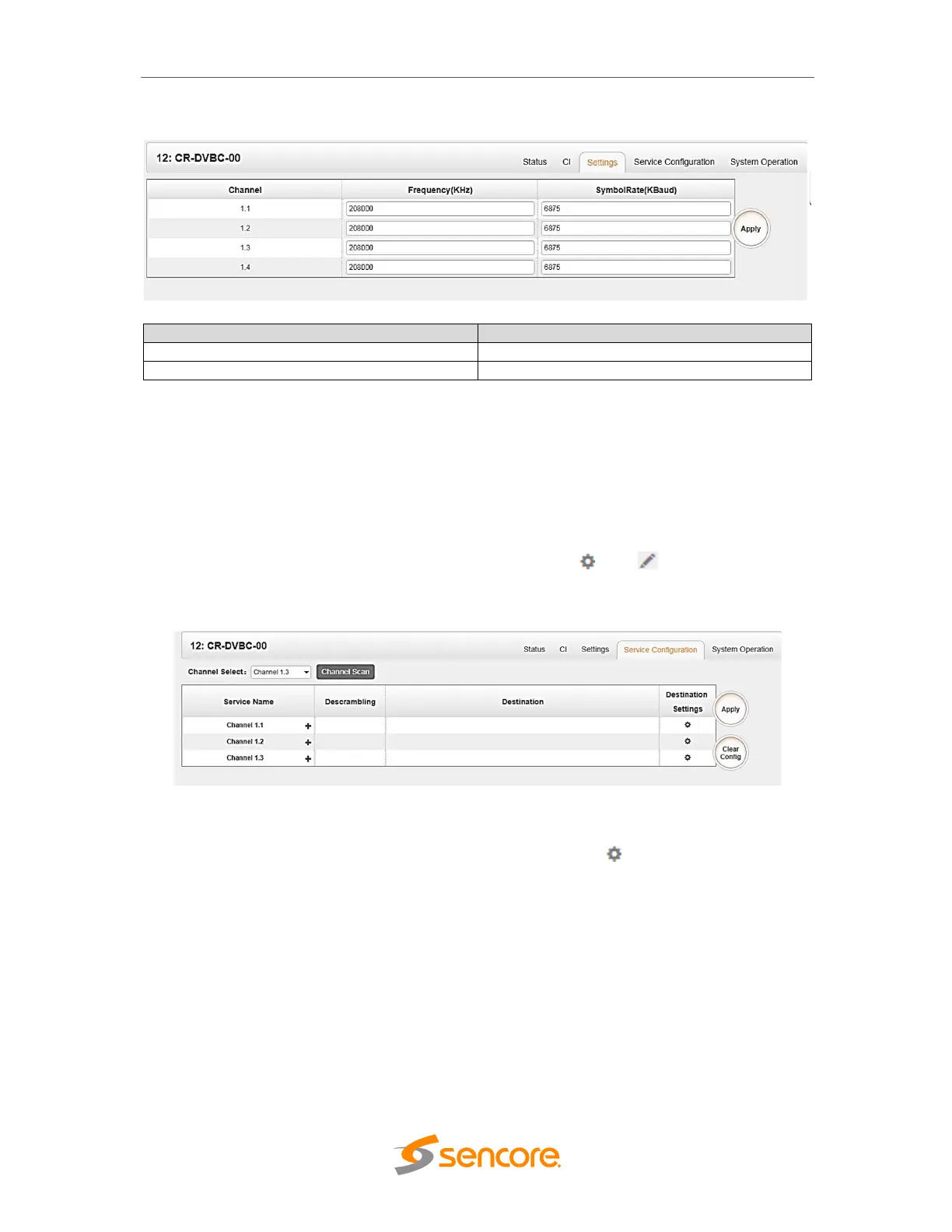
Frequency (KHz) 48000~862000
Symbol Rate (KBaud) 3000~7000
3.3.1.4 Module Service Configurations
Service Configuration page is where you manage the received service and output them
to their designated interface. The configuration for all module in CMP203 is mostly
same. First, you need to scan the port on each TS with LOCKED status. Each port
might be scanned automatically or need to scan one by one. After scanning each
channel, you can output each service by clicking the icon and below “destination
Settings”. You can route a whole stream or a service/s from the input channel toward
the available output channel (IP or RF). Two type of routing are possible;
1. Bypass mode routes whole input transport stream towards IP or RF output.
Bypass mode activation cause output channel will be occupied only by this
stream. Any attempt of routing other stream/service towards this channel will
show error. This can only be done when you click the icon on the TS. Bypass
cannot be on the single service only.
2. Multiplex mode is the counter part of bypass mode. This mode allows the
administrator to perform the following operations:
a. Routing single service towards output channel will results in SPTS creation
b. Routing services towards single output channel will results in MPTS creation
c. Routing service/s AND stream/s towards single output channel will results in
MPTS creation



 To Next Page