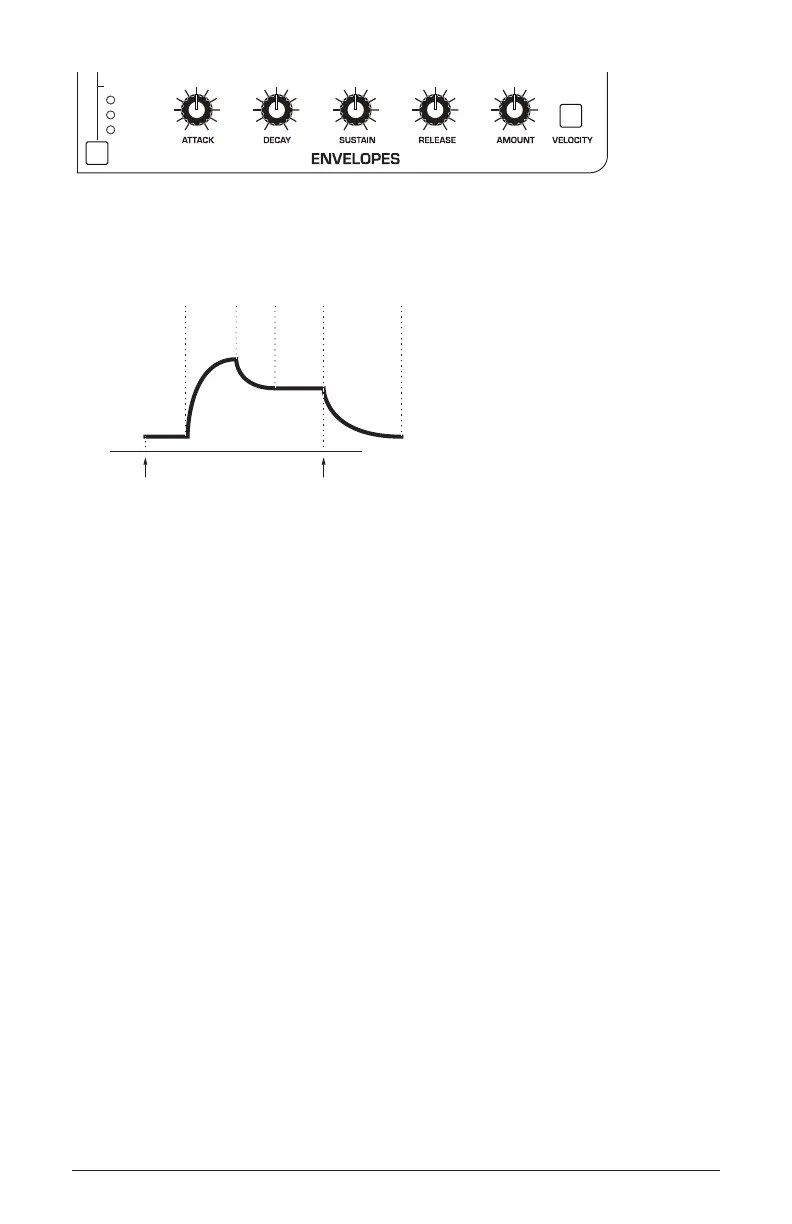
28 About the Amp Envelope
Sequential
ENV ROUTING
ENV 2
Filter+Gate
Filter+Amp
Amp
Envelope 2 parameters
attack
decay
sustain
release
amplitude
time
note offnote on
delay
A typical 5-stage, DADSR envelope
As noted previously, the Amplier Envelope works in conjunction
with the Filter Envelope, with the Filter Envelope controlling how
the lter opens and closes and the Amplier Envelope controlling
how the Amplier controls the overall volume shape of the sounds
you create.
To hear the effect of the Amplier Envelope:
1. Recall the Basic Program by pressing the global button and using the
select knob to navigate to the basic program command, then press write.
2. Repeatedly strike a note on the keyboard as you turn the Amplier
Envelope’s attack knob clockwise. Notice how the attack becomes
slower and more gradual the further you turn the knob.
3. Reset the attack parameter to zero (fully counter-clockwise).
4. Next, repeatedly strike a note on the keyboard as you turn the Ampli-
er Envelope’s sustain to zero. Notice how it changes the sound so that
the sound no longer sustains even if you hold down the key. The only
sound you hear is the decay portion of the sound.
5. Now, with sustain still set to zero, repeatedly strike a note on the
keyboard as you turn the Amplier Envelope’s decay knob clockwise
and counterclockwise. Notice how it changes the sound as the note
decays faster or slower after its initial attack stage.















 To Next Page