Roller rotating knob B
MISFEED REMOVAL
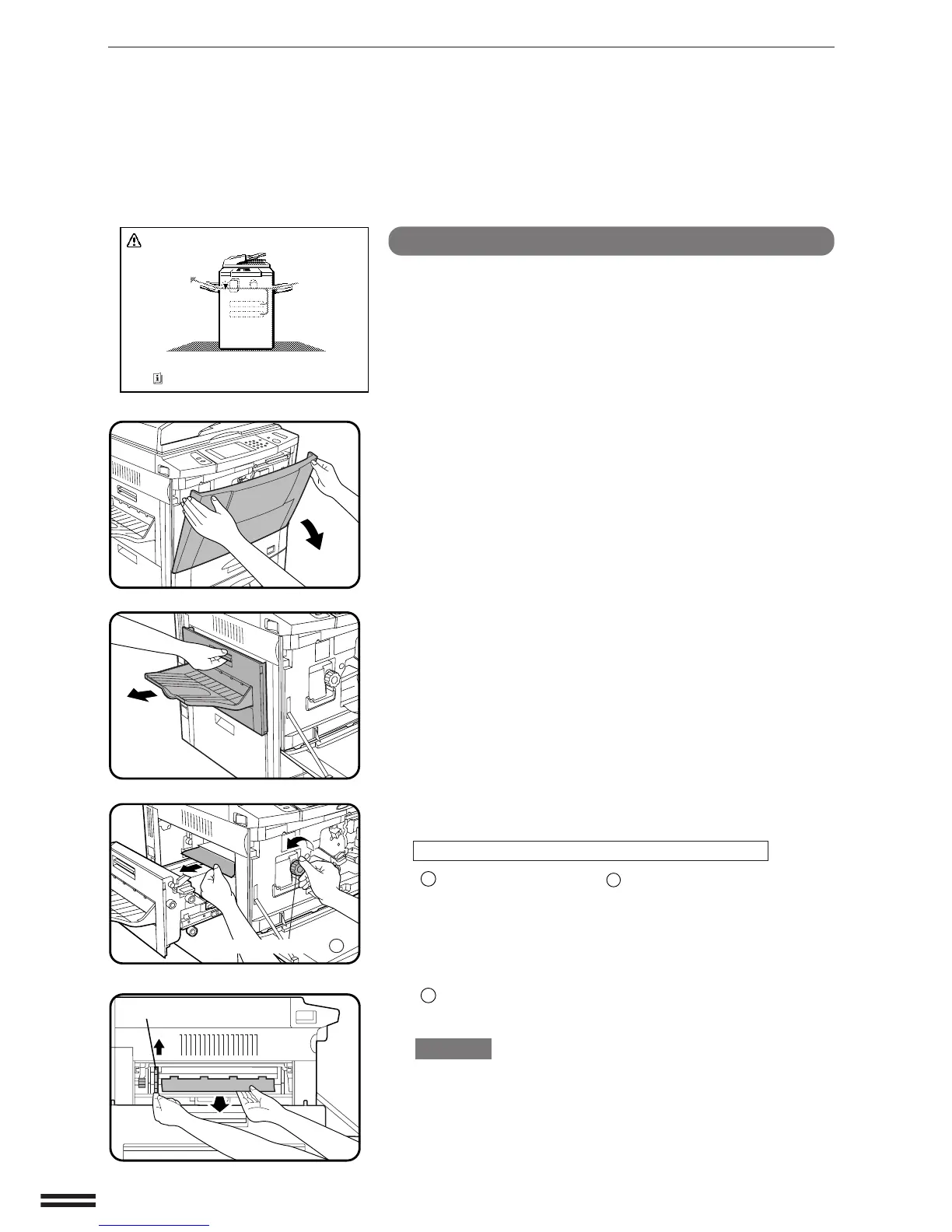
Misfeed around the fusing unit and exit area
NOTE:
If an optional finisher (AR-FN3) is fitted, please refer to chapter 7
Optional Equipment for additional misfeed removal help.
1
Open the front cover.
2
Open the exit area cover carefully.
3
Remove the misfed paper.
If the misfed paper is in the inner part of the exit area:
1
Turn roller rotating knob
B
in the direction of the arrow and
remove the paper.
2
If the misfed paper is deep in the fusing unit, lift the fusing unit
tab and remove any misfed paper.
CAUTION
The fusing unit is hot! Be sure to touch only the green tab or the
green roller rotating knob.
COPIER TROUBLE? Misfeed removal
A MISFEED HAS OCCURRED.
CLEAR INDICATED AREA.
PRESS FOR RECOVERY INSTRUCTIONS.



 To Next Page