50
Connecting a PC
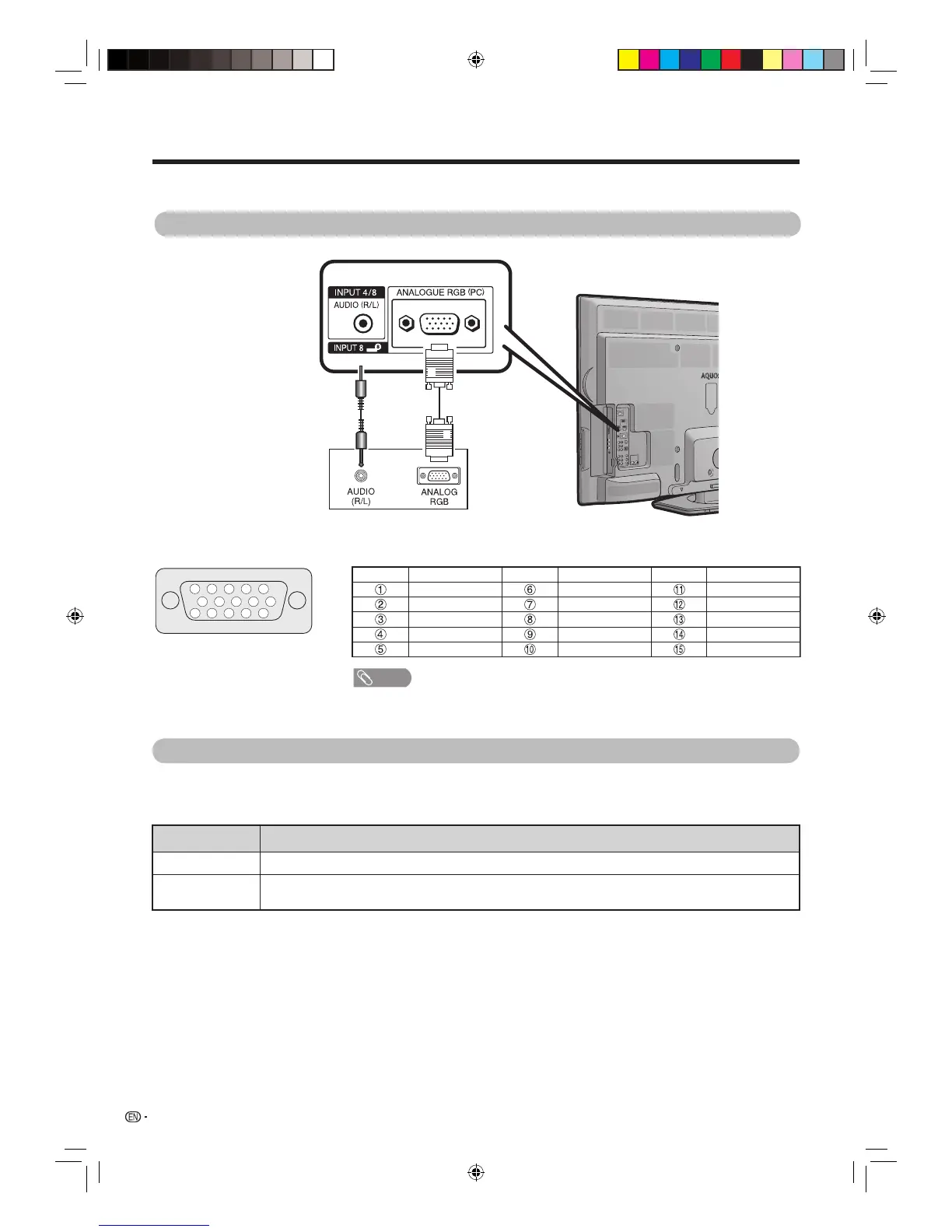
Use the PC terminals to connect a PC.
Signal names for 15-pin mini D-sub connector
NOTE
• Macintosh adaptor may be required for use for some Macintosh computers.
• Pin No.
5
is not used for inputting the signal.
15
14
13
12
9
11
10
8
7
6
5
4 3
2
1
Pin No. Signal name Pin No. Signal name Pin No. Signal name
R GND (Ground) Not connected
G GND (Ground) SDA
B GND (Ground) HD
Not connected +5V VD
CSYNC GND (Ground) SCL
Analogue Connection
PC
Ø 3.5 mm stereo minijack cable
(Commercially available)
RGB cable
(Commercially
available)
Audio select for connecting a PC
When using the INPUT8 (PC) terminal, you must select which terminal uses the AUDIO (R/L) jack for analogue
audio input.
Go to “Menu”
s
“Setup”
s
“Option”
s
“Terminal setting”
s
“PC input”
s
“Audio select”.
Selected items Description
Video When connecting devices with AV cable to the INPUT8 (PC) terminal, display images without audio.
Video+audio When connecting a PC to the INPUT8 (PC) terminal, and inputting analogue audio signals from the INPUT8
(AUDIO) terminal.
40LX710H_en.indd 5040LX710H_en.indd 50 2010/04/15 16:12:442010/04/15 16:12:44




 To Next Page