R
34
Switching the analogue audio format
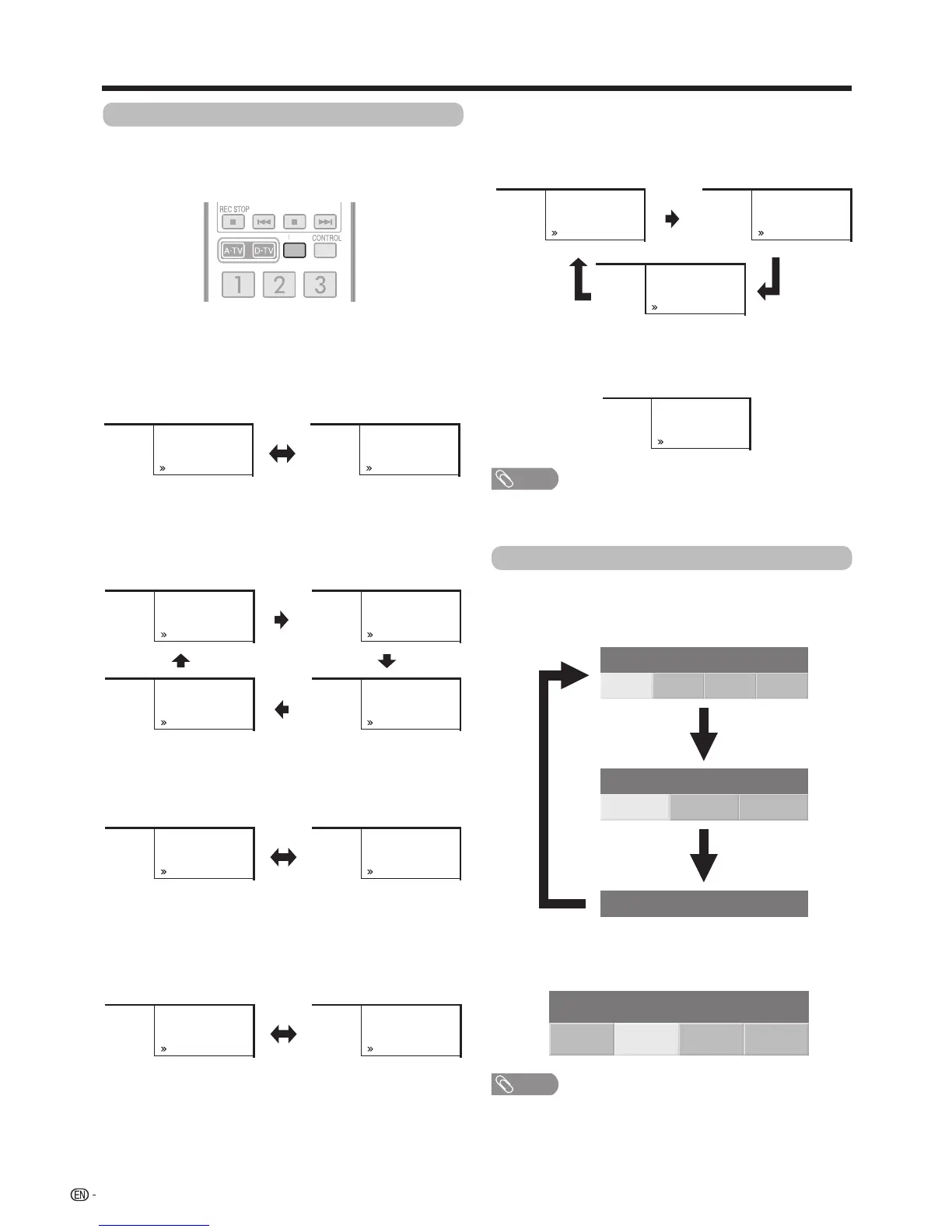
Youcanswitchbetweenmultipleaudiomodes
when watching a multiple audio or stereo broadcast
programme.
When receiving a monaural signal
Eachtimeyoupress
MPX
, the mode switches
betweenNICAMMONOandMONO.
Watching TV
NOTE
• “BBC2”,“99”and“PAL”aretentativenetworkname,
channel and colour system.
In the NICAM TV broadcasts
When receiving a stereo signal
Eachtimeyoupress
MPX
, the mode switches
betweenNICAMSTEREOandMONO.
When receiving a bilingual signal
Eachtimeyoupress
MPX
, the mode switches among
NICAMCHA,NICAMCHB,NICAMCHABand
MONO.
In the TV mode of A2 TV broadcasts
When receiving a stereo signal
Eachtimeyoupress
MPX
, the mode switches
betweenSTEREOandMONO.
When receiving a monaural signal
When you press
MPX
,“MONO”displays.
When receiving a bilingual signal
Eachtimeyoupress
MPX
, the mode switches among
CHA,CHBandCHAB.
Stereo mode
Bilingual mode
Monaural mode
Stereo mode
Bilingual mode
Monaural mode
Switching the digital audio format
Ifmultisoundmodesarereceived,eachtimeyou
press
MPX
the mode switches as follows.
w Press c/d toselectLorRsoundwhenthe
STEREOorDUALMONOscreenisdisplayed.
STEREO
New Information
PAL PAL
MONO
New Information
01
D/K
A-TV
01
D/K
A-TV
MONONICAM
New Information
PAL PAL
MONO
New Information
01
A-TV
01
A-TV
D/K D/K
CH ANICAM
New Information
PAL
CH BNICAM
New Information
PAL
CH ABNICAM
New Information
PAL
PAL
MONO
New Information
D/K D/K
D/K D/K
01
A-TV
01
A-TV
01
A-TV
01
A-TV
01
New Information
A-TV
01
STEREONICAM MONO
New Information
A-TV
CH A
New Information
PAL
CH B
New Information
PAL
PAL
CH AB
New Information
01
D/K
A-TV
01
D/K
A-TV
01
D/K
A-TV
PAL
MONO
New Information
01
D/K
A-TV








 To Next Page