EasyManua.ls Logo

Sharp LC-46LX650H - Page 72

Sharp LC-46LX650H
102 pages
Print Icon
To Next Page IconTo Next Page
To Previous Page IconTo Previous Page
Loading...
72
Connecting a PC
NOTE
• ConnectthePCbeforemakingadjustments.
• Selectablepicturesizemayvarywithinputsignaltype.
• Youmaynotbeabletochangethewidemodewhilein3Dmode.
a
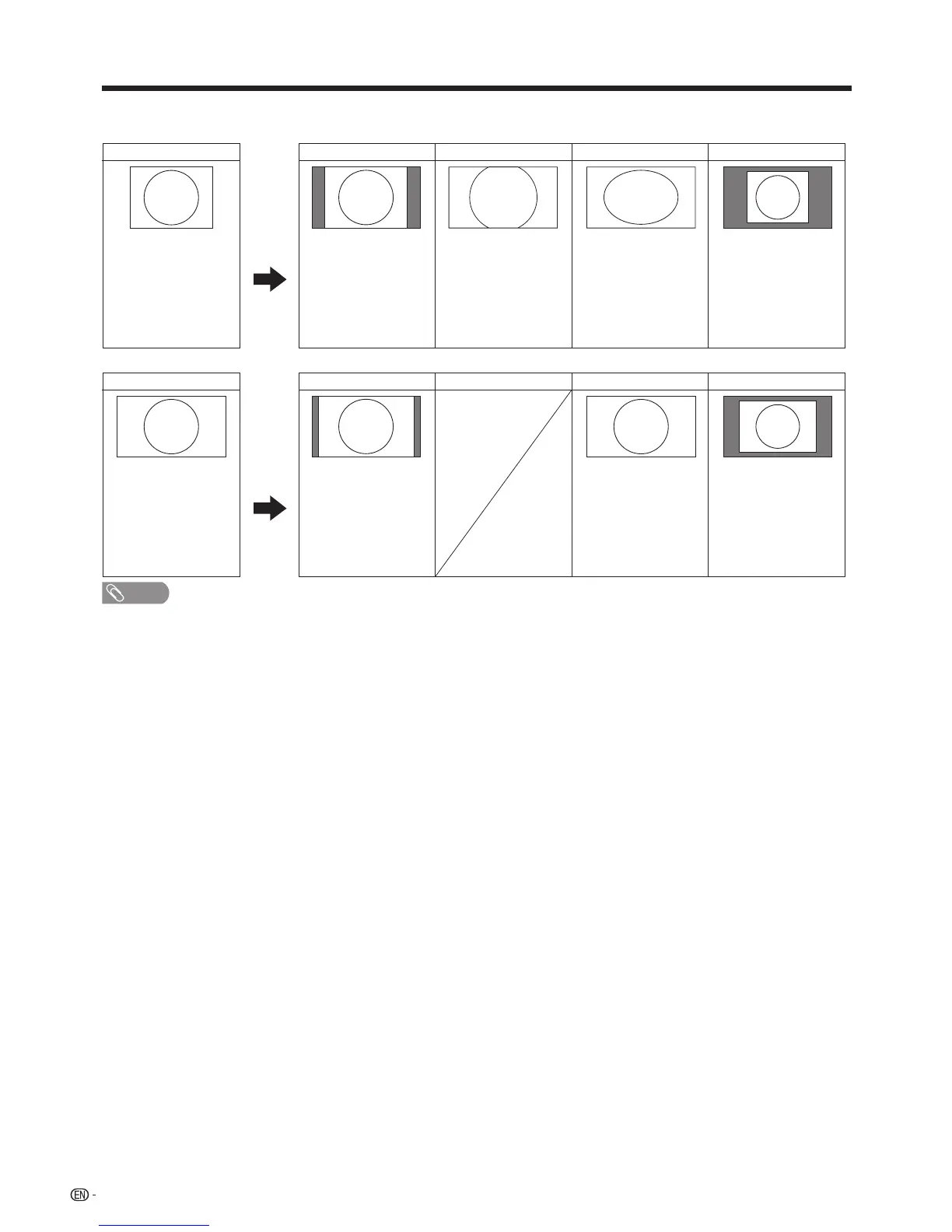
Picturesizeimages.
Input Signal CinemaNormal
1024
g
768
Forviewingwide
screenprograms.The
topandbottomof
theimageisslightly
cropped.
Keepstheoriginal
aspectratioinafull
screendisplay.
Full Dot by Dot
Animagefullyllsthe
screen.
Detectstheresolution
ofthesignaland
displaysanimage
withthesamenumber
ofpixelsonthe
screen.
Input Signal
Full
Animagefullyllsthe
screen.
Detectstheresolution
ofthesignaland
displaysanimage
withthesamenumber
ofpixelsonthe
screen.
1360
g
768
Normal
Keepstheoriginal
aspectratioinafull
screendisplay.
Dot by Dot

Table of Contents

Related product manuals