99
OPTIONAL
EQUIPMENT
20-BIN STAPLE SORTER (SF-S55N)
4
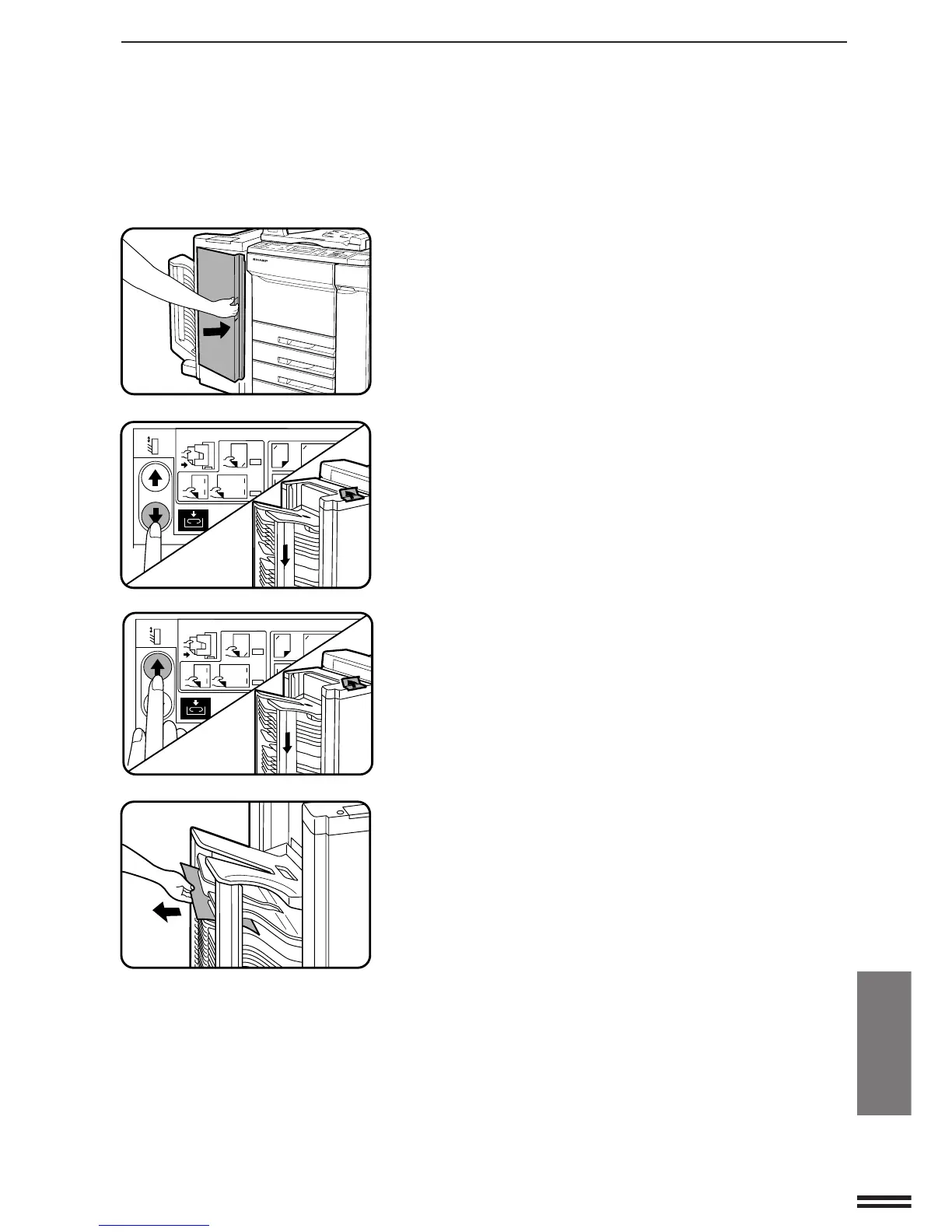
Close the front cover of the staple sorter.
●
Confirm that the misfeed display is cleared.
If the message indicating a misfeed is still displayed, remove
any remaining misfed paper following the misfeed location
indications.
●
If any copy is misfed in a sort bin and difficult to remove,
proceed to the next step.
5
Check the misfeed location and press the bin up key or
the bin down key on the staple sorter depending on the
misfeed location.
●
If the paper is misfed above the wide interval bin, press the bin
down key.
●
If the paper is misfed below the wide interval bin, press the bin
up key.
6
Remove the misfed paper to the left.
●
Confirm that the misfeed display is cleared.
If the message indicating a misfeed is still displayed, check the
inside of the copier and remove any remaining misfed paper.
A4
A3
B4
A4 A3 B4
A4R
HAND-INSERTED
SORTED
A4
A3
B4
A4 A3 B4
A4R
HAND-INSERTED
SORTED
20-bin staple sorter (SF-S55N)



 To Next Page