13
Menu Navigation
The DIS-CCU provides controls from the front panel for
system setup and configuration. Use the 5-button keypad to
navigate the menu and change settings.
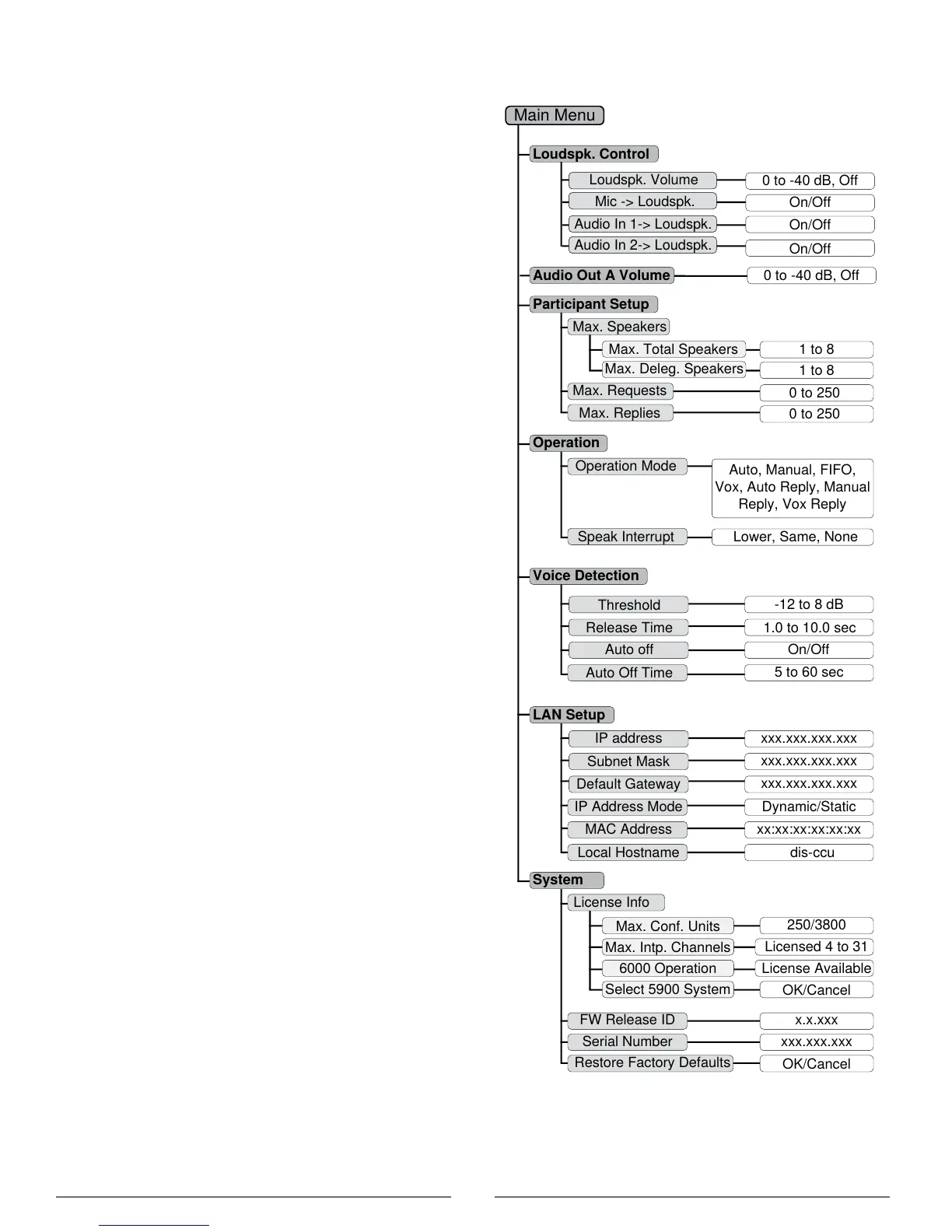
The figure below gives an overview of the menu structure.
• Use arrow buttons to cycle through menu items
• Press enter (center) button to navigate to an editable
field.
• Use up/down buttons to cycle through the available
values
Loudspk. Control
Max. Speakers
Max. Requests
0 to -40 dB, Off
On/Off
Audio In 1-> Loudspk.
Audio In 2-> Loudspk.
On/Off
Auto Off Time
5 to 60 sec
Auto off
On/Off
Speak Interrupt Lower, Same, None
0 to 250
Max. Replies
Operation Mode
1.0 to 10.0 sec
Release Time
-12 to 8 dB
Threshold
1 to 8Max. Total Speakers
1 to 8
Max. Deleg. Speakers
Local Hostname
Dynamic/Static
IP Address Mode
dis-ccu
Restore Factory Defaults
MAC Address
Subnet Mask
Default Gateway
IP address
Participant Setup
License Info
FW Release ID
Serial Number
250/3800
Max. Conf. Units
Licensed 4 to 31
Max. Intp. Channels
License Available
6000 Operation
OK/Cancel
Select 5900 System
System
Operation
Voice Detection
LAN Setup
Main Menu
Mic -> Loudspk.
Loudspk. Volume
Auto, Manual, FIFO,
Vox, Auto Reply, Manual
Reply, Vox Reply
xx:xx:xx:xx:xx:xx
xxx.xxx.xxx.xxx
xxx.xxx.xxx.xxx
xxx.xxx.xxx.xxx
x.x.xxx
xxx.xxx.xxx
OK/Cancel
0 to 250
6000 tMode
Audio Out A Volume 0 to -40 dB, Off
On/Off
Menu Overview - DCS 6000 Mode



 To Next Page