43
Adding an External Audio Source
Two inputs are available on the DIS-CCU for adding an external audio source to the system, often useful for
teleconferencing or internet calling.
1. Connect a line-level audio source, such as the audio output of a computer, teleconferencing unit, or wireless
microphone system to the audio input on the DIS-CCU back panel.
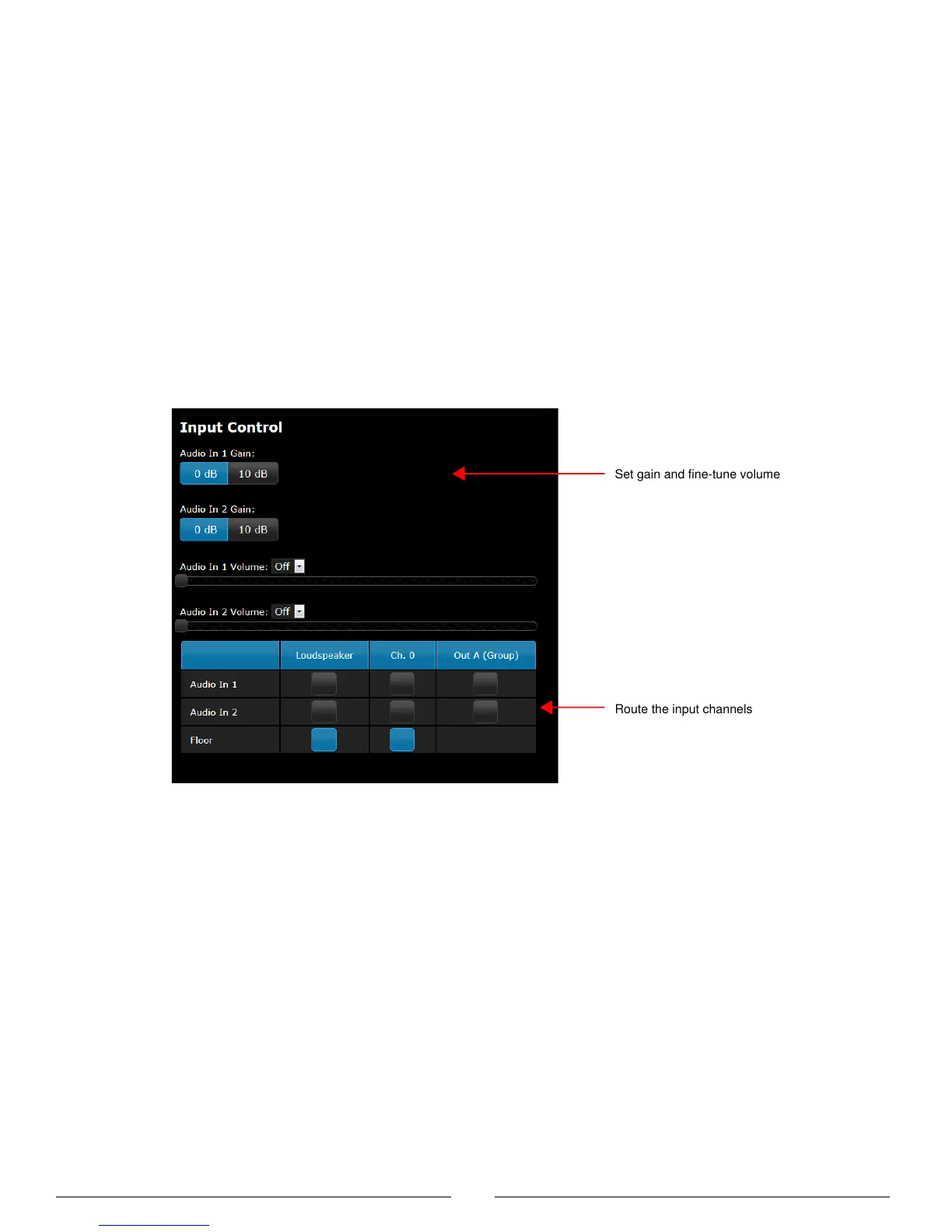
2. Open the web interface to Audio > Input Control.
3. Select the input gain according to the output of the external device. If necessary, select 10 dB for a slight gain boost.
4. Select the routing for the audio channel:
• Loudspeaker: to all microphone unit loudspeakers
• Ch. 0: to the headphone output on the microphone unit
5. If desired, route the channel to Output A (Group) to output a blend of the external source with the microphone units:
• Deselect for teleconferencing or signal processing to avoid a feedback loop
• Select for a wireless microphone to be blended with other microphone unit audio
6. Adjust the volume of the audio input to mix naturally with speech levels of the microphone units.
Set gain and fine-tune volume
Input Control Page
Audio
> Input Control



 To Next Page