53
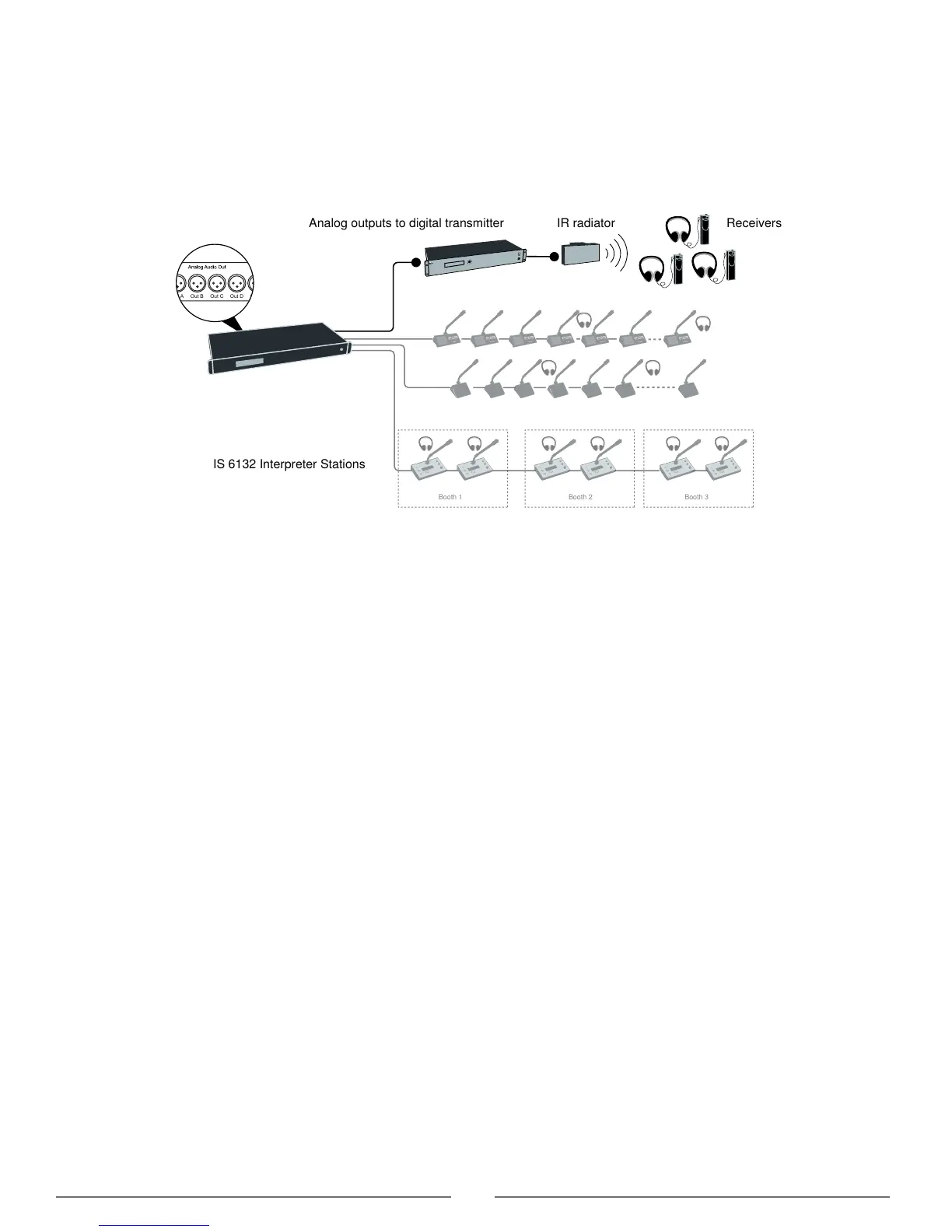
Wireless Language Distribution
Provide additional monitoring access by connecting a wireless language distribution system to the one of the CCU audio
outputs. Use the browser interface to route the desired interpretation channels or a subset of microphones to that group
output.
The DCS 6000 Digital Infrared Language System transmits this audio signal to a number of portable listening devices.
Out A Out B Out C Out D Out E Out F Out G Out H
IS 6132 Interpreter Stations
Analog outputs to digital transmitter
Wireless Language Distribution
Listening to Interpretation
Follow these steps to listen to one of the interpretation channels:
1. Connect headphones to the headphone jack on the conference unit.
2. Select a channel by pressing the selector buttons on the front of the unit. When no channel LED is illuminated, the floor
mix is selected.
3. Adjust the audio level of the headphones using the volume buttons.
Set up Interpretation Channels
1. Purchase and install an additional feature license if more than 4 languages are needed.
2. Assign the number of interpretation channels needed in the system: Interpretation > Interpreter Channels.
3. Select a language for each channel by choosing from the drop-down menu: Interpretation > Language Setup.
4. Assign the languages to the corresponding interpreter booths. By default, Booth 1 is assigned Channel 1, Booth 2
assigned Channel 2, etc. Interpretation > Booth Setup.



 To Next Page