19
Audio Recorder
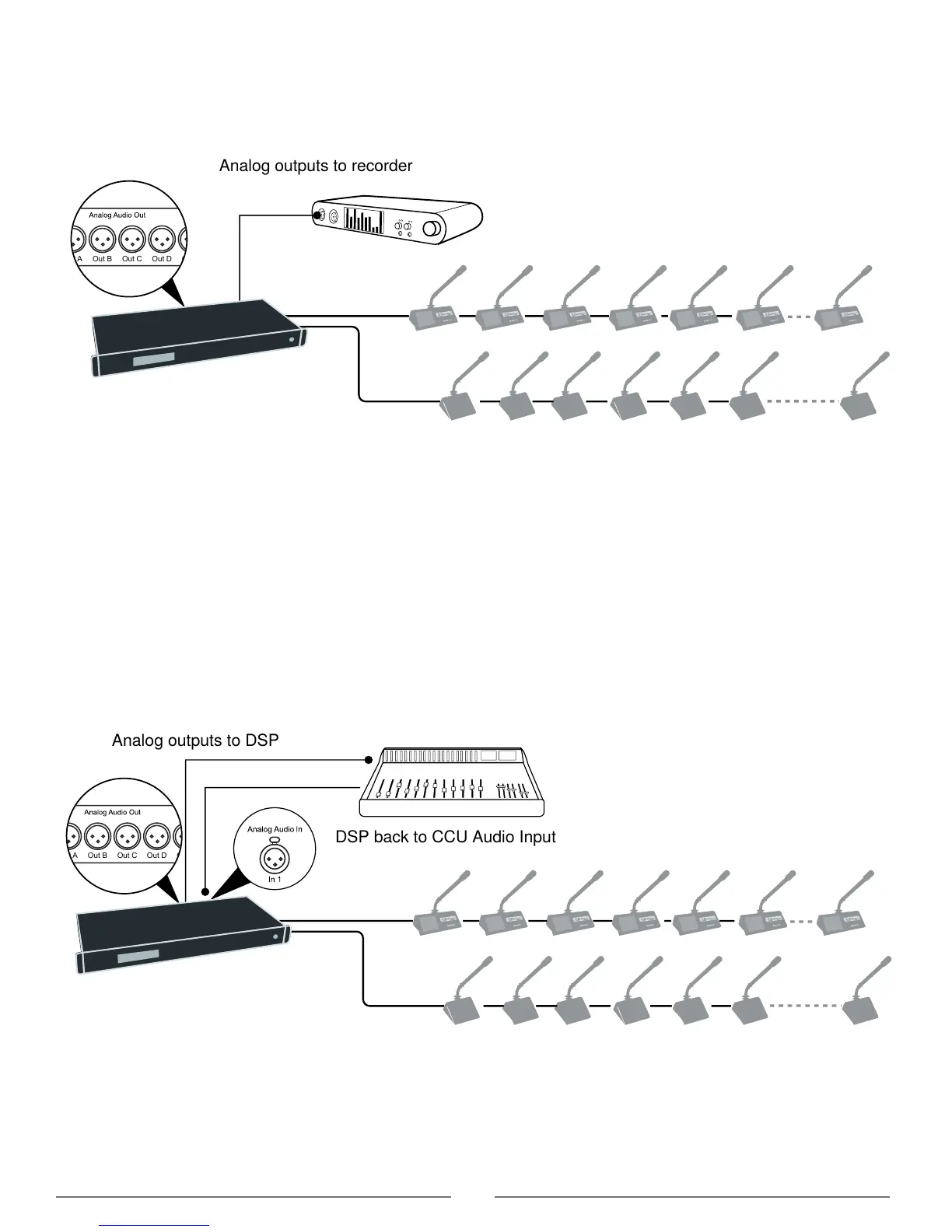
Connect an audio recorder to the analog outputs of the CCU to record floor audio, translations, or a specific set of
microphones. Use the browser interface to buss units to groups and assign them to the specific output (A-H). Connect the
XLR outputs of the CCU to the inputs of an audio recorder.
Out A Out B Out C Out D Out E Out F Out G Out H
Analog outputs to recorder
Recording Audio
Mixer or DSP
Connect a mixer to the CCU analog outputs to control individual microphone volume or equalization. Use the browser
interface to buss units to groups and assign them to the specific output (A-H).
To return the audio to the DCS 6000 system:
1. Connect the output of the external device to Audio Input 1 on the CCU
2. Route the Input 1 audio by selecting the Loudspeaker and Ch. 0 and deselecting Out A (Group) Audio > Input Control >
Audio In 1
3. To avoid a feedback loop, turn off the internal Floor routing by deselecting Loudspeaker and Ch. 0: Audio > Input Control
> Floor
Out A Out B Out C Out D Out E Out F Out G Out H
DSP back to CCU Audio Input
Inserting a Mixer or DSP



 To Next Page