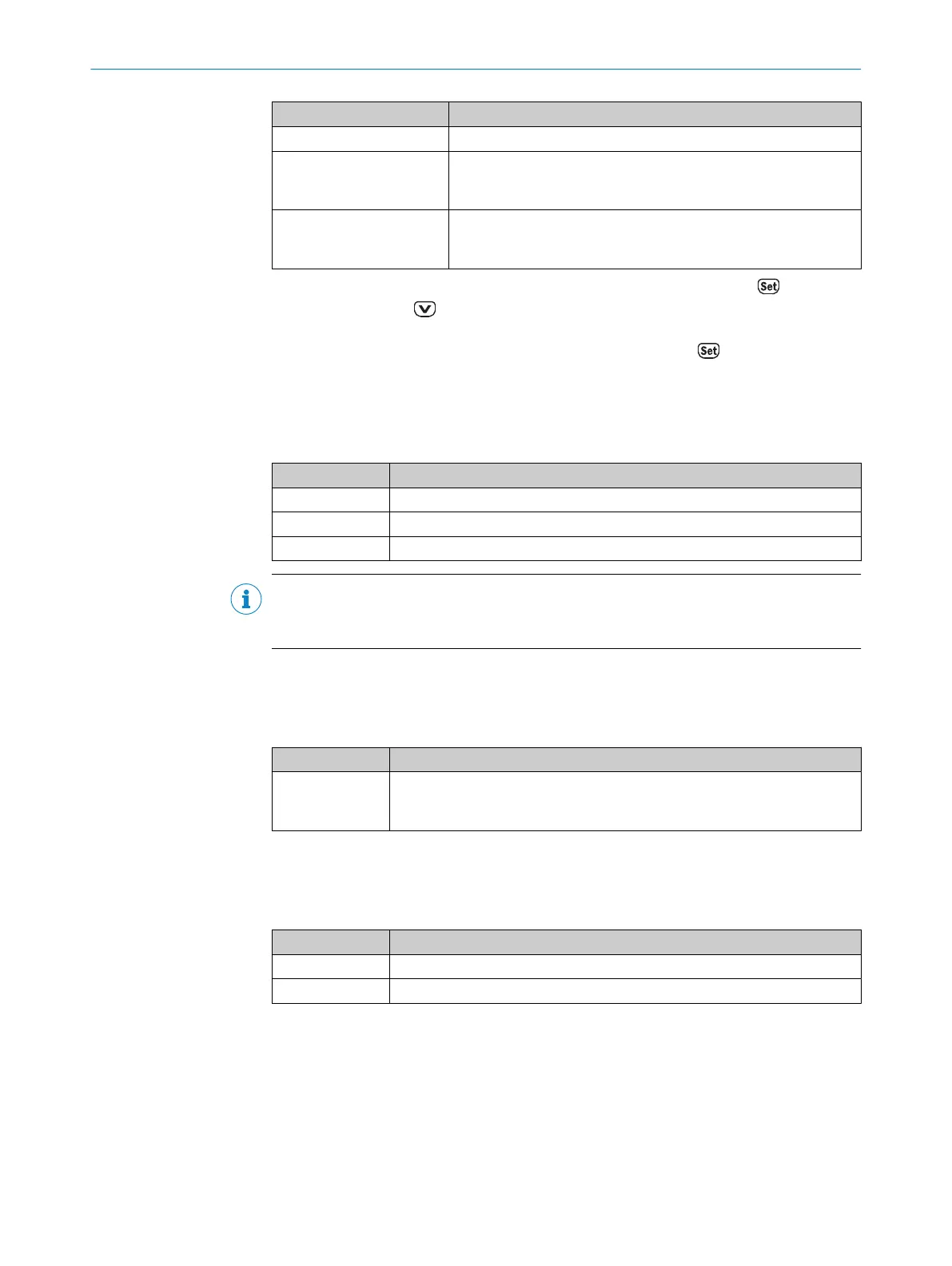
Process values Description
Laser operating hours Display of the operating hours of the laser diode
Warnings Displays the pending warnings. If there is a warning pending, the
PWR LED flashes orange. If there are no warnings pending, NoWarn
is displayed, see "Warning messages", page 94.
Error Display of the pending errors. If there is an error pending, the PWR
LED flashes red. If there are no errors pending, NoErr is displayed,
see "Error messages", page 95.
You get from measured value display to menu operation by pressing the pushbut‐
ton. You can use the pushbutton to select between displaying the Menu device
parameter, the SwVers software version and the HwVers hardware version in the main
menu. Select the respective menu and confirm by pressing the pushbutto.
7.1.2 SwVers menu
The SwVers menu displays all information relating to the software.
Table 11: SwVers menu
Parameter Description
App-uC Displays the version of the application processor
FPGA Displays the version of the FPGA (field programmable gate array)
Com-uC Displays the version of the communication processor
NOTE
Since the display can only show a total of 6 characters, this information is automatically
displayed as running text.
7.1.3 HwVers menu
The HwVers menu displays all information relating to the hardware.
Table 12: HwVers menu
Parameter Description
HwVers Display of the version number (=hardware update number). During initial
delivery, this corresponds to the serial number and can change due to a
hardware update during repair.
7.1.4 Menu menu
The Menu menu contains all device parameters.
Table 13: Menu menu
Options Description
CANopen Display CANopen interfacesee "CANopen menu", page 36.
more? Activation of advanced menu viewsee "More? menu", page 37.
7.1.5 CANopen menu
Use this menu to parameterize the CANopeninterface
7 OPERATION
36
O P E R A T I N G I N S T R U C T I O N S | DL100 Pro CANopen 8015418/19HA/2022-12-15 | SICK
Subject to change without notice












 To Next Page