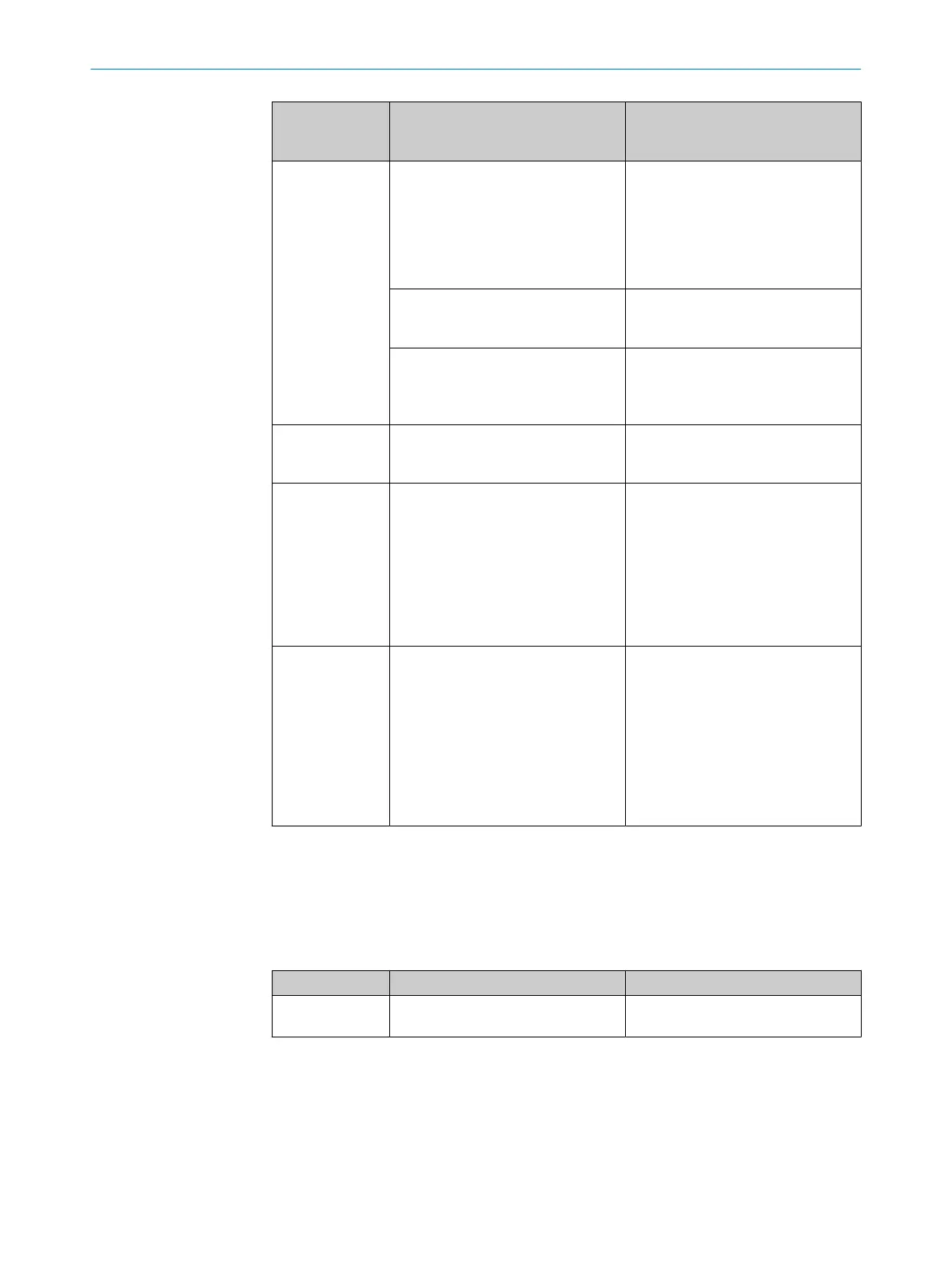
Display in the
main menu
(meaning)
Possible causes Troubleshooting
ErrPlb
(Plausibility error)
Measured value not plausible. Light
path between the measuring device
and the reflector interrupted.
Observe the light spot on the reflec‐
tor. The light spot must not drift from
the reflector. If necessary, realign
the measuring device and reflector
or use a larger reflector. For align‐
ment and mounting see "Mounting",
page 18.
Measured value not plausible. Meas‐
ured value outside the permissible
measuring range.
Check measurement range. If neces‐
sary, use device variant with high
measuring range.
Measured value not plausible. Opti‐
cal interference is present, e.g. as
a result of parallel mounted optical
sensors.
Remove any optical interference see
"Mounting", page 18.
ErrLsr
(Laser error)
The service life of the measurement
laser has been exceeded.
Replace the device. It is advisable to
replace the device during the next
maintenance session.
ErrLvl
(Level error)
Current signal attenuation is beyond
the error limitsee "Received signal
level", page 28.
■
Align the distance sensor and
reflector with each other see
"Aligning the distance sensor
and reflector with each other",
page 27.
■
Clean the optical interfaces like
the reflector and viewing window.
■
Check the reflective tape for dam‐
age.
ErrTmp
(Temperature
error)
The internal device tempera‐
ture is outside the range of
–15°C...+80°C.
For the permissible ambient temper‐
ature see "Ambient data", page 100.
■
Check the ambient temperature.
Provide better ventilation if neces‐
sary.
■
Shield the device from radiated
heat, e.g. shade the measuring
device from direct sunlight.
■
At low ambient temperatures, use
a heating system for the device.
■
At high ambient temperatures,
use a cooling housing.
12.5
Communication problems
12.5.1 Ethernet problems
The LED LNK signal the connection status (link) of the Ethernet ports.
Table 58: LED LNK
Display Status Measures
Off No physical connection (link) to the
next participant available.
Check Ethernet wiring.
12.5.2 Bus status (LED STA)
The device uses a red/green bi-color LED to display the bus status as well as the
Network State Machine. In case of conflict, red dominates.
Information on the timing of the LED see table 60, page 97. The implementation
follows standard CiA 303-3 version 1.4.0, in which further detailed information about
the timing and the red/green conflict behavior is found.
12 TROUBLESHOOTING
96
O P E R A T I N G I N S T R U C T I O N S | DL100 Pro CANopen 8015418/19HA/2022-12-15 | SICK
Subject to change without notice












 To Next Page