OPERATING INSTRUCTIONS | LFP INOX 8019921/15H0 / 2019-09-30 | SICK AG
Irrtümer und Änderungen vorbehalten
40
8 OPERATION
8.4.13 Setting the oset
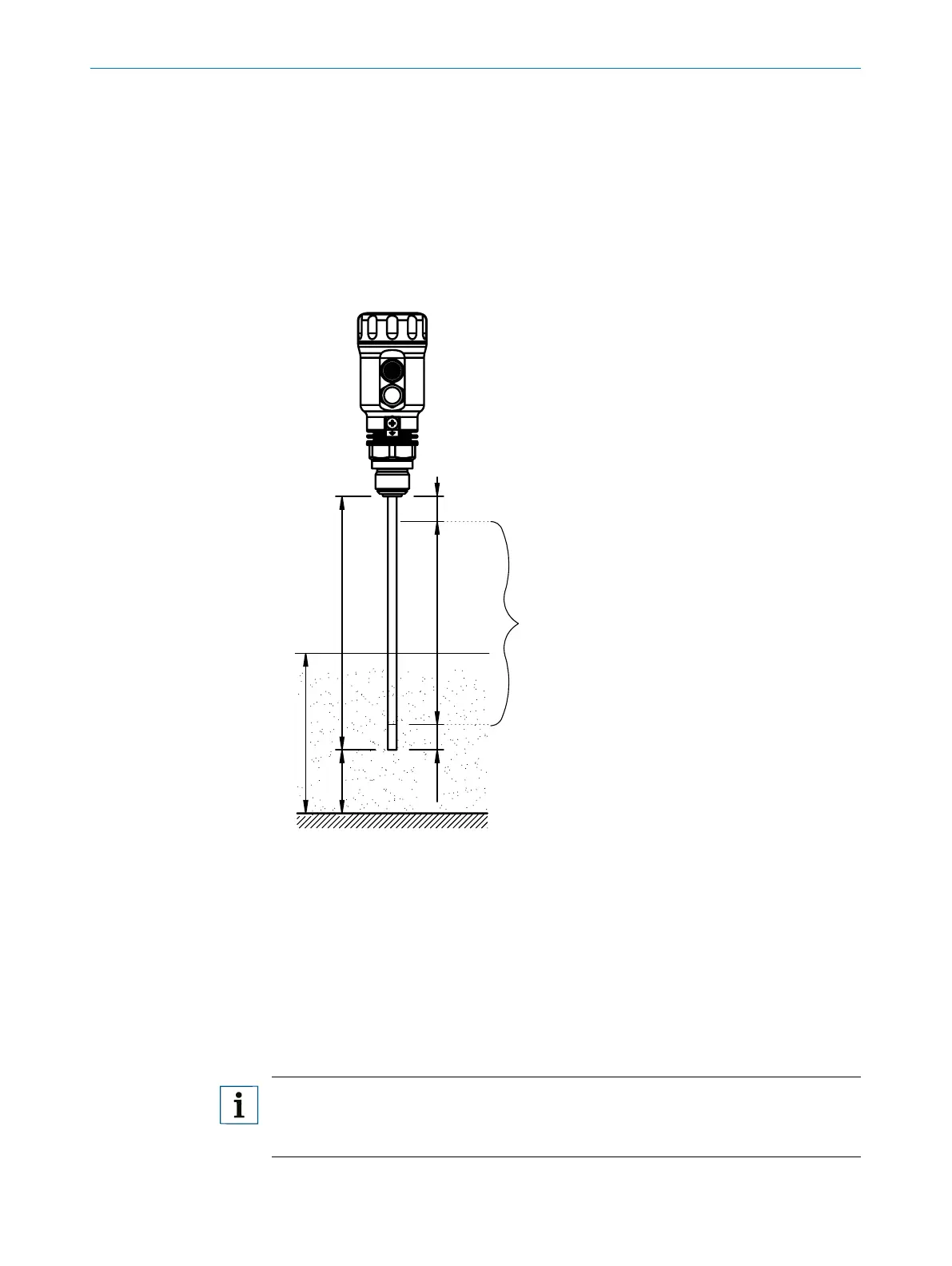
This setting makes it possible to indicate the level value on the display in relation to the
tank bottom instead of the end of the probe. The actual container level is then indi-
cated on the display.
Conguration
1. Log in to expert mode, see “8.4.1 Expert mode”.
2. Set the oset in the EXPRT-Cong-Oset menu (0 to 3,000 mm)
L
O
IAE
IA
M
Fig. 7: LFP Inox
1 Level
2 QALOW/QAHIGH
SPx/RPx
FHx/FI x
Can only be set in this zone
O: Oset
L: Probe length
M: Measurement length
IA: Inactive area at process connection
IAE: Inactive area at probe end
Note:
If the oset parameter is changed, the SPx/RPx/FLx/FHx/QALOW/QAHIGH parameters
are automatically adjusted.



 To Next Page