OPERATING INSTRUCTIONS | LFP INOX 8019921/15H0 / 2019-09-30 | SICK AG
Irrtümer und Änderungen vorbehalten
50
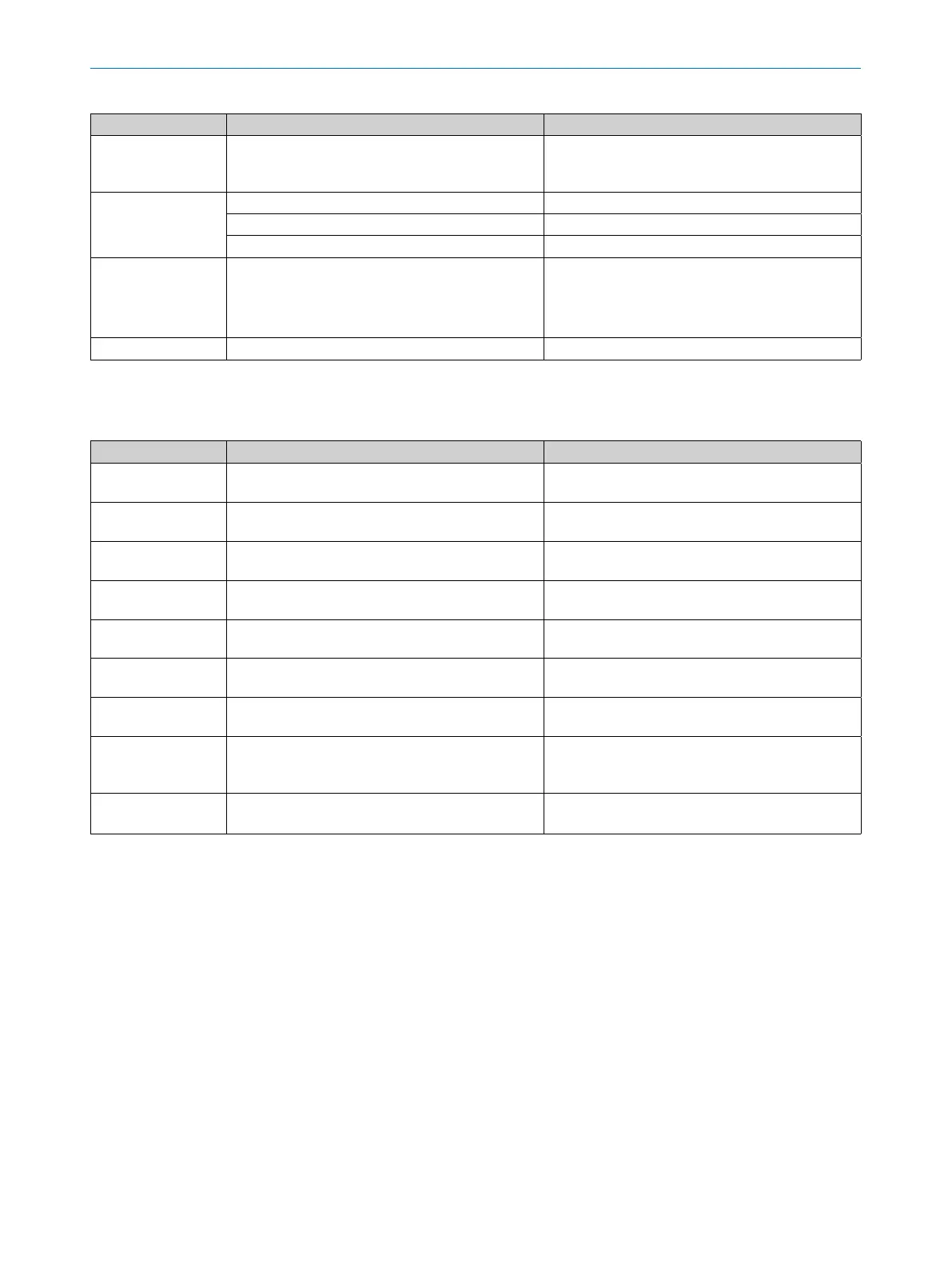
11 TROUBLESHOOTING
Error Cause Solution
The display only
shows RUN. It is
otherwise empty.
The Menu-DspVal menu parameter is at QaBarG
and the level is below QALOW.
Change QALOW or DspVal
Display o Temperature too high Reduce the temperature
Temperature too low Increase the temperature
No supply voltage Connect sensor correctly
!Err[xx]
!ErM[xx]
!ErI[xx]
!ErO[xx]
System error The device is faulty and needs to be replaced.
NVFail Memory error The device is faulty and needs to be replaced.
11.2 Operating the display
Error Cause Solution
The menu item SPx/
RPx is not displayed
QxMENU/OUx is not
congured to Qx-Hno and/or Qx-Hnc
Perform conguration of Qx (see “8.2 Conguring
the switching outputs”).
The menu item FHx/
FLx is not displayed
QxMENU/OUx is not
congured to Qx-Fno and/or Qx-Fnc
Perform conguration of Qx (see “8.2 Conguring
the switching outputs”).
QAFAIL is not dis-
played.
The analog output Qa is in voltage mode (QATYP =
0 to 10 V)
Perform conguration of Qa (see “8.3 Conguring
the analog output”).
SimVol is not dis-
played
The analog output Qa is in current mode (QATYP =
4 to 20 mA)
Perform conguration of Qa (see “8.3 Conguring
the analog output”).
SimCur is not dis-
played
The analog output Qa is in voltage mode (QATYP =
0 to 10 V)
Perform conguration of Qa (see “8.3 Conguring
the analog output”).
EXPRT-Cong-… is
not displayed
Correct password not entered See “8.4.1 Expert mode”.
EXPRT-Foam-… is
not displayed
Correct password not entered See “8.4.1 Expert mode”.
Lengths are ex-
pressed as decimal
numbers
Inch is activated as the display unit Perform conguration of units (see “8.4.12 Select-
ing the display unit (millimeter / inch)”)
The menu only
shows PASSW
Display lock is activated See “8.4.11 Activating the display lock”.



 To Next Page