EasyManua.ls Logo

SICK MultiTask RAY10 - User Manual

SICK MultiTask RAY10
166 pages
Go to English
Print Icon
To Next Page IconTo Next Page
Loading...
O P E R A T I N G I N S T R U C T I O N S
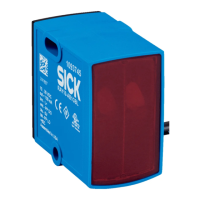
RAY10
MultiTask photoelectric sensors
de
en
es
fr
it
ja
pl
pt
ru
zh

Table of Contents

Questions and Answers

  • S
    Samuel Porter Jr.Aug 5, 2025
    Why is the yellow LED flashing on my SICK Accessories?
    • N
      Nicole SheltonAug 5, 2025
      The yellow LED might be flashing because the distance between the sensor and reflector is too large, the light beam isn't fully aligned, or the reflector isn't suitable. To fix this, fully align the light beam with the reflector, clean the optical surfaces of the sensor and reflector, ensure you're using a suitable SICK reflector, and check/adjust the sensing range if needed.
  • S
    Sara CohenAug 11, 2025
    What to do if the yellow LED doesn't light up on SICK Accessories?
    • K
      Karen LandryAug 11, 2025
      If the yellow LED on your SICK Accessories doesn't light up even when the light beam is aligned and there's no object in the way, the issue could be due to several reasons. First, check the power supply and all electrical connections (cables and plug connections) to ensure they are within the limit values. Also, voltage interruptions can be a cause, so ensure a stable power supply. If the power supply is fine, the sensor may be faulty and need to be replaced.
  • J
    John FoxAug 17, 2025
    What to do if SICK Accessories have signal interruptions when object is detected?
    • E
      Elizabeth HarrisonAug 17, 2025
      If you're experiencing signal interruptions when an object is detected by your SICK Accessories, it could be due to the depolarizing properties of the object's surface (like tape) causing reflection. Try reducing the sensitivity or changing the position of the sensor to resolve this issue.
  • K
    Kerry YangAug 23, 2025
    How to fix blue LEDs that are very close together on SICK Accessories?
    • T
      Tiffany CurryAug 23, 2025
      If the blue LEDs on your SICK Accessories are very close together, it's likely that the front screen and/or reflector is contaminated. Cleaning the optical surfaces of both the sensor and reflector should resolve this issue.
  • S
    stephen86Aug 29, 2025
    Why are the switching outputs not behaving in accordance with table 5 on SICK Accessories?
    • L
      leslieruizAug 29, 2025
      The switching outputs may not behave as expected due to IO-Link communication, changes in configuration, or a short-circuit. Check the electrical connections and adjust the configuration.

Summary

General Safety Notes

General safety notes

Read instructions before commissioning. Installation by trained specialists. Not a safety component per EU Machinery Directive. Avoid UV/weather exposure.

Notes on UL Approval

Notes on UL approval

Device requires isolating transformer with secondary overcurrent protection or Class 2 power supply. UL Environmental Rating: Enclosure type 1.

Intended Use

Intended use

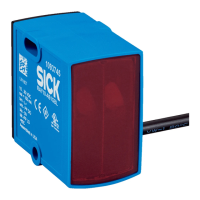
OPTO-electronic photoelectric retro-reflective sensor for non-contact detection of objects, animals, and persons. Reflector required.

Operating and Status Indicators

Operating and status indicators

Description of LEDs and BluePilot: Yellow LED for received light, Green LED for supply voltage, BluePilot for signal strength/contamination.

Mounting

Mounting

Mount sensor and reflector using SICK accessories. Align them and observe max tightening torque of 0.65 Nm.

Electrical Installation

Electrical installation

Connect in voltage-free state. Apply voltage after all connections are made. Details for standard I/O and IO-Link modes.

Commissioning

Alignment

Align the sensor and reflector correctly using the signal strength light bar on the back of the sensor.

Check the application conditions

Adjust the distance between the sensor and the reflector according to the corresponding diagram.

Additional functions

Details on time functions (ON/OFF delay) and light/dark switch functionality.

Indication for contamination during run mode

How the sensor indicates contamination and recommended actions for cleaning.

Process Data Structure

Process data structure

Explanation of the data structure for IO-Link communication, including byte allocation and data types.

Troubleshooting

Troubleshooting

Table of common faults, their causes, and recommended measures to resolve them.

Disassembly and Disposal

Disassembly and disposal

Instructions for sensor disposal according to country-specific regulations, emphasizing recycling of materials.

Maintenance

Maintenance

SICK sensors are maintenance-free. Periodic cleaning of lens surfaces and checking connections is recommended.

Technical Data

Electrical and mechanical data

Detailed specifications including sensing range, supply voltage, current consumption, response time, switching frequency, and protection class.

Dimensional drawing

Diagram showing the physical dimensions of the RAY10 sensor with labeled components and mounting holes.

SICK MultiTask RAY10 Specifications

General IconGeneral
BrandSICK
ModelMultiTask RAY10
CategoryAccessories
LanguageEnglish

Related product manuals