SIMATIC Rack PC 547B
Operating Instructions, 12/2007, A5E01127519-02
89
Troubleshooting/FAQs
12
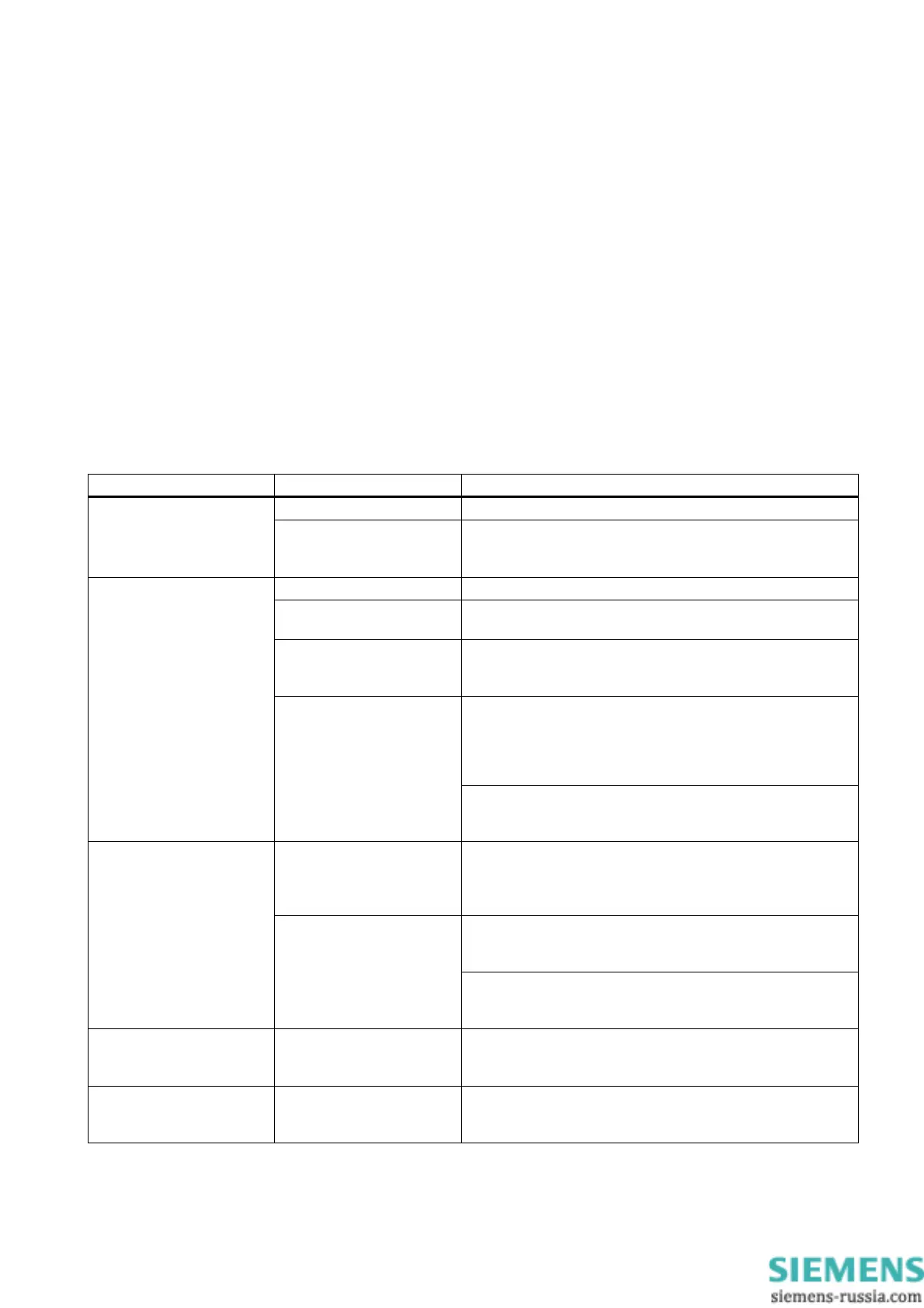
12.1 General problems
This chapter provides you with tips on how to locate and troubleshoot common problems.
Problem Possible cause Remedy
No power supply Check the power supply, and the power cord / connector The device is not
operational
Device is being operated
outside the specified
ambient. conditions
• Check the ambient conditions.
• After transport in cold weather, wait approximately
12 hours before switching on the device.
The monitor is switched off. Switch on the monitor.
The monitor is in "power
save" mode.
Press any key on the keyboard.
The brightness button has
been set to dark.
Increase brightness by means of luminance control. For
detailed information, refer to the monitor operating
instructions.
• Check whether the power cord has been properly
connected to the monitor and to the system unit or to the
grounded shockproof outlet.
• Check whether the monitor cable has been properly
connected to the system unit and to the monitor.
The external monitor
remains dark.
The power cord or the
monitor cable is not
connected.
If the monitor screen still remains dark after you have
performed these checks, please contact your technical
support team.
The mouse driver is not
loaded.
Check whether the mouse driver is properly installed and
present when you start the application program. For more
detailed information, refer to the manuals for the mouse or
application programs.
Check whether the mouse cord is properly connected to the
system unit. If you use an adapter or extension on the mouse
cable, also check the connectors.
The mouse pointer does not
appear on the screen.
Mouse not connected.
If the mouse pointer still does not appear on the screen after
you have performed these checks and measures, please
contact your technical support team.
Wrong time and/or date on
the PC.
1. Press <F2> within the boot sequence to open the BIOS
Setup.
2. Set the time and date in the setup menu.
Although the BIOS setting is
OK, the time and data are
still wrong.
The backup battery is dead. In this case, please contact your technical support team.














 To Next Page