Device maintenance and repair
7.4 Removing and installing hardware
SIMATIC IPC547G
Operating Instructions, 04/2020, A5E49948632-AA
119
7.4.4 Replacing redundant power supply module
If a module of the redundant power supply is defective, you can continue to operate the
device until the device can be shut down in a controlled manner.
The replacement of one of the two modules of the redundant power supply can be
performed, however, without shutting down the device.
Requirement
● Cross-tip screwdriver P1
Procedure
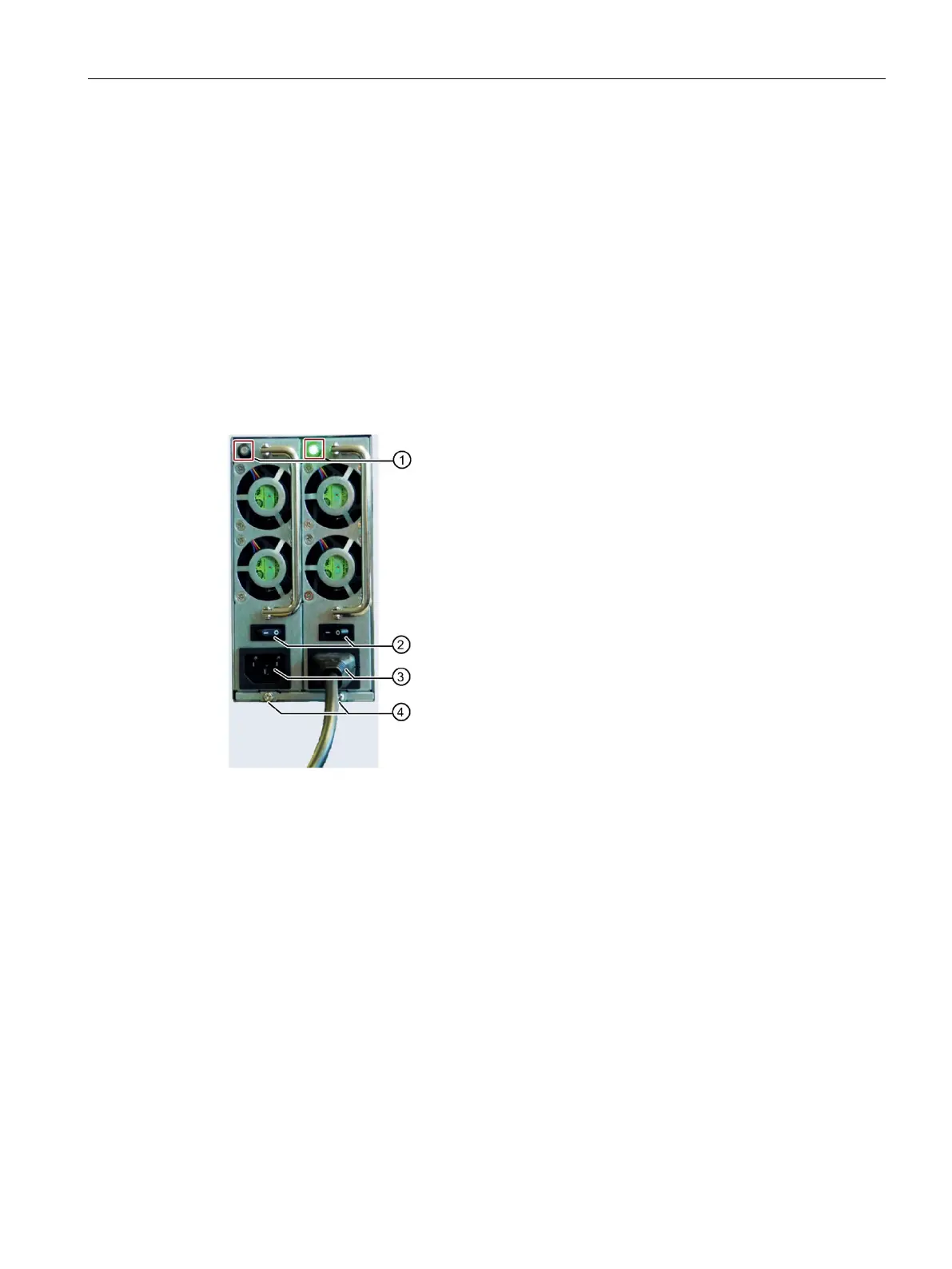
Use the LEDs
to determine which module is
defective (LED at the top of the module is lit red or
is not lit).
– Switch off the device so that the power supply is
switched off.
or
– Switch off the defect module
②.
Remove the power cable of the defective module.
Remove the highlighted screw of the defective
module
④.
Pull out the defective module at the handle.
Insert the new module and secure it with the
highlighted screw.
Connect the power supply cable again.
– Switch on the device.
or
– Switch on the module
② (LED on top of module
is lit green).
See also
Switching off the device (Page 63)


 To Next Page