P003948 Uscan User Manual Page | 15
Setting up the System
To setup the system with the optional mobile stand refer to Mobile Stand Setup. To configure the system for
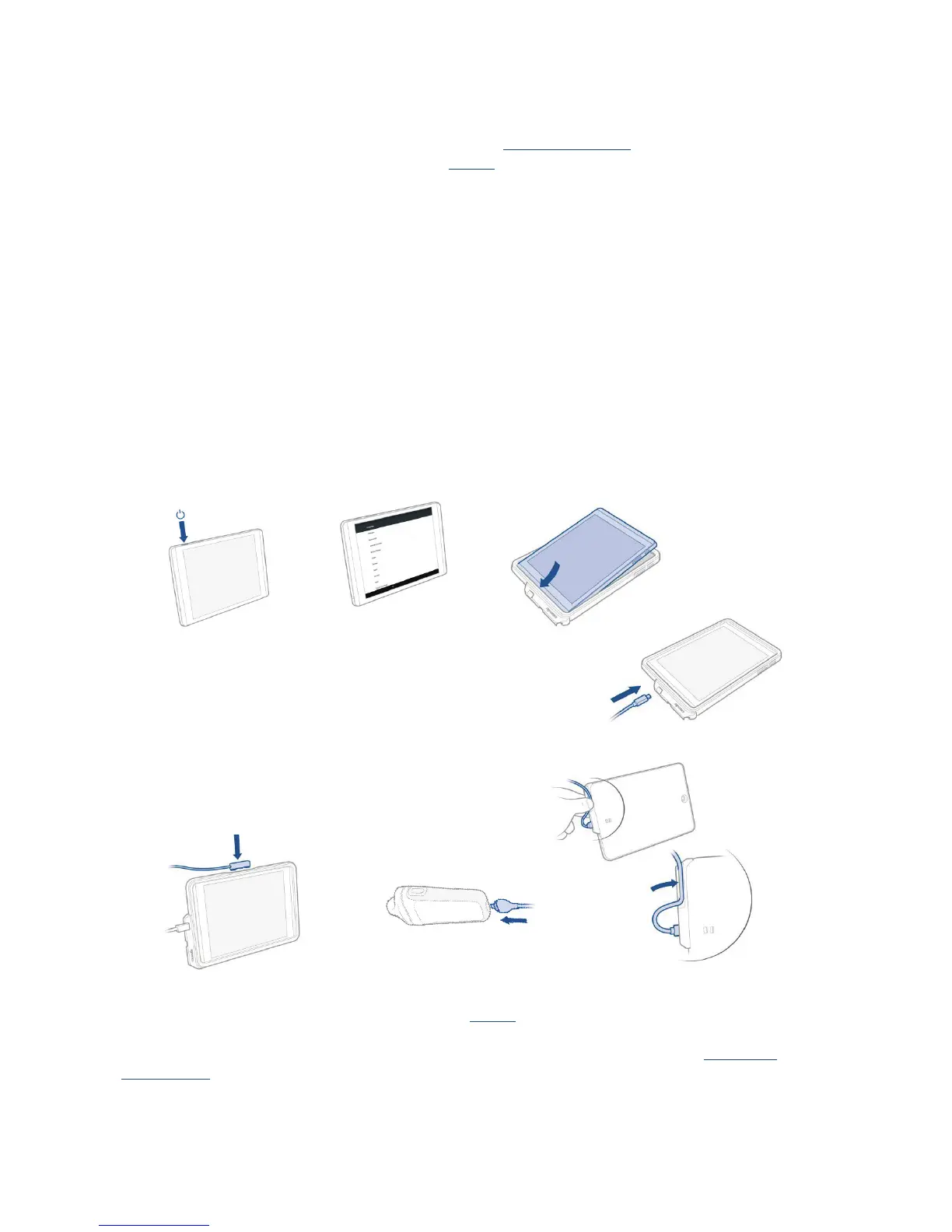
mobile use, follow the instructions below (and see Fig 2.2):
1. Press and hold the Power button for 2 seconds to turn the Uscan Display on.
2. The UScan application setup wizard will run. Setup the following:
2.1 Language.
2.2 Date and time.
2.3 Wi-Fi connectivity.
2.4 Registration information.
3. Insert the display into the cover.
4. Insert the USB cable into the display.
5. Secure the cable in the provide cable clip (tablet only).
6. Insert the other end of the cable into the Uscan probe.
7. Connect the provided display charger to the display and fully charge the system.
Fig 2.2 Display setup
After setup, the Uscan Home screen is displayed (see Fig 2.3) and the device is ready to use with default
settings. The default settings are appropriate where there is a single user of the system and patient data is not
saved to remote servers. The system can be further customized by setting preferences (see
Preference
SetupSettings).


 To Next Page