P003948 Uscan User Manual Page | 20
Tap Bluetooth.
Slide the on-screen button to the right
to turn Bluetooth on.
Select the bar code scanner to pair it with the system.
Tap Home
to return to Uscan Home screen.
Imaging Screens
Ultrasound Scan Screens
Tap Ultrasound on the Home sc
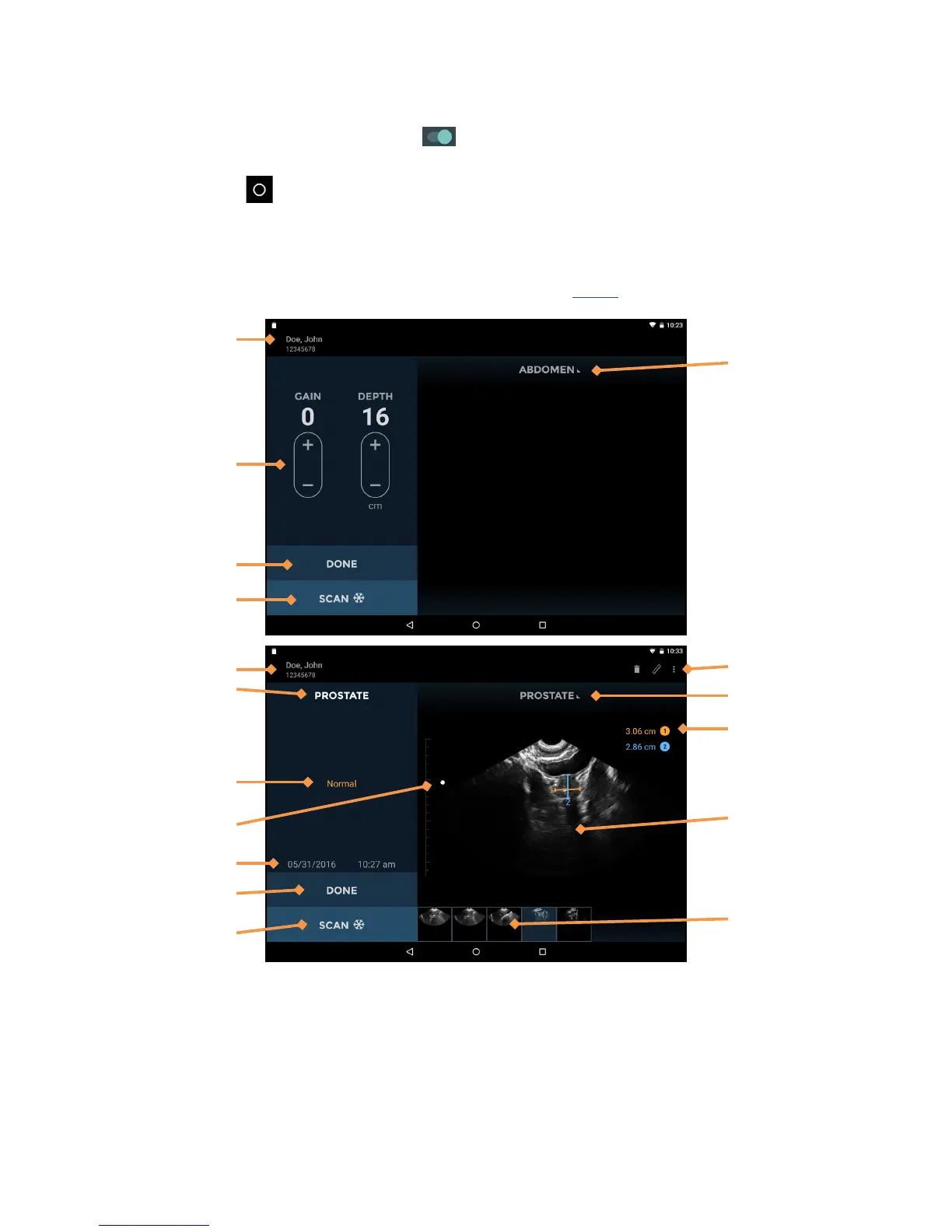
reen to start an ultrasound exam. See Fig 2.6 for ultrasound screen layouts.
Fig 2.6 Ultrasound Scan Screens
The ultrasound screen layouts contain the following areas:
Patient Details –
displays patient details for the current exam.
Preset Used – dis
plays the scan preset used for the current image.
Image Text Annotation – displays the text annot
ation for the image.
Image Date and Time – displays the date
and time of the image.
Gain and Depth Controls – adjust the
gain (brightness) or the depth for the system.


 To Next Page